Boss of the SOC Version 1 (2015)
A writeup for the original BOTS V1 debuted at Splunk .conf in October 2016.

Web site defacement :
101:
Question: What is the likely IPv4 address of someone from the Po1s0n1vy group scanning imreallynotbatman.com for web application vulnerabilities?
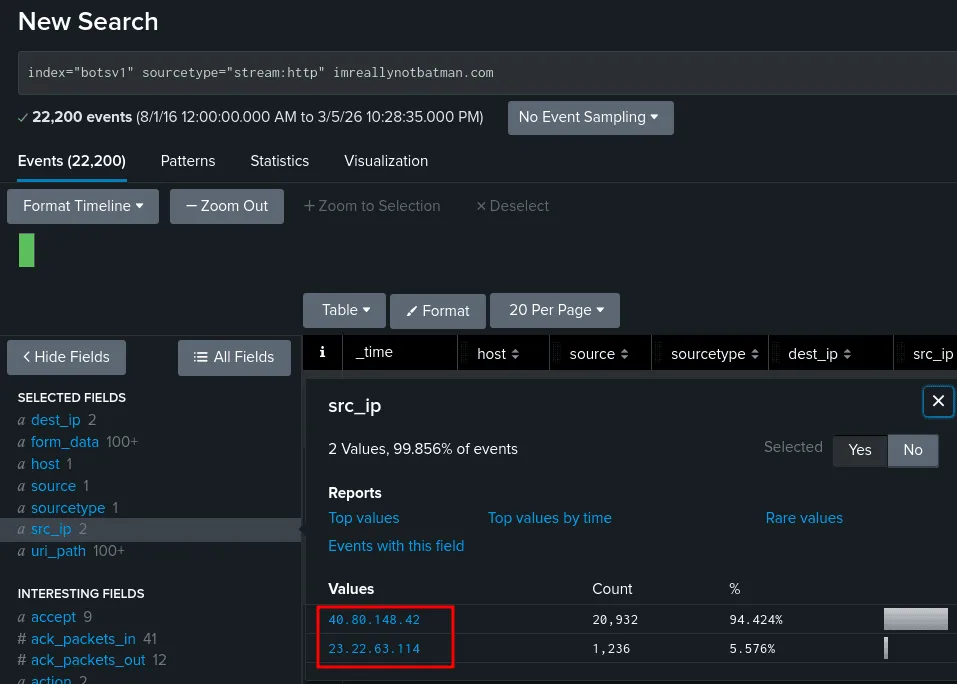
The hunt starts again, we use the index botsv1 and the sourcetype here is http traffic since they’re scanning a web app, that would give us more visibility, the thing with active scanning is that it is bound to be noisy and produces a huge amount of traffic, as seen in the image above, these 2 src_ip addresses have made the contact with the website thousands of time, which can be the doing of an automatic tool, to validate our findings we check each of them for more clues.
filtering by the source address 40.80.148.42, we see the pages he requested from the website are the typical endpoints you’d find on a wordlist for fuzzing, and the difference between the requests is in miliseconds, which solidates our theory about the 40.80.148.42 being the ipv4 we’re looking for which is correct.
102:
Question: What company created the web vulnerability scanner used by Po1s0n1vy? Type the company name. Answer guidance: For example “Microsoft” or “Oracle”
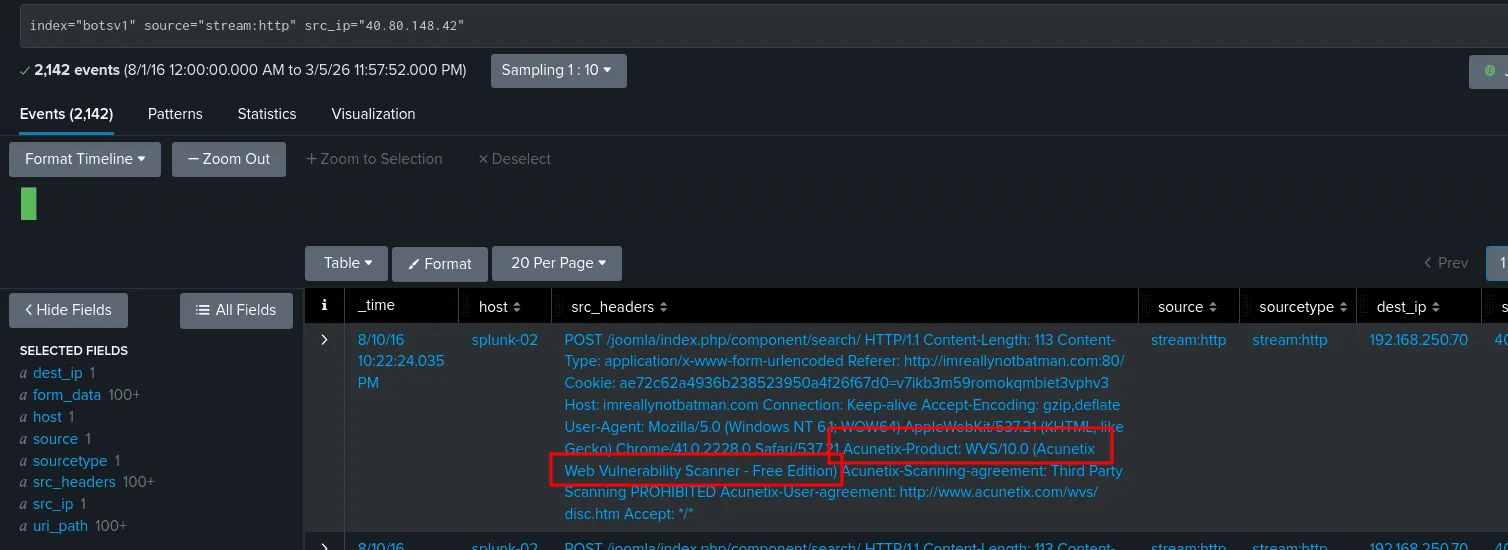
from the previous question we already identified the ip address of the attacker that’s performing the scan, one way to detect scanners is user-agents, as seen in the image if we check the source agents of the 40.80.148.42 requests we find a mention of Acunetix which is a well known tool for scanning ( though attackers most of the time won’t be so sloppy to neglect this fact but if they are like in this case we can take advantage of it )
103:
Question: What content management system is imreallynotbatman.com likely using? Answer guidance: Please do not include punctuation such as . , ! ? in your answer. We are looking for alpha characters only.
same image as before if we see the uri_path we see it has the keyword joomla which is a well known CMS ( content management system ), so the answer to this is joomla.
104:
Question: What is the name of the file that defaced the imreallynotbatman.com website? Please submit only the name of the file with extension? Answer guidance: For example “notepad.exe” or “favicon.ico”
from the previous questions we infer that imreallynotbatman.com resolves to 192.168.250.70, and we learned there are at least 2 ip address with abnormal traffic to the server 192.168.250.70, we learned that 40.80.148.42 was scanning the server but still didn’t investigate the other ip 23.22.63.114. now the question at hand is finding the name of the file with extention taht defaced the server, before investigating we know among other things ( html files too), to deface a website it can be done with an image file, the most common, and the adversary would have to upload that image => a POST request and to view that image => GET request on the root / of the server or page, something like http://imreallynotbatman.com/$FILENAME.$EXTENTION ( the source ip here would be of our server ) so now that I have a theory, my focus is to either validate or devalidate it, in both cases let’s get our hands dirty searching for these things. investigating the 23.22.63.114 interactions with our website we notice a bruteforce attack was going on, this flags the ip address as a target for investigation and if so, may be related to our defacemnet case for now :
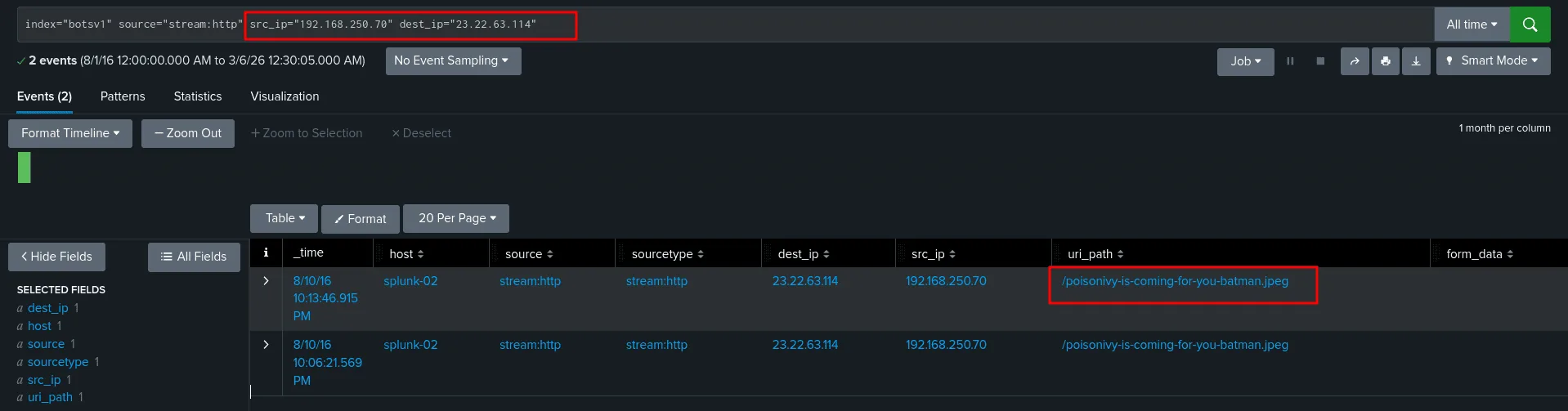
as seen in the image above when we check for the connections that happened between the two, the image matches the defacement evidence we’ve been looking for and the asnwer is poisonivy-is-coming-for-you-batman.jpeg, we can verify it’s the correct one by investigating it further.
105:
Question: This attack used dynamic DNS to resolve to the malicious IP. What fully qualified domain name (FQDN) is associated with this attack?
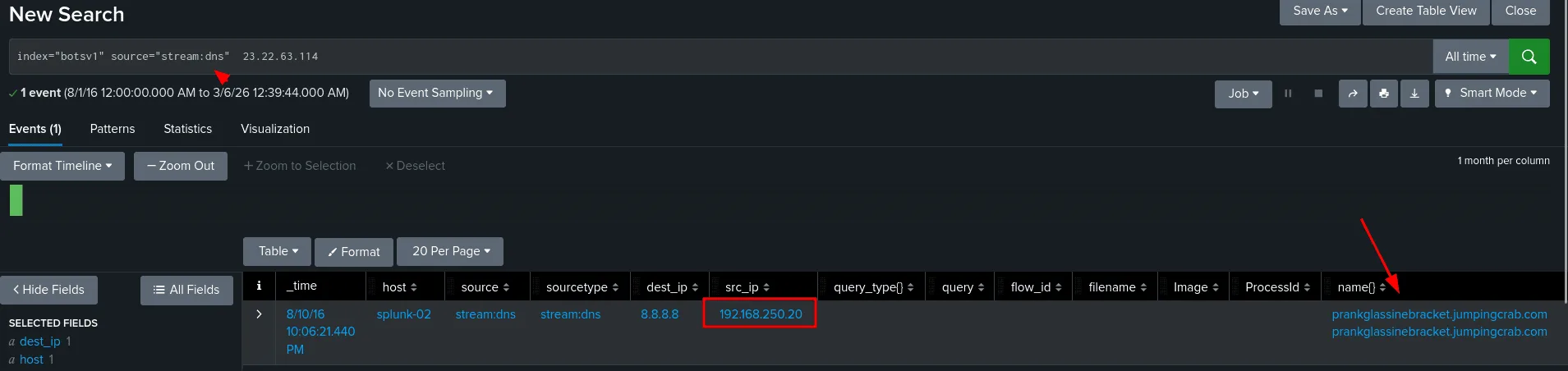
as seen in the image above, since from the last question we confirmed the ip 23.22.63.114 was indeed malicious, to find the FQDN, the source type dns can provide this information for us, we found that the 192.168.250.20 asked the 8.8.8.8 (google’s dns) to resolve the prankglassinebracket.jumpingcrab.com and the answer was 23.22.63.114 !! as a threat hunter and a soc analyst, this tells us a few things, first is that 192.168.250.20 which corresponds to the host we6038srv may have been compromised too, we may be interested in looking for lateral movement from the first host 192.168.250.70, investigate any users on this host and their processes, plus the important part, what process triggered the dns request in the first place.
106:
Question: What IPv4 address has Po1s0n1vy tied to domains that are pre-staged to attack Wayne Enterprises?
from the last question we have already answered this one, the answer to the dns request for prankglassinebracket.jumpingcrab.com is 23.22.63.114 (though there may be other domains )
108:
Question: What IPv4 address is likely attempting a brute force password attack against imreallynotbatman.com?
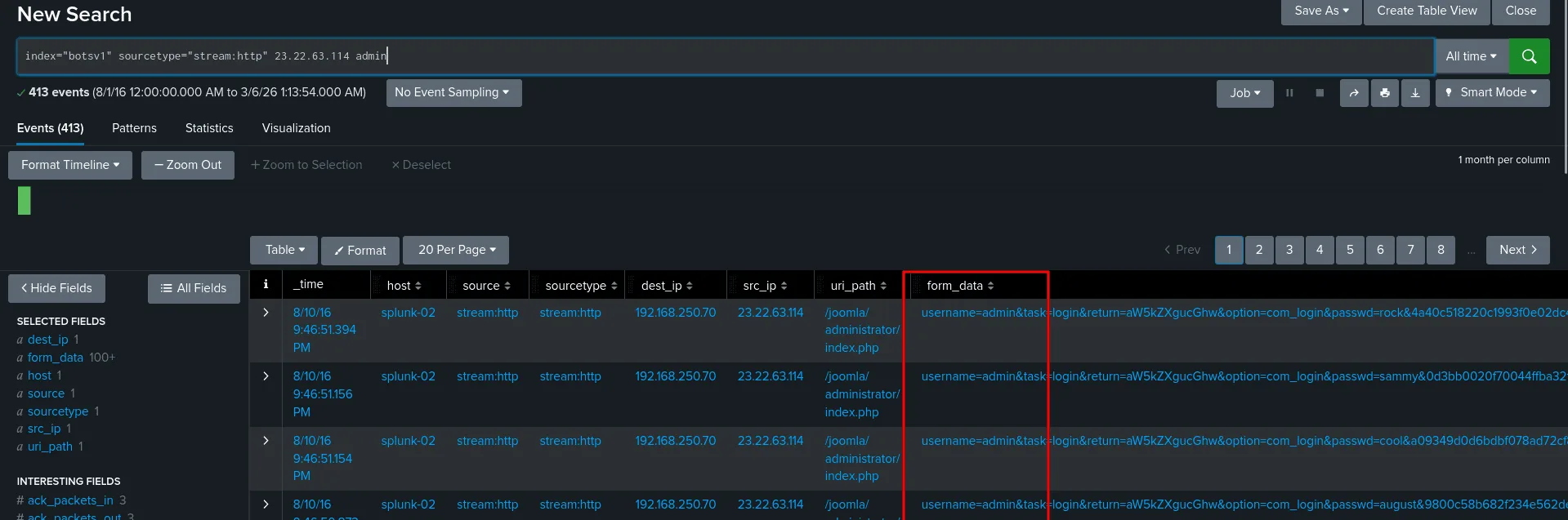
we also answered this when we were investigating 23.22.63.114 as we found it was trying to brutefoce the password of the user admin. the image below is just one way to find the answer.
109:
Question: What is the name of the executable uploaded by Po1s0n1vy? Answer guidance: Please include file extension. (For example, “notepad.exe” or “favicon.ico”)
the game has become easier since we mapped the ip addresses the Po1s0n1vy group is using, and the ip addresses of our affected hosts. plus uploading is associated with POST requests most of the time, all of these are theories in attemp to narrow down the events.
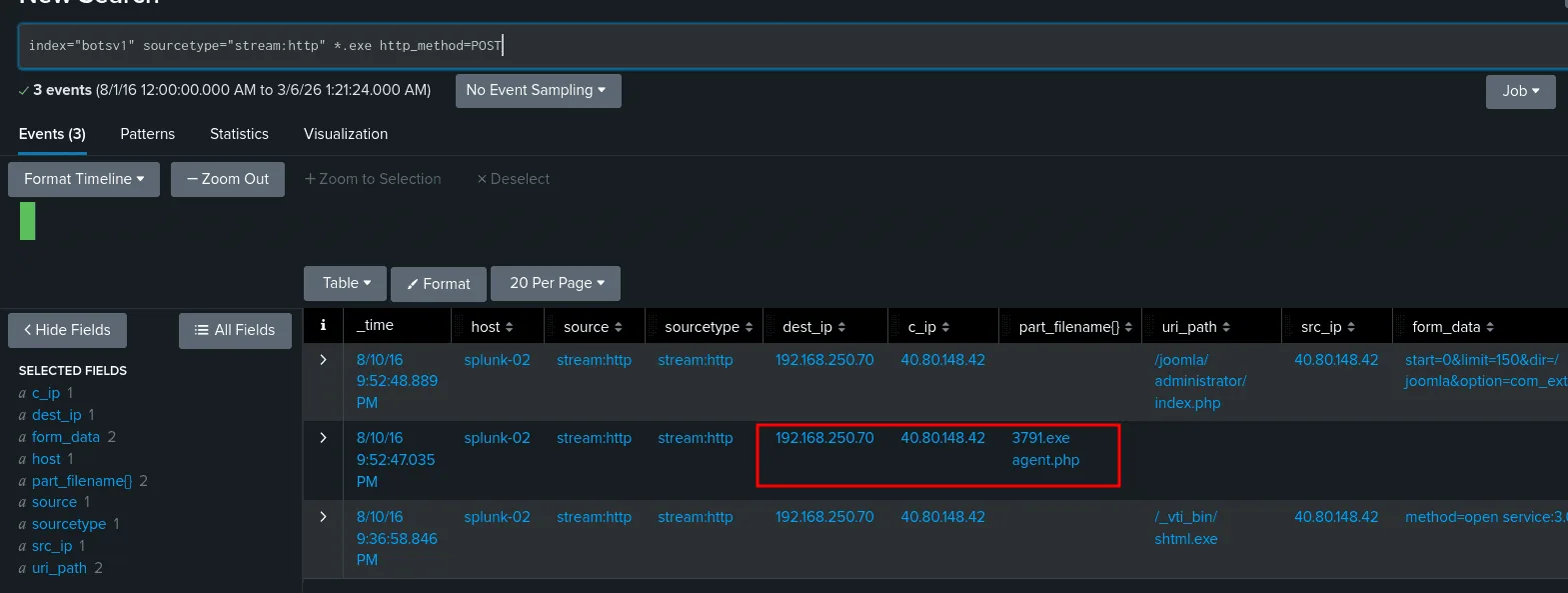
we always validate our findings before making conclusions, and a good suspect from the above image is 3791.exe, investigating it we find out that it indeed the file we were looking for as it was uploaded by the adversary to our already mapped affected host.
110:
Question: What is the MD5 hash of the executable uploaded?
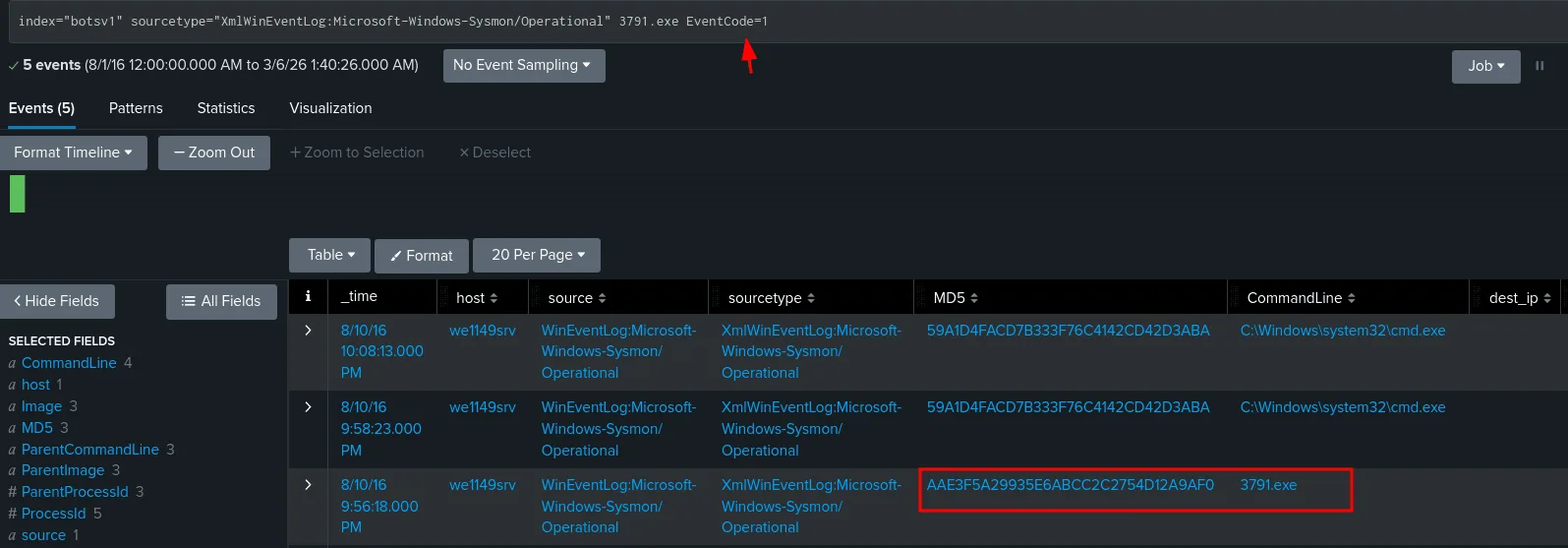
as far as my humble experience goes, since we know the name of the execitable now, sysmon logs will have this info for us, we check sysmon as the sourcetype and we also add event code 1, to filter for process creation events only, and the hash is : AAE3F5A29935E6ABCC2C2754D12A9AF0.
111:
Question: GCPD reported that common TTPs (Tactics, Techniques, Procedures) for the Po1s0n1vy APT group, if initial compromise fails, is to send a spear phishing email with custom malware attached to their intended target. This malware is usually connected to Po1s0n1vys initial attack infrastructure. Using research techniques, provide the SHA256 hash of this malware.
This is an APT group we’re talking about, threat hunting these means we’ll be targeting their IOCs if they’re present in our enivorement, investigate their TTPs, and we’re need to look them up first, before we found 2 ips tied to their initial attack infrastructure : 40.80.148.42 and 23.22.63.114.
checking 40.80.148.42 against VirusTotal didn’t get us much, next is 23.22.63.114, though VirusTotal shows both as clean ip addresses, this time we’ll be digging more :
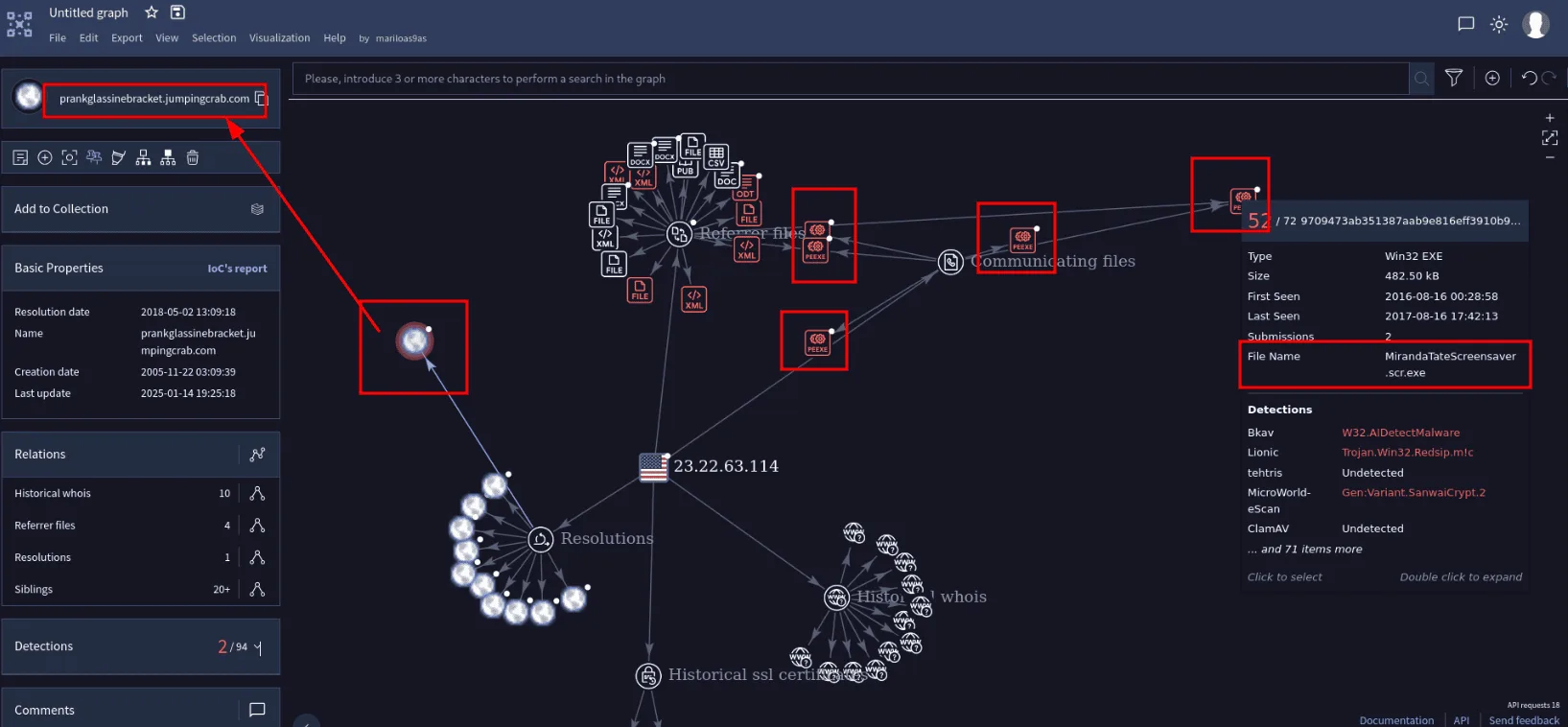
In the graph in the image above we find that this ip address used to resolve to the malicious domain we found before in our earlier investigation prankglassinebracket.jumpingcrab.com , which means we’re likely in the right path, we also find many malicious executables related to this ip address, which would server as IOCs. Though when checking if any of them is present in our enviroment none was! I still checked them in virustoatal is all the executables were malicious, I wasn’t really ( and still not ) really sure how i was supposed to know the associated malware was MirandaTateScreensaver.scr.exe and not the others! my guess is that so much changed since 2016 and the other executables were added over the years. looking this MirandaTateScreensaver.scr.exe in virustotal we do find the sha256 : 9709473ab351387aab9e816eff3910b9f28a7a70202e250ed46dba8f820f34a8
112:
Question: What special hex code is associated with the customized malware discussed in question 111?
this was found in VirusTotal community tab for MirandaTateScreensaver.scr.exe, there was a comment that goes back 9 years by ryan_kovar:
1
53 74 65 76 65 20 42 72 61 6e 74 27 73 20 42 65 61 72 64 20 69 73 20 61 20 70 6f 77 65 72 66 75 6c 20 74 68 69 6e 67 2e 20 46 69 6e 64 20 74 68 69 73 20 6d 65 73 73 61 67 65 20 61 6e 64 20 61 73 6b 20 68 69 6d 20 74 6f 20 62 75 79 20 79 6f 75 20 61 20 62 65 65 72 21 21 21
it’s a hex that decodes to : ‘Steve Brant’s Beard is a powerful thing. Find this message and ask him to buy you a beer!!!’ , no idea what this mean, my guess is this is a hex string that was found in the malware sample, threat actors often leave these as signatures or for whatever reason they would think it’s a good idea, anyway it serves later on as an IOCs and a signature to detect the malware, thus community members share them.
113:
Question: What was the first brute force password used?
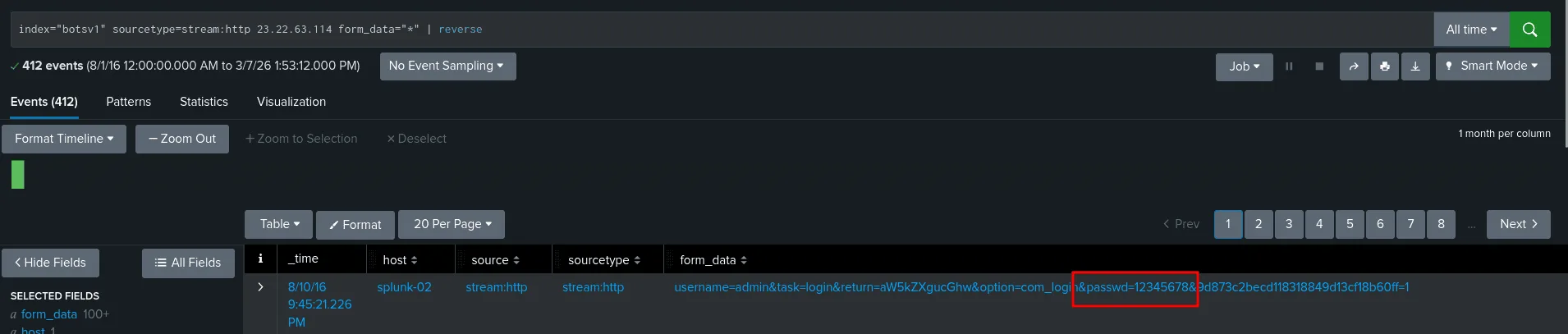
we already investigated this bruteforce attack before, and we know the adversary’s ip address is 23.22.63.114, we can also filter by POST requests, I just chose any events that has form_data and reversed the order so we get the first password attempted in this bruteforce attack and it was 12345678.
114:
Question: One of the passwords in the brute force attack is James Brodsky’s favorite Coldplay song. We are looking for a six character word on this one. Which is it?

using the regex above in the image, which is a nice thing SPL supports, we’ve got around 315 6 chars passwords, I tried to look up any favorite songs of James Brodsky, but not luck, attempting to solve this question in this day and age is kinda madness, lucky me the only coldpaly songs I know are Look at the Sky and Yellow. It’s funny is that I got introduced to these by a CTF, exactly BITSCTF 2025 in the osint challenges they had 2 about these coldplays, one about the bracelets they use ( which was new information to me at the time ) and flipper zero, and the second about finding the place a friend of the author sat at at the stadium in this concert ( the writeup for the challenge https://ctftime.org/writeup/40016 ), and I watched ton of these solving the challenge back then : https://www.youtube.com/watch?v=x0jAKrd6wqc .
So I just attempted Yellow and it worked. pure luck maybe ?
115:
Question: What was the correct password for admin access to the content management system running “imreallynotbatman.com”?
let’s just agree the correct password would be the last plus he’ll use it again to login, so we’ll find it last and used at least twice ( but here is the catch, these 2 times don’t necessarly have to be from the same ip address src_ip=”23.22.63.114” , which was I missing when I first attempted this, we shouldn’t assume it was the same ip address, and thus we should not include it in the SPL query, took me a bit to figure out what I was doing wrong )

as seen in the image above only the password batman was used 2 times, we can further validate it’s the one we’re looking for and our previous theories too.
116:
Question: What was the average password length used in the password brute forcing attempt? Answer guidance: Round to closest whole integer. For example “5” not “5.23213”
we can use the same regex we used before to extract the passwords, and using both eval and avg functions from SPL to count the average:
1
2
index="botsv1" sourcetype=stream:http http_method=POST dest_ip="192.168.250.70"| rex field=form_data "(?i)passwd=(?<password>[^&]+)"
| eval length=len(password) | stats avg(length) as average
the result is 6.174334140435835 -> rounded to 6.
118:
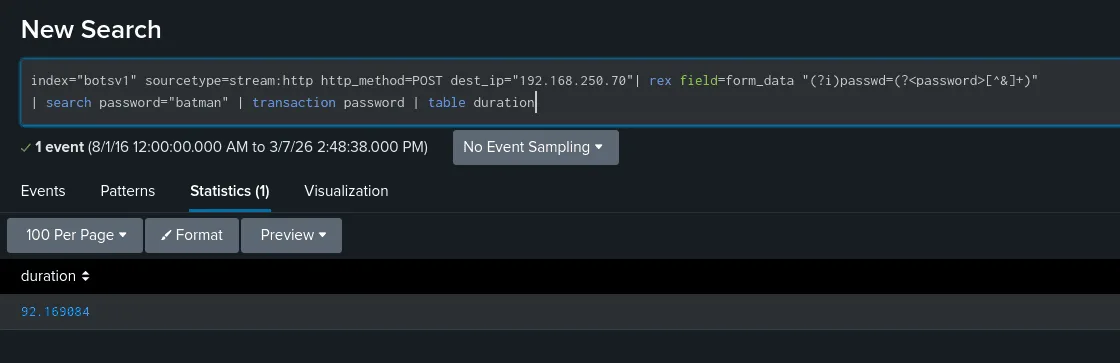
Question: How many seconds elapsed between the time the brute force password scan identified the correct password and the compromised login? Answer guidance: Round to 2 decimal places.
for this we can use transaction to calculate how many seconds elapsed as seen in the image below:
119:
Question: How many unique passwords were attempted in the brute force attempt?

we’ll be using dc from stats which is used to count the distinct number of passwords that were attempted here.
Ransomware :
Q200:
Question: What was the most likely IPv4 address of we8105desk on 24AUG2016?
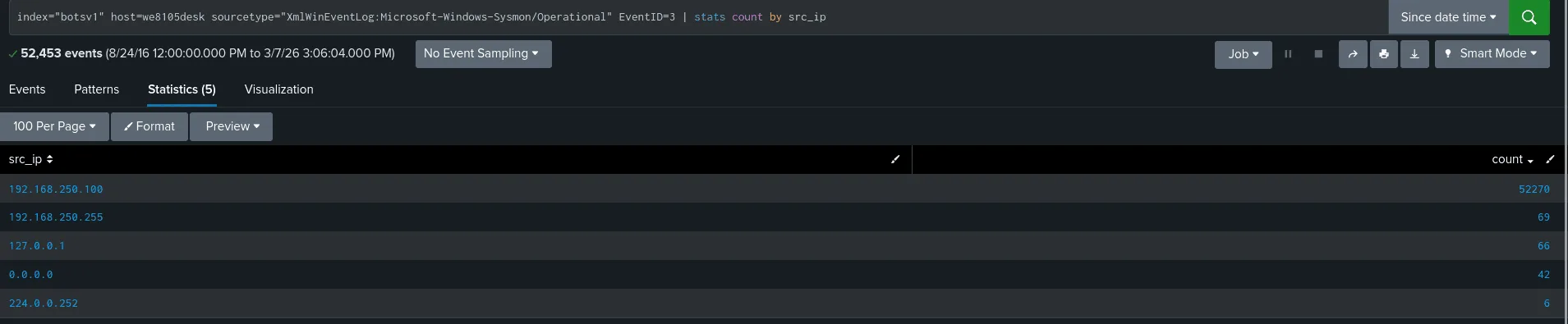
I believe there are many ways to find the ipv4 we’re looking for (using the sourcetype dns is one of them, after all windows hosts are always noisy in the network ), but here we’ll be using sysmon as the sourcetype, filtering by eventId 3 which would filter only network activity, common sense says if this is the host we8105desk chances are its ip address would be the one to show up the most when we filter by the src_ip and we can validate this after we find it, looking at the image, the answer is 192.168.250.100 ( we filtered results by time too at the start to only show events on 24 august 2016 ).
Q201:
Question: Amongst the Suricata signatures that detected the Cerber malware, which one alerted the fewest number of times? Submit ONLY the signature ID value as the answer. Answer guidance: No punctuation, just 7 digits
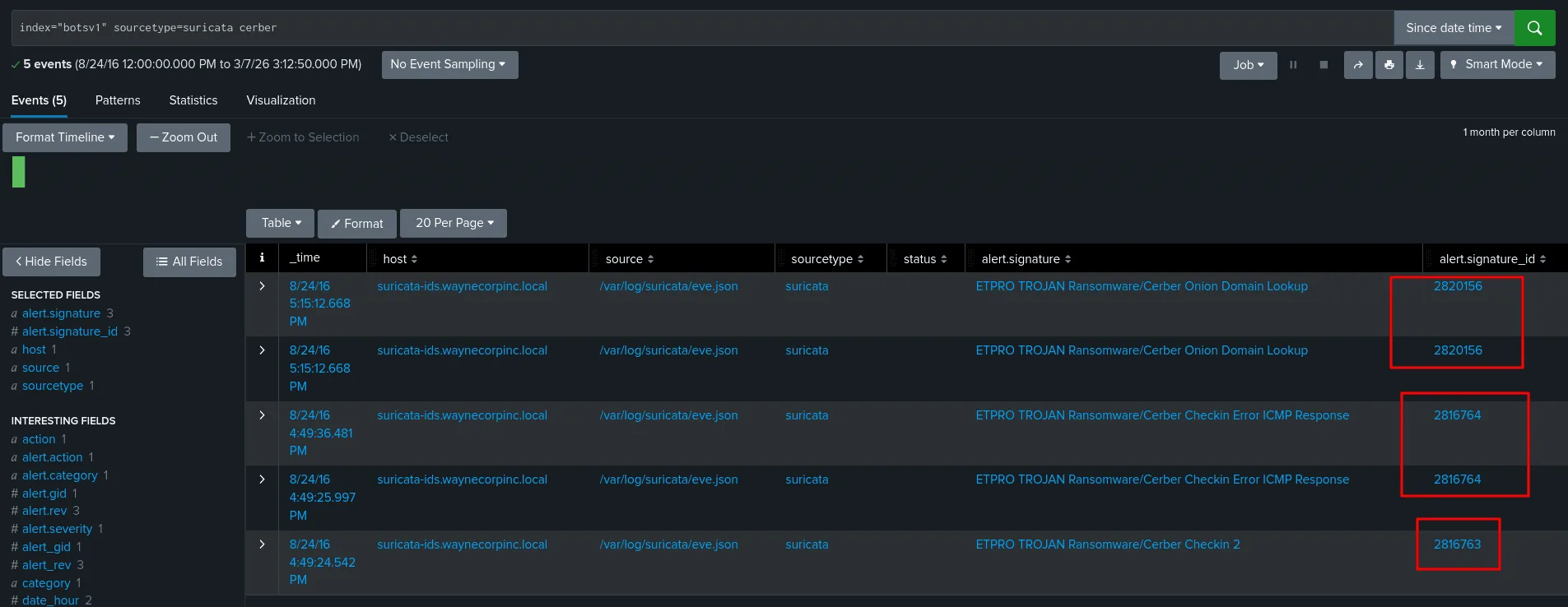
as seen in the image above, checking the suricata logs for alerts of Cerber ransomware only the alert signature ‘ETPRO TROJAN Ransomware/Cerber Checkin 2’ shows once with id 2816763.
Q202:
Question: What fully qualified domain name (FQDN) does the Cerber ransomware attempt to direct the user to at the end of its encryption phase?
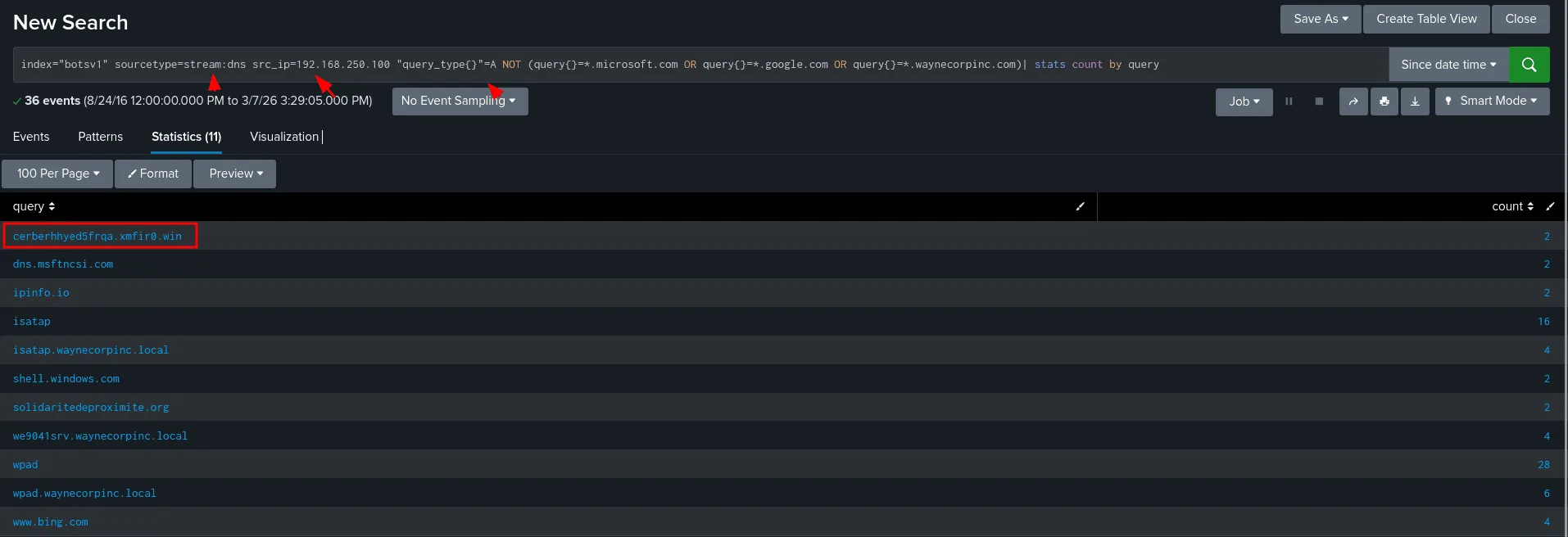
as seen in the image above we’ve filtered quite a bit now, first redirecting to a domain => dns will come in play here for sure, so we know where to look plus we know the source from question 1 would be 192.168.250.100, we also discard a known domain of microsoft and windows etc … and the answer would be cerberhhyed5frqa.xmfir0.win , first of all it has cerber on it same as the name of the malware, that’s not enough so we investiget it further to validate our theory and it’s ineed the correct answer.
Q203:
Question: What was the first suspicious domain visited by we8105desk on 24AUG2016?
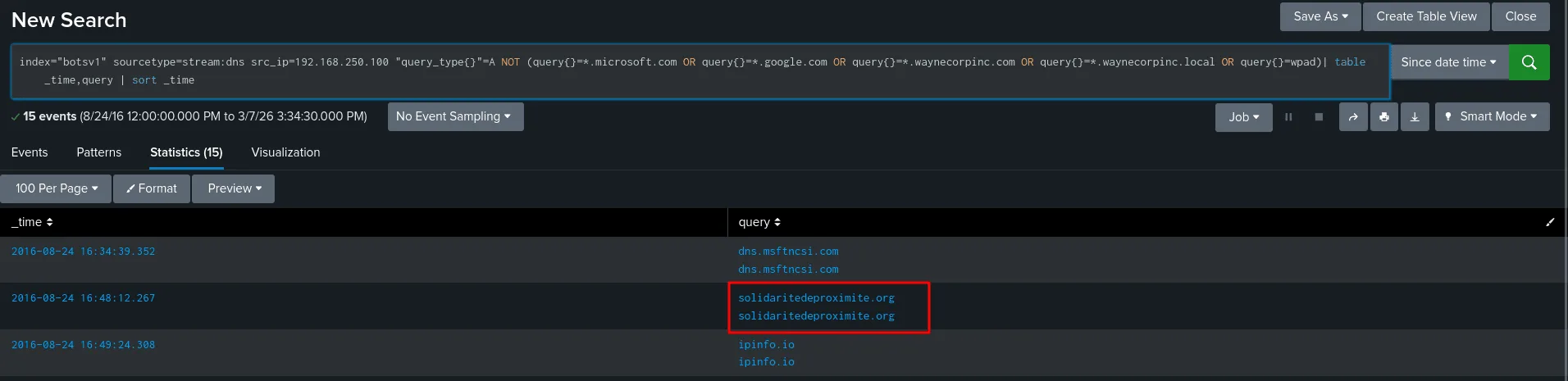
using the same SPL query as before but sorting by time we suspect solidaritedeproximite.org as a suspecious domain visited by the user, and yes I never rush to conclusion so we first verify:
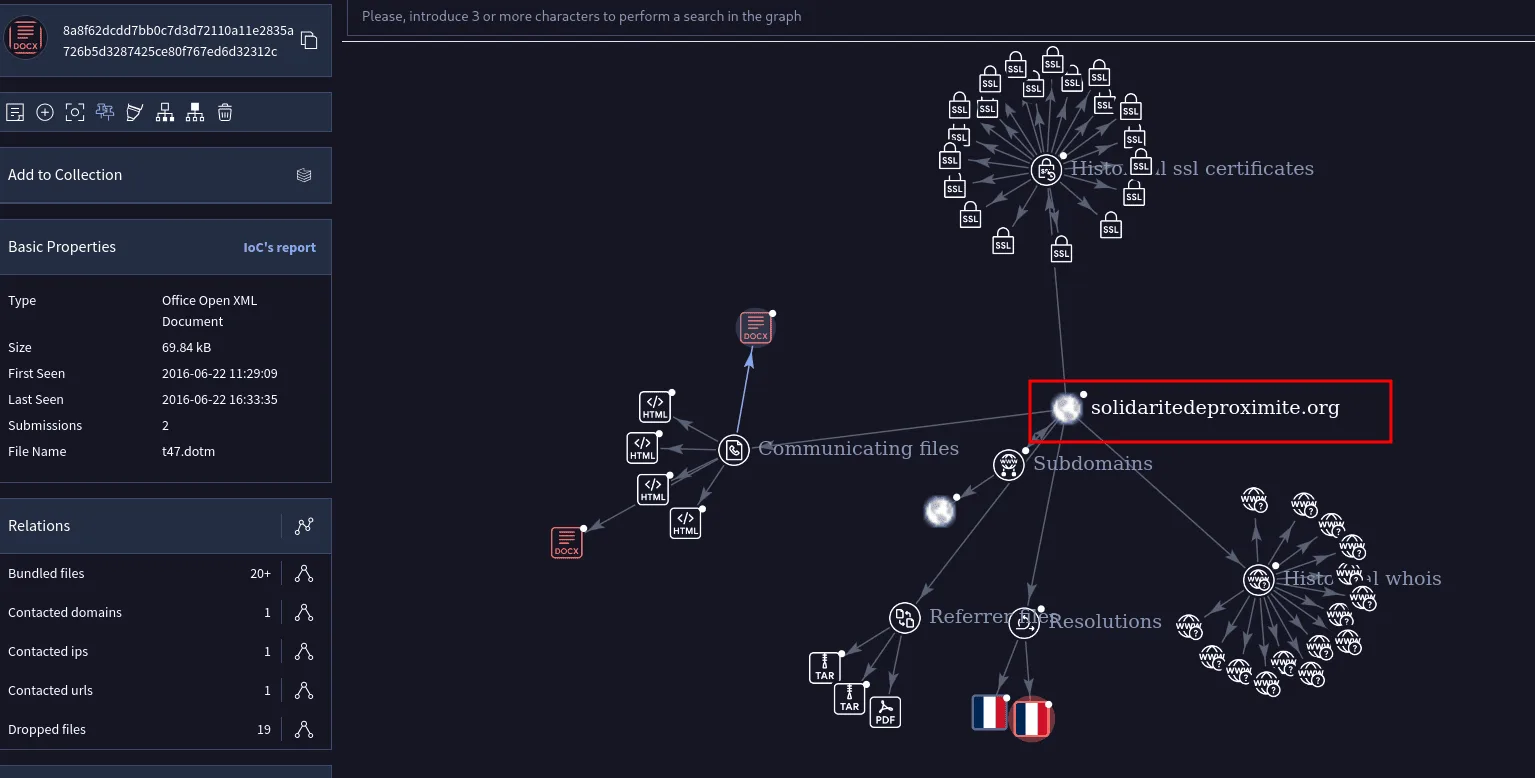
as seen in the above image, this domain is suspecious and it’s the answer.
Q204:
Question: During the initial Cerber infection a VB script is run. The entire script from this execution, pre-pended by the name of the launching .exe, can be found in a field in Splunk. What is the length of the value of this field? Answer guidance: Enter the number of characters (i.e.the “length”) of the field.
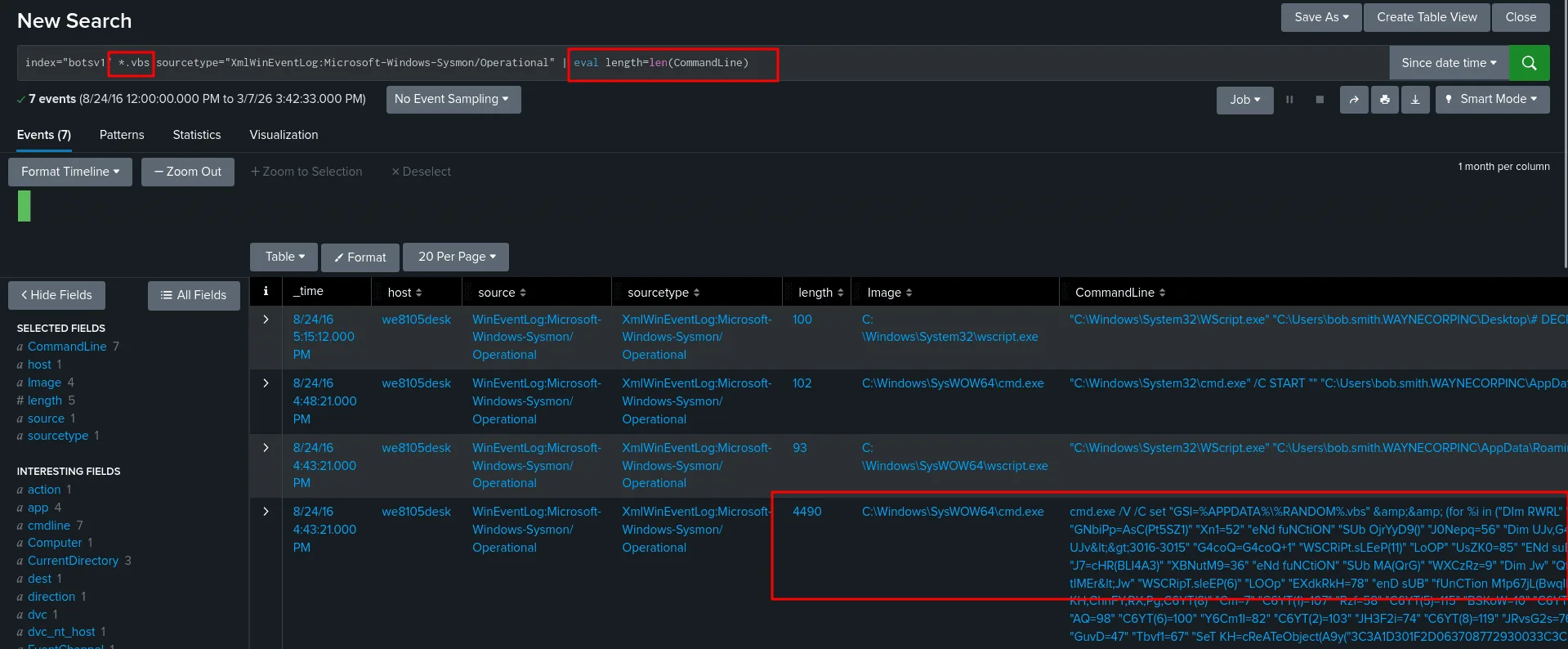
whenever it’s about files my go to is sysmon first, and we indeed fine the vbs script that was run using cmd.exe, I defined a new field length to get the length of the CommandLine. as seen above as seen above it’s 4490.
Q205:
Question: What is the name of the USB key inserted by Bob Smith?
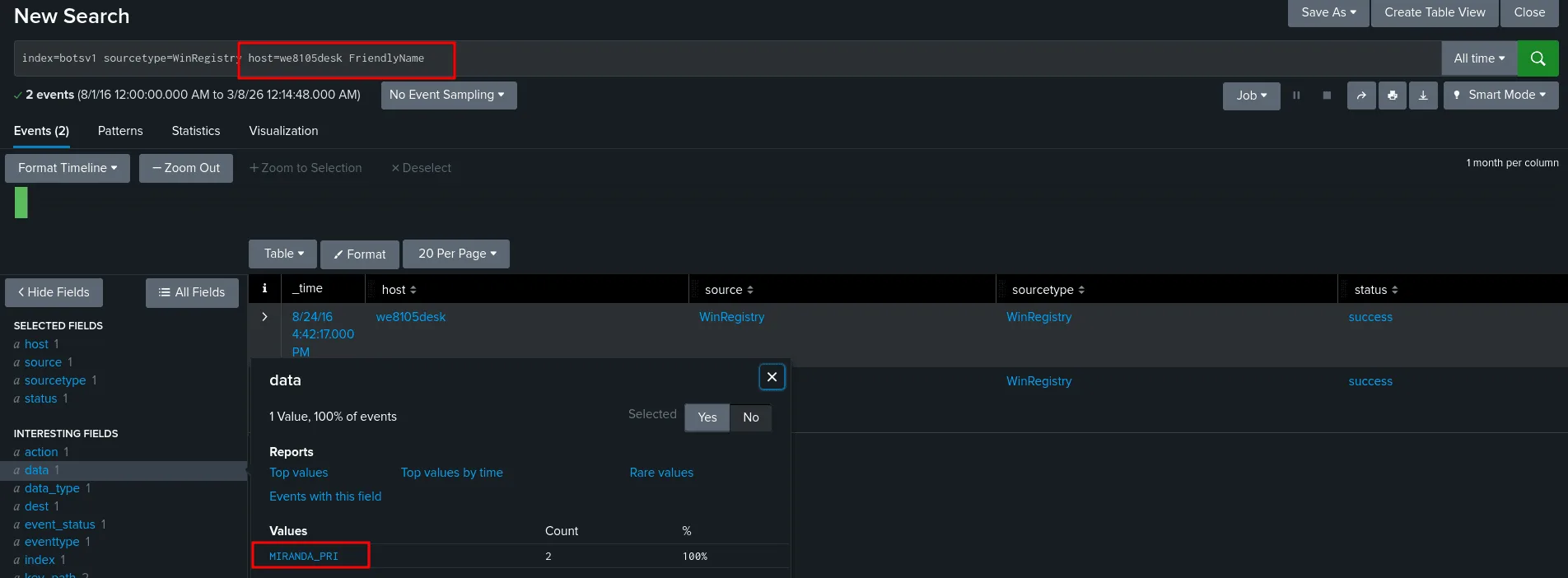
To find the name of the USB device inserted by Bob Smith, I queried the Windows Registry logs in Splunk using the search above, we filtered by the host cuz we know what host Bob Smith is on.
Windows stores metadata about every USB device that has ever been connected in the registry under HKEY_LOCAL_MACHINE\SYSTEM\CurrentControlSet\Enum\USBSTOR. Within each device’s subkey, Windows automatically generates a FriendlyName value — a human-readable string built from the device’s vendor and product descriptor fields (e.g., “SanDisk Ultra USB Device”). By filtering on sourcetype=WinRegistry and targeting host=we8105desk (Bob Smith’s workstation), I narrowed the results to registry events captured on his machine. Adding FriendlyName as a keyword further filtered results to only the registry entries that contain the device’s readable name, directly revealing what USB device was plugged in. This works even if the device is no longer connected, since FriendlyName persists in the registry after removal, making it a reliable artifact for forensic investigation. => MIRANDA_PRI.
Q206:
Question: Bob Smith’s workstation (we8105desk) was connected to a file server during the ransomware outbreak. What is the IPv4 address of the file server?
I used the following SPL query as a start :
1
index=botsv1 host=we8105desk | stats count by dest_ip
The workstation connected to 192.168.250.20 exactly 1608 times, that’s suspectious enough for us to investigate it. while at it we discovered that these guys connnected over smb (port 445) dozens of times. This confirms our theory that the ipv4 is 192.168.250.20 .
Q207:
Question: How many distinct PDFs did the ransomware encrypt on the remote file server?
1
index=botsv1 host=we9041srv sourcetype="WinEventLog:Security" Relative_Target_Name="*.pdf" | stats dc(Relative_Target_Name) as pdf_files
my thought process if to first query by the host we9041srv and *.pdf for pdf files, I noticed the WinEventLog:Security sourcetype logged pdf files in the Relative_Target_Name field, to ensure we don’t count other files other than pdf one, we filter by the Relative_Target_Name field and count only distinct results, which amounts to 257.
Q208:
Question: The VBscript found in question 204 launches 121214.tmp. What is the ParentProcessId of this initial launch?
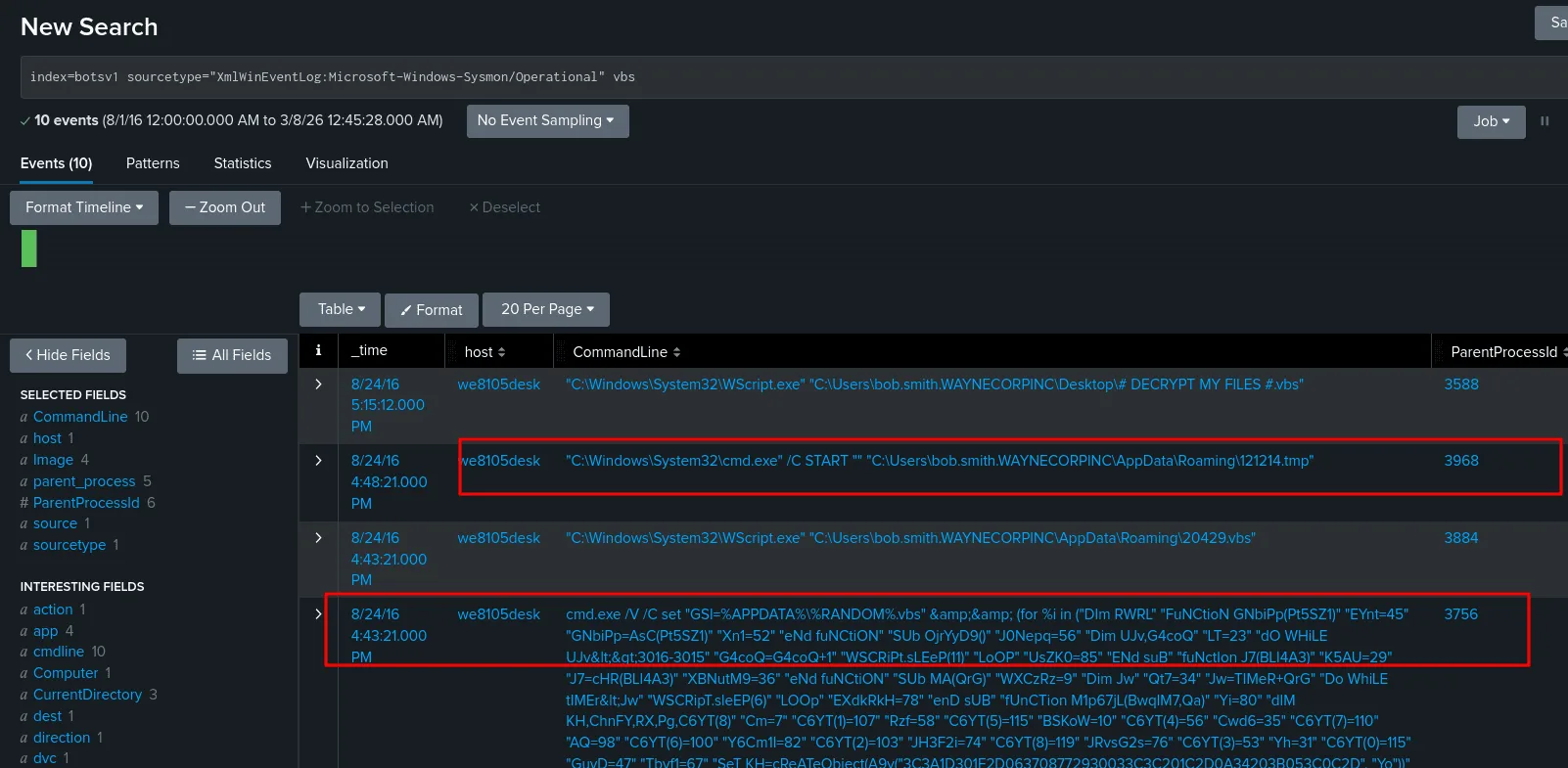
we already found the vbs script before, we use the sysmon sourcetype here to gather more info about the processIds and parentprocess Ids. as see in the image the ParentProcessId for this is 3968.
Q209:
Question: The Cerber ransomware encrypts files located in Bob Smith’s Windows profile. How many .txt files does it encrypt?
1
index=botsv1 sourcetype="XmlWinEventLog:Microsoft-Windows-Sysmon/Operational"  TargetFilename="C:\\Users\\bob.smith.WAYNECORPINC\\*.txt" | stats dc(TargetFilename)
the questions says Bob Smith’s Windows profile, I first checked the different files at TargetFilename, and then recognize the pattern of what would be his windows profile, using wildcard to get only txt files and then counting by distinct files. the result is 406.
Q210:
Question: The malware downloads a file that contains the Cerber ransomware cryptor code. What is the name of that file?
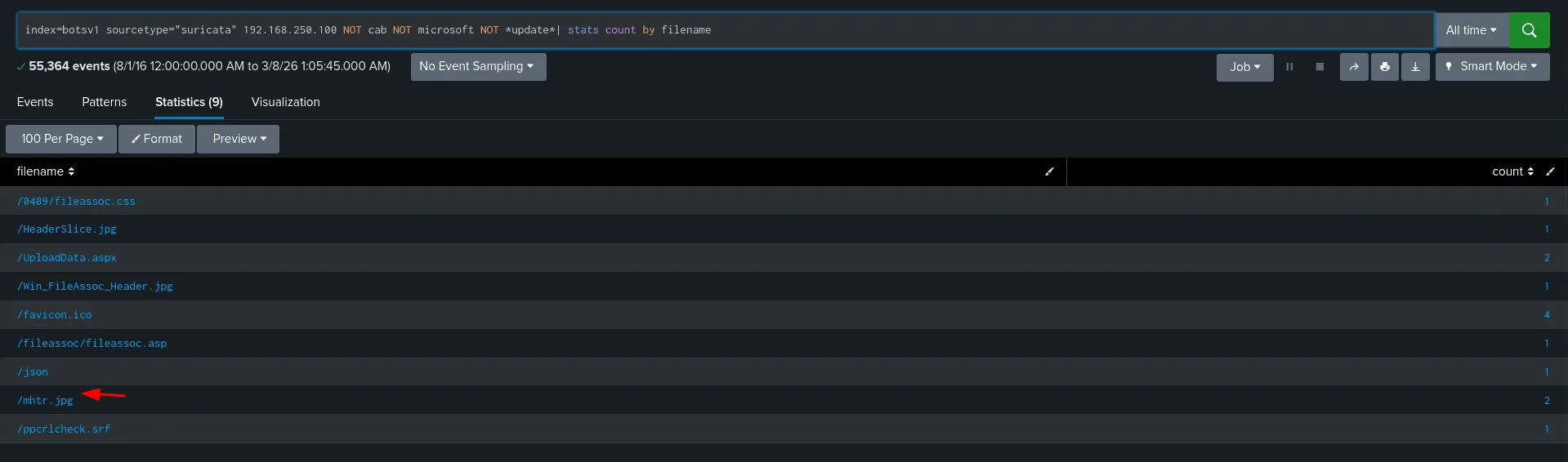
we’re checking suricata logs here, we know the src is 192.168.250.100, and we discard results we’re not interested in like files from microsoft etc, we narrowed down the results to 9 ones, we can check them one by one, looking up the file mhtr.jpg online revealed that it was related to the ransomware attack, and thus the file we’re looking for is mhtr.jpg.
Q211:
Question: Now that you know the name of the ransomware’s encryptor file, what obfuscation technique does it likely use?
the answer is steganography, more on it here : www.netskope.com/blog/anatomy-ransomware-attack-cerber-uses-steganography-hide-plain-sight
This marks the end of this senario, honestly I was planning to release another writup but writing really takes a lot of my time so I’ll leave it here for now as I’m quite tired.